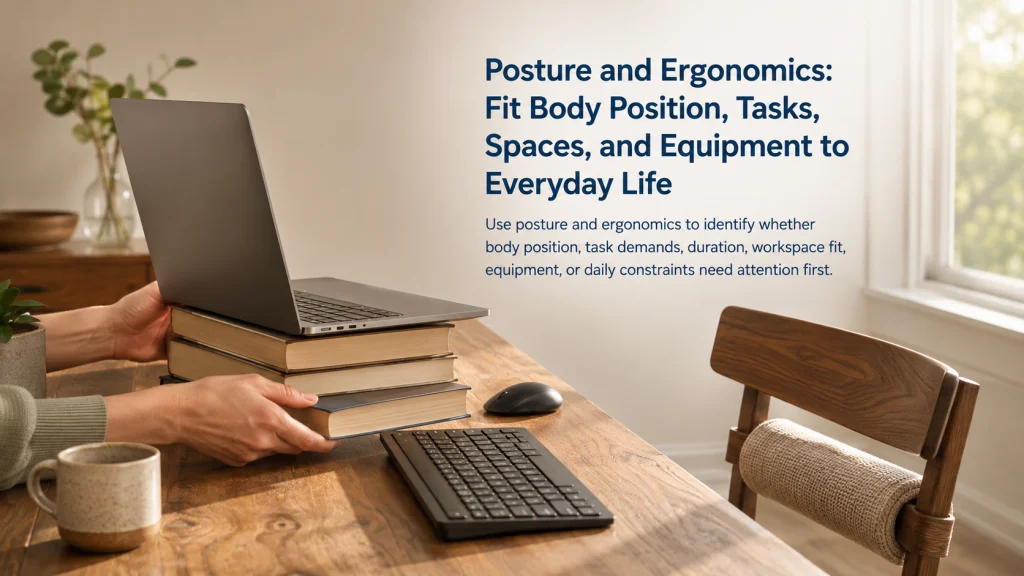
Posture and ergonomics are easier to improve when you first identify what is failing: body positioning, task height, reach, duration, force, equipment fit, or the limits of the space. A position that looks neutral can still become tiring when it is held too long, while an unusual position may be manageable when the task is brief and well supported. Start with one reversible change that matches the actual task, then observe whether comfort, effort, and function improve. Stop self-guided troubleshooting when symptoms are new, severe, persistent, worsening, unexplained, or affecting normal activity.
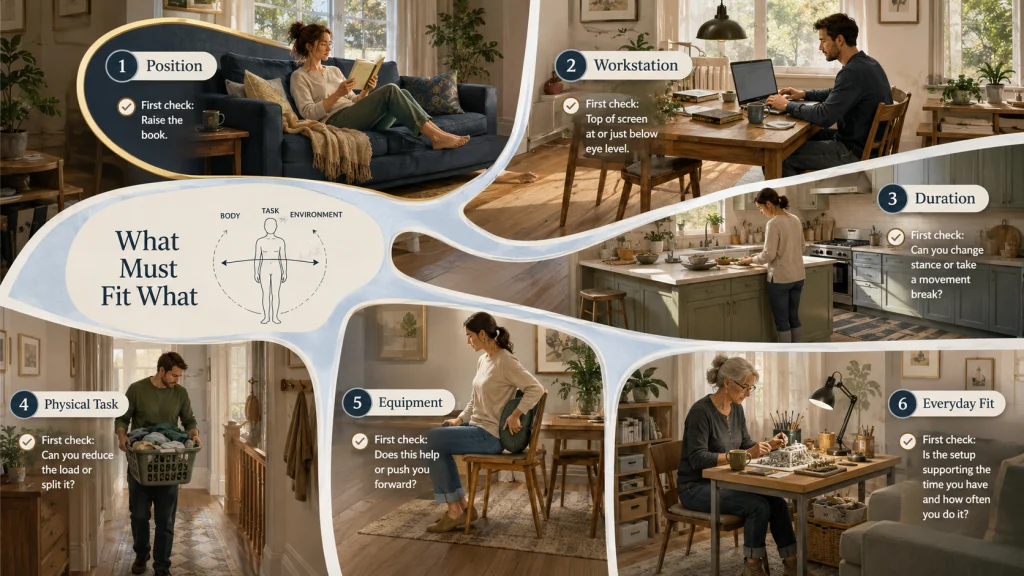
Six Everyday Scenes, Six Different First Decisions
Six people can all say, “My posture is bad,” while needing six different starting points.
| Everyday scene | What may need attention first |
|---|---|
| Reading on a deep sofa with the book low in the lap | Support, viewing height, and how long the position is held |
| Working from a laptop at a dining table | Screen height, keyboard reach, pointing-device access, and seat fit |
| Standing at a counter for a long kitchen task | Work height, foot position, task duration, and opportunities to change stance |
| Carrying a full laundry basket through a narrow hallway | Load size, grip, route, reach, and how the load is divided |
| Adding a cushion or back support to a chair | Whether the support improves fit or pushes the body too far forward |
| Doing a hobby at a small table in a shared room | Task height, lighting, storage, reach, and the need to pack away quickly |
The visible body position is only one part of the picture. The more useful question is: what must fit what? Your body must fit the task, the task must fit the space, and any equipment must support that relationship rather than create a new problem.
Products sold for posture, offices, fitness, sleep, and support are often presented as separate answers. In daily life, the difficulty may be much simpler: the work surface is too high, the object is out of reach, the task lasts too long, or the setup allows no position change. A feature helps only when the surrounding conditions let that feature do its job.
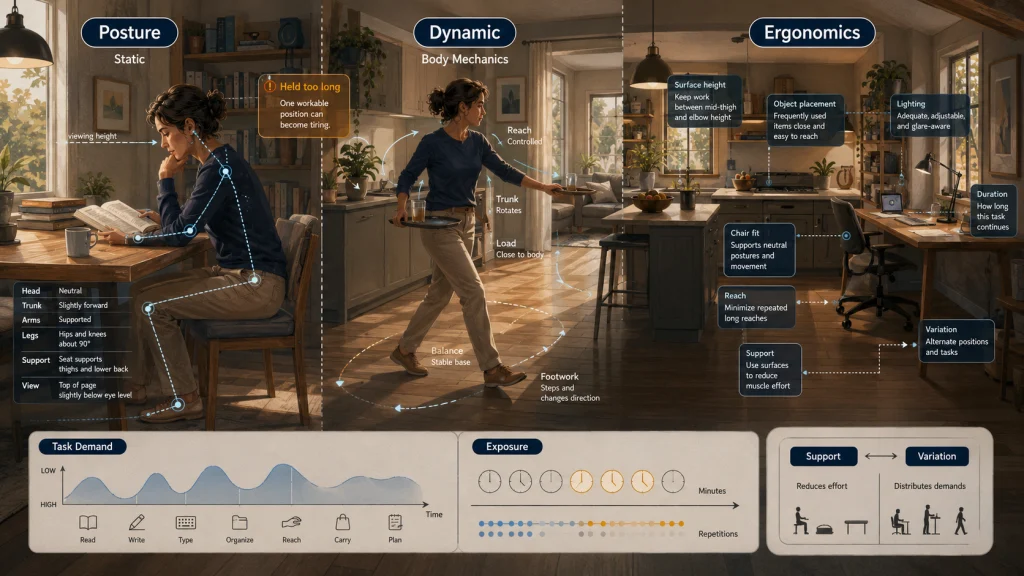
Know Which Part of the System You Are Describing
Several related terms are often treated as if they mean the same thing. Separating them makes it easier to choose a useful next step.
| Term | Practical meaning | Question to ask |
|---|---|---|
| Posture | The position of the body at a particular moment, whether still or moving | Where are the head, trunk, arms, and legs relative to the task? |
| Static posture | A position held with little movement | How long is this position being maintained? |
| Dynamic posture | Body positioning while moving, reaching, carrying, or changing direction | Does the movement require awkward reach, force, or repeated effort? |
| Body mechanics | How the body organizes movement, leverage, balance, and force during a task | Can the task be made closer, lighter, lower effort, or easier to control? |
| Ergonomics | Fitting tasks, spaces, tools, and equipment to the people using them | Which part of the setup is asking the person to compensate? |
| Task demand | The force, reach, precision, repetition, attention, and time required | What does the task repeatedly ask the body to do? |
| Exposure | How often and how long a demand occurs | Is the issue the position itself, or the amount of time spent in it? |
| Support | A surface or object that helps maintain a workable position | Does the support reduce effort without restricting useful movement? |
| Variation | Changing position, task, load, or pace over time | Can the day include more than one workable position? |
Posture describes what the body is doing. Ergonomics asks why the body is doing it and whether the task or environment can be changed. That distinction keeps a visible position from becoming the only explanation for every comfort problem.
Separate Alignment From Comfort, Workload, Duration, and Symptoms
A tidy-looking position is not automatically comfortable, and a comfortable position is not automatically suitable for every task or every length of time. Appearance gives limited information. It does not show how much force the hands are using, whether the screen is difficult to see, how often the position changes, or whether symptoms are developing for a reason that lifestyle guidance cannot address.
Consider a person sitting upright at a desk. The shoulders may look level, but the mouse may be too far away. The chair may support the back, but the seat depth may press behind the knees. The monitor may be centered, but glare may cause the person to lean forward. The position alone does not reveal the full workload.
Key decision: Describe the problem in four parts before changing anything: what the body is doing, what the task demands, how long it lasts, and what symptoms or functional limits are present.
When the problem is ordinary setup friction, a small adjustment may be enough to test the idea. When symptoms are significant, unusual, or worsening, the correct next step is evaluation rather than a longer list of positioning tips.
Start With Body Awareness When the Setup Is Basically Workable
Sometimes the chair, surface, and task are acceptable, but the person has not noticed how they repeatedly approach the activity. A reader may hold a phone low for long stretches, perch at the edge of a seat despite available back support, or keep one shoulder raised while using a device.
In that situation, the first step is observation rather than equipment. Notice where the body is supported, whether the task can come closer, whether the feet have a stable place, and whether the position changes naturally. The goal is not to hold one pose all day. It is to make positions easier to enter, easier to leave, and less demanding for the task at hand.
Use the guide to improving everyday posture when the main need is understanding body position, neutral ranges, self-observation, and simple low-risk adjustments.
Practical tip: Choose one recurring activity and check it at the beginning, middle, and end. A setup that feels fine for five minutes may reveal a reach or support problem after a longer period.
Look at the Whole Workstation When Devices Control the Position
A home workspace can appear organized while still forcing several compromises. A laptop combines the screen and keyboard, so raising one can make the other harder to use. A chair may fit the table but leave the feet unsupported. A larger monitor may improve viewing but take away the writing space needed for another part of the job.
The most useful check follows the work itself. Can the person see the screen without repeatedly leaning in? Can the keyboard and pointing device be used with the arms close to the body? Is there enough room for the hands, documents, and frequently used objects? Can the setup be changed when the task shifts from typing to reading or video calls?
The home office ergonomics guide is the right next step when screen position, keyboard reach, pointing-device use, lighting, seat fit, or a shared work surface is the main difficulty.
Note: A complete office rebuild is not always necessary. A stable change in viewing height or input-device placement may answer the most important question before larger purchases are considered.
Treat Duration and Position Change as Their Own Problem Layer
A person can have a well-fitted chair and still feel worn down by a day with little movement. The same can happen with standing. Replacing all sitting with all standing only exchanges one fixed position for another when the schedule, workload, and opportunities to move remain unchanged.
Duration becomes the central issue when discomfort builds gradually during long blocks, concentration drops, or the person repeatedly shifts because the body wants a different position. The answer may involve changing the sequence of tasks, alternating where work happens, standing for selected activities, or placing routine items so that brief movement occurs naturally.
Use the sitting, standing, and movement guide when the setup is reasonable but the day contains long uninterrupted periods in one position.
A workable routine does not need a perfect timer. It needs realistic opportunities to change load and position without making the day harder to manage.
Examine Force, Reach, Carrying, and Repetition During Physical Tasks
Posture advice becomes too narrow when the task involves a load. A laundry basket, grocery bag, storage bin, vacuum, garden tool, or repeated household action changes the problem. The body must not only hold a position but also control force, distance, balance, and repetition.
Start with the object and route. Can the load be divided? Are stable handles available? Does the person need to twist because the path is narrow? Is the object stored above shoulder level or below knee level? Does a repeated reach occur because frequently used items are placed at the back of a cabinet?
The lifting, carrying, and repetitive-task guide is appropriate when the main issue is force, load size, grip, reach distance, task frequency, or the path used to move an object.
Safety warning: Do not use general body-mechanics advice to push through a task that feels unsafe, exceeds your ability, follows an injury, or causes significant symptoms. Reduce the demand, get assistance, or stop the task as appropriate.
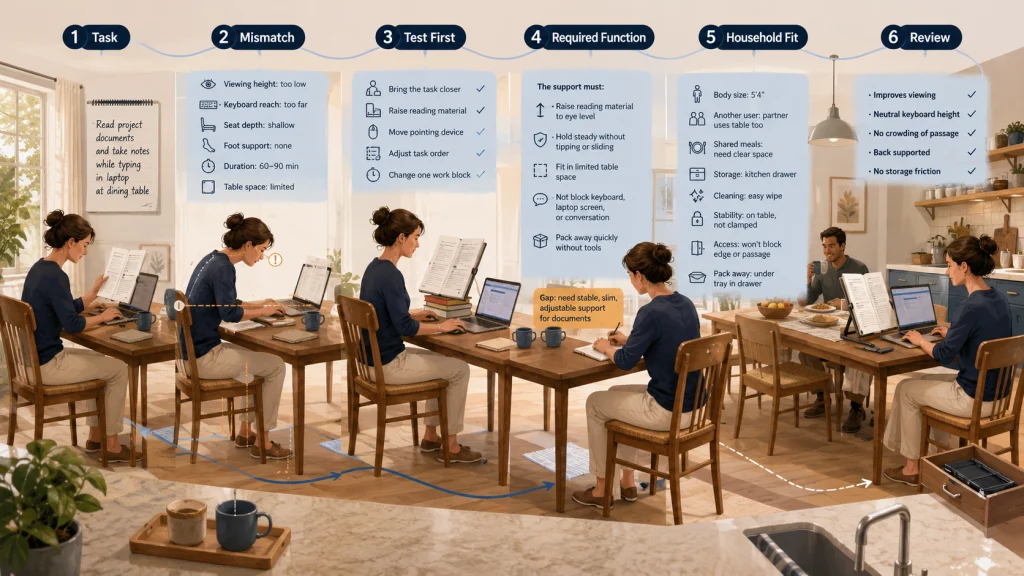
Define the Use Case Before Considering Furniture or Supports
Chairs, cushions, footrests, laptop stands, monitor arms, document holders, and other supports can be useful. They can also solve the wrong problem. A thick cushion may raise the hips but reduce usable back support. A footrest may create a stable place for the feet yet crowd a narrow passage. Shared furniture may also need quick, obvious adjustments rather than a setting that works for only one person.
This is where product-function analysis matters. The question is not whether an item is labeled ergonomic. The question is whether its dimensions, adjustment, stability, care needs, storage, and compatibility match the person, task, and room.
A Product-Last Decision Ladder
- Name the task. Identify the exact activity and where it happens.
- Describe the mismatch. Note the height, reach, support, force, duration, or space problem.
- Try a reversible change. Reposition the task, adjust the sequence, move a frequently used item, or use an existing stable surface differently.
- Define the required function. Decide what a product would need to change and what it must not interfere with.
- Check household fit. Consider body size, shared users, storage, cleaning, stability, access, and available space.
- Review the result. Keep the item only if it improves the task without creating another recurring problem.
Review the ergonomic equipment and support guide when a purchase is being considered and the required function is already clear.
Adapt the Setup to the Activity, Room, Schedule, and People Using It
Many households cannot dedicate a room to one activity. A dining table becomes a workstation, homework space, craft surface, and place for meals. A caregiver may need quick access to supplies. A traveler may work from temporary spaces. Two people of different heights may share the same chair and screen.
These constraints are not side notes. They determine whether an otherwise sensible setup can be repeated. A change that takes fifteen minutes to assemble may be ignored for a ten-minute task. A support that works for one person may block access for another. A hobby setup may need better storage and lighting more than another seat adjustment.
The everyday ergonomics guide helps when the main challenge involves a specific activity, room, body size, schedule, travel pattern, caregiving role, or shared-space arrangement.
Editorial observation: Repeatability matters in shared and temporary spaces. A setup that can be placed, adjusted, stored, and restored without disrupting the room is more likely to support the activity consistently.
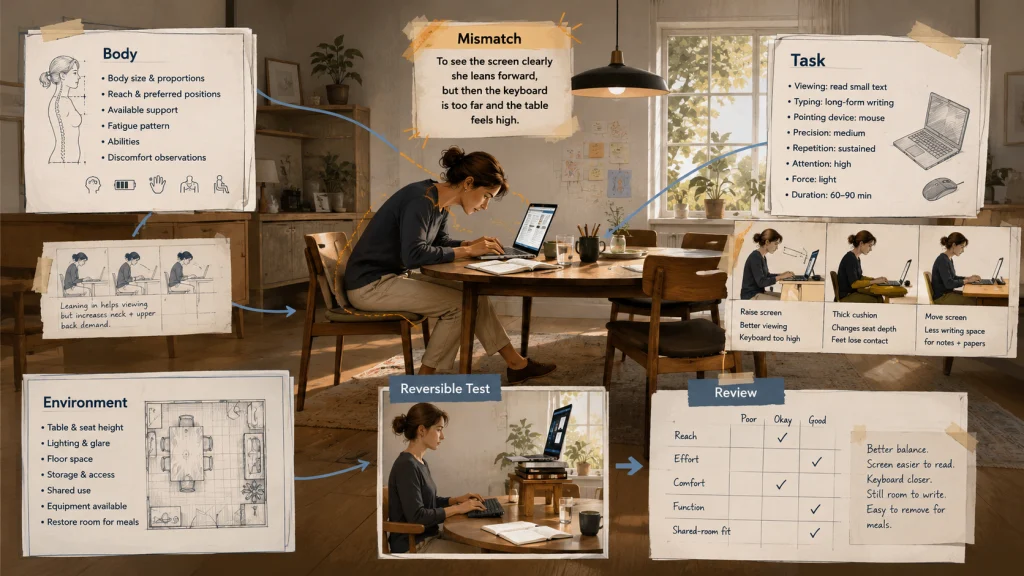
Use the Body-Task-Environment Triangle Before Buying Anything
A practical ergonomics check has three connected sides. Changing one side can improve the whole setup, but it can also shift the difficulty elsewhere.
| Side of the triangle | What to record | Useful questions |
|---|---|---|
| Body | Size, reach, preferred positions, abilities, fatigue pattern, and current symptoms | Which positions feel workable? What movement or reach is difficult? Are symptoms present? |
| Task | Viewing, typing, lifting, carrying, precision, repetition, force, and duration | What must be seen, reached, held, moved, or repeated? How long does it continue? |
| Environment | Surface height, seat, lighting, floor space, storage, noise, shared use, and available equipment | What can be adjusted? What is fixed? Who else needs to use the space? |
After filling in the three sides, write one sentence that names the mismatch. For example: “The screen is difficult to see from the chair, so I lean forward during long reading tasks,” or “The laundry basket is wide and the hallway is narrow, so I carry it away from my body.”
Then choose one small test. Raise the reading material with a stable existing surface. Move the basket contents in two lighter trips. Bring a frequently used object within easier reach. Shorten one work block by changing tasks. A reversible test provides better information than buying several items at once.
A Neutral Position Can Still Become Tiring
Neutral positioning generally means keeping joints within comfortable middle ranges rather than at repeated extremes. It can reduce unnecessary effort for many tasks, but it is not a pose that must be held without interruption.
Muscles still work to maintain the head, trunk, and arms. Attention narrows during demanding tasks. A person may gradually move closer to the screen, grip a tool more firmly, or stop using available support. Even a carefully arranged setup can become tiring when the task is long, repetitive, visually demanding, or mentally absorbing.
Variation is therefore part of the setup, not evidence that the original position failed. Sitting back for reading, moving closer briefly for detail work, standing during a call, changing hand position, and walking to another part of the room can all distribute demands differently.
Note: Frequent discomfort is not something to dismiss simply because the setup looks neutral. Recheck the task and duration, and seek appropriate guidance when symptoms persist or interfere with normal function.
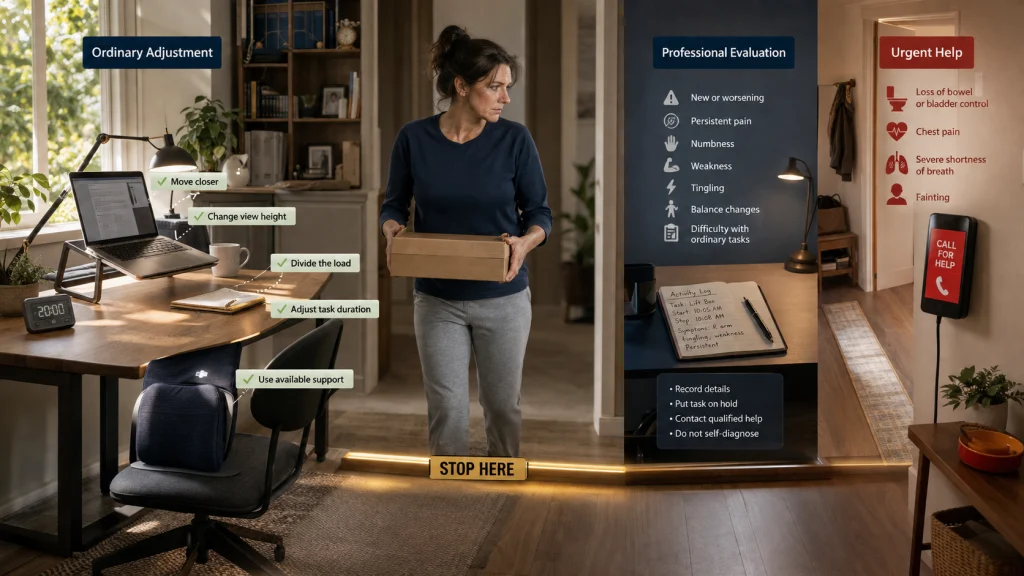
Know When Ordinary Adjustment Is No Longer Enough
Lifestyle troubleshooting is appropriate for simple fit and workflow questions in generally healthy adults. It cannot determine whether symptoms come from a joint, nerve, spine, balance, connective-tissue, circulation, or other medical issue.
Safety warning: Stop self-guided positioning changes and seek appropriate professional evaluation for new, severe, persistent, worsening, or unexplained pain; numbness; weakness; tingling; balance changes; symptoms after a fall or injury; or a functional change that makes ordinary activity difficult. Loss of bowel or bladder control, chest pain, severe shortness of breath, or fainting require urgent medical help.
Do not rely on a brace, support, posture reminder, furniture change, or online routine to diagnose or treat these problems. A qualified professional can assess the symptoms, the relevant activity, and whether the task should be modified or paused.
This guidance also does not provide rehabilitation protocols, individualized corrective exercise, clinical workstation assessment, or treatment for a diagnosed condition.
Choose the Next Guide by the Dominant Problem Layer
Use the first row that best describes the recurring difficulty. Do not choose by the product you already own or the label that sounds most familiar.
| Dominant problem | Best next guide | What that guide focuses on |
|---|---|---|
| Body awareness, basic positioning, or uncertainty about neutral ranges | How to improve posture | Observation, positioning concepts, and practical adjustments |
| Screen, keyboard, mouse, lighting, or home-workspace fit | Home office ergonomics | Computer tasks and workspace arrangement |
| Long periods of sitting, standing, or too little position change | Sitting and standing at work | Duration, variation, and movement opportunities |
| Force, load, carrying, reach, or repeated physical tasks | Manual material handling | Task demands, load control, and repeated effort |
| Furniture, cushions, footrests, stands, or supports | Ergonomic equipment | Function, dimensions, adjustment, compatibility, and household fit |
| A specific room, activity, schedule, body size, travel pattern, or shared space | Everyday ergonomics | Applying ergonomic reasoning to real-life constraints |
When two rows seem equally important, start with the one that is easiest to test safely. A low-cost change in task position or duration may reveal whether a product or larger room change is actually needed.
Make One Reversible Change, Then Review the Result
Name the dominant layer in plain language: body awareness, workstation fit, duration, physical task demand, equipment fit, or a household constraint. Choose the matching guide, make one low-risk change, and observe the same activity again rather than changing the whole room at once.
Review whether the task requires less reaching, force, holding, or compensation. Also check whether the change creates a new problem for storage, shared use, movement, or another part of the task. Stop the experiment when symptoms worsen, function declines, or the situation falls outside ordinary lifestyle adjustment.
Explore the Right Next Step
| Start here when you need help with | Continue with |
|---|---|
| Basic body positioning and self-observation | practical posture improvement |
| Computer work and a home workspace | a better-fitting home office |
| Long sitting or standing periods | more workable position changes |
| Lifting, carrying, reaching, and repeated household tasks | safer task-demand decisions |
| Furniture, accessories, and supports | equipment chosen by function |
| Activities and spaces that do not fit standard setups | ergonomics for everyday situations |
FAQs
🧭 What is the difference between posture and ergonomics?
Posture describes the body’s position during an activity. Ergonomics examines how the body, task, space, and equipment fit together. A posture change may help, but sometimes the better answer is changing the task height, reach, duration, or tool placement.
🪑 Do I need an ergonomic chair to sit comfortably?
Not automatically. Seat height, depth, back support, foot position, desk height, task duration, and the person’s body size all affect fit. Define the mismatch first, then decide whether adjustment, a different task setup, or different furniture is needed.
💻 Is a laptop stand enough for a home workstation?
A stand may improve viewing height, but raising a laptop also raises its keyboard and pointing surface. The full setup must still allow workable input-device placement, stable support, and enough room for the task.
⏱️ How often should I change position?
There is no single schedule that fits every person and task. Look for realistic opportunities to alternate activities, adjust position, or move before fatigue and concentration loss build. The routine should support the work rather than interrupt it so often that it becomes impractical.
📏 What does a neutral position mean?
It generally means using comfortable middle ranges rather than repeatedly holding joints near their extremes. Neutral does not mean rigid or motionless, and even a workable position can become tiring when it is maintained too long.
🧺 Is lifting technique the only thing that matters when carrying a load?
No. Load weight and size, handle quality, reach distance, route, frequency, storage height, and the person’s capability all affect the task. Reducing the demand or dividing the load may be more useful than focusing only on body position.
🛒 When should I buy a posture support or accessory?
Consider a product after you can state the required function clearly. Check dimensions, adjustment, stability, compatibility, storage, cleaning, and shared use. Avoid buying several items at once because that makes it difficult to tell what actually changed the task.
🚩 When should I stop adjusting my setup and seek help?
Stop treating the problem as an ordinary setup issue when symptoms are unusual, do not settle, become worse, follow an injury, or begin to limit normal activity. The warning box above gives the full stop conditions; urgent symptoms require immediate medical help rather than more positioning experiments.