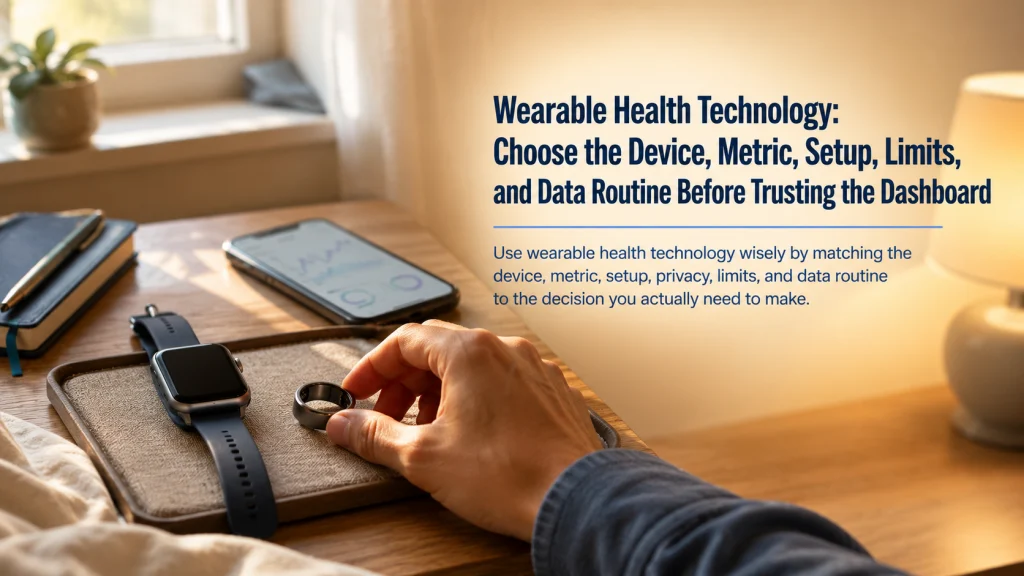
Wearable health technology is useful only when the device, metric, setup, limits, and data routine match the decision you actually want to make. A smartwatch, fitness tracker, smart ring, app, sensor, or connected feature can support everyday awareness, but the dashboard is still a tool for organizing information rather than a diagnosis. Start by naming the tracking question, then check compatibility, fit, subscriptions, privacy, missing data, and the action the information can reasonably support. When symptoms are urgent, severe, or unexplained, respond to the symptoms rather than waiting for the screen to settle the question.
Seven people can need seven different wearable decisions
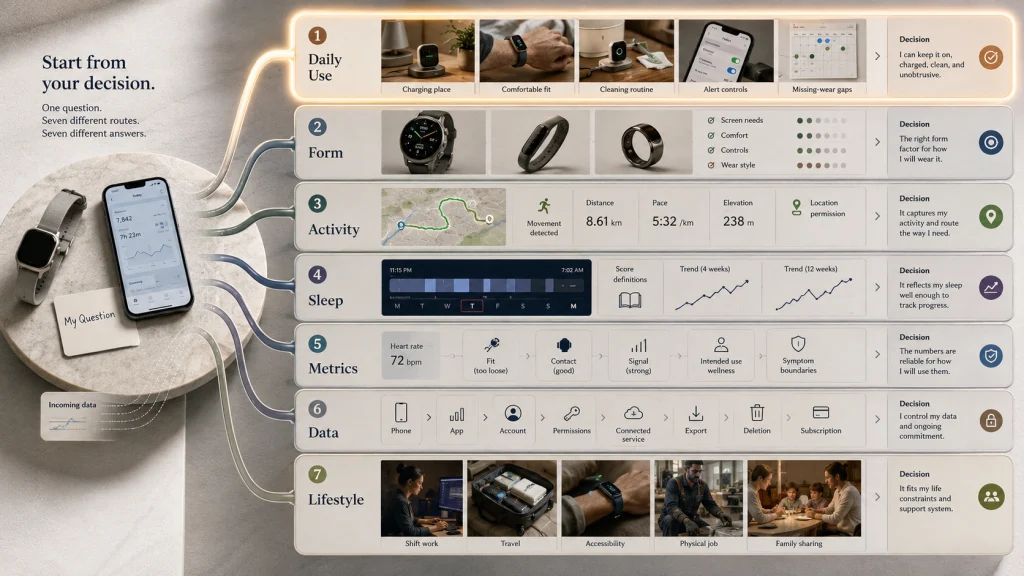
One adult wants fewer interruptions on the wrist. Another is deciding between a watch, a slim tracker, and a ring. A third wants to record a walking route, while someone else is trying to understand why a sleep score changed. Another person is reviewing a heart-rate trend, one is checking who can access health-app data, and one needs a device that fits shift work, limited hand use, frequent travel, or another specific part of daily life.
They may all be looking at the same shelf, but they do not have the same next step. Start with the part of the tracking system that must work for the actual question.
Retail displays combine hardware, sensors, apps, subscriptions, alerts, and coaching under one wellness promise. Fit, charging, missing data, compatibility, privacy, and long-term support remain separate decisions.
Key decision: Name the job before comparing the device. A tool chosen for route recording should be judged differently from one chosen for quiet notifications, sleep trends, or easier data export.
Use the right words before trusting the dashboard
Wearable dashboards place measurements, estimates, scores, trends, and alerts beside one another, which can make them look equally certain. They are not. Understanding the label is the first protection against reading more into the data than the device can support.
- Wearable
- A consumer device worn on the body that collects, displays, or sends information.
- Sensor
- The hardware that detects movement, light changes, location signals, temperature, electrical signals, or other inputs.
- App
- The software that receives, organizes, interprets, stores, and shares information from the device.
- Estimate
- A calculated value based on sensor inputs and an algorithm, not a direct view of the body or behavior.
- Trend
- A repeated pattern across time that may be more useful than one isolated value.
- Alert
- A prompt generated when the device or app detects a condition defined by its settings and software.
- General-wellness feature
- A function intended to support a healthy lifestyle, routine, awareness, or everyday activity without diagnosing or treating a condition.
- Medical-device function
- A function with a specific medical intended use, instructions, limits, and supported population that must be checked separately.
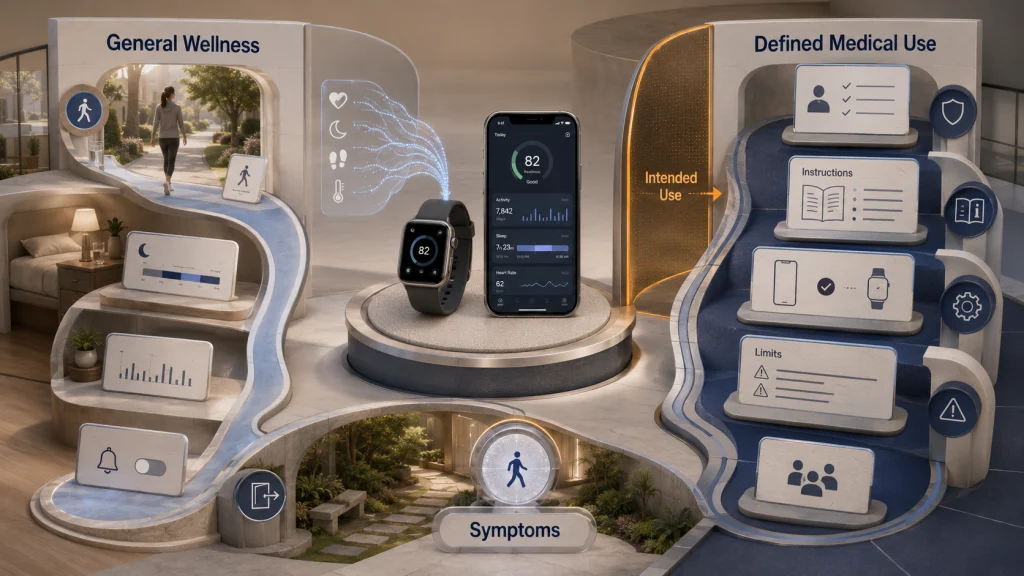
The distinction matters because the same app can contain ordinary wellness features beside a separately defined medical-device function. One regulated function does not make every score or coaching message medical information.
General wellness and medical use require different expectations
The intended use of a feature matters more than how advanced the screen looks. A step count, activity reminder, sleep estimate, or recovery score may support everyday decisions. A feature intended for a specific medical purpose has its own instructions, limitations, eligibility rules, and regulatory status.
| Question | General-wellness use | Medical-device use |
|---|---|---|
| What is the feature for? | Supporting routines, awareness, activity, or healthy-lifestyle choices | A defined medical purpose stated in official instructions |
| What can the result support? | A practical observation or low-risk lifestyle decision | Only the use described by the feature’s current instructions and limits |
| Can it diagnose a symptom? | No | Do not assume so without a specific intended use and professional context |
| Does one normal value rule out a problem? | No | No single consumer-facing result should override concerning symptoms |
| What must be checked? | Fit, setup, wear time, algorithm limits, privacy, and usefulness | Eligibility, instructions, warnings, supported devices, region, software, and current regulatory status |
Use this boundary before interpreting any dashboard. A polished graph can still represent an estimate, and an alert can still require confirmation rather than an immediate conclusion.
Begin with the decision you want to make
“I want more health data” is too broad. A better question connects the metric to a decision: move more during desk work, compare routes, reduce charging gaps, control notifications, or export a long-term record.
The question should also name what you will do with the result. If the answer does not change a reasonable action, collecting more data may create attention without creating value.
| Dashboard question | What to examine first |
|---|---|
| Can I use the device consistently? | Fit, charging, care, alerts, goals, and daily setup |
| Which form factor fits me? | Screen needs, wrist comfort, ring fit, battery routine, and interaction style |
| Can it track my activity or route? | Movement detection, workout modes, distance, pace, elevation, and GPS behavior |
| What can sleep and recovery scores tell me? | Wear time, sleep estimates, score definitions, missing nights, and trend limits |
| How should I view everyday health metrics? | Sensor conditions, repeated patterns, alerts, intended use, and symptom boundaries |
| Who controls the data? | Permissions, sharing, subscriptions, export, transfer, deletion, and account access |
| Will the system fit my life? | Work, mobility, accessibility, travel, motivation, household sharing, and long-term effort |
This seven-question dashboard is a routing tool. It prevents a form-factor problem from being mistaken for an accuracy problem, or a privacy concern from being buried under a list of sensors.
Route 1: Make daily use workable before judging the data
Capable sensors can still produce an incomplete record when the device is uncomfortable, uncharged, loose, removed often, or overwhelmed by alerts. These setup details determine whether enough consistent information is collected.
Start with the ordinary routine. Decide when the device will charge, how it will be cleaned, which wrist or finger is comfortable, what water exposure is allowed, which alerts deserve attention, and whether goals feel supportive rather than distracting. Exact care, charging, fit, and water limits must be checked against current official instructions for the chosen device.
A person who charges overnight may lose most sleep data. Someone who charges during a shower may discover that the battery still runs low during a long workday. Another user may stop wearing the device because a band traps moisture or the notification pattern feels intrusive. The right setup is the one that reduces these gaps without creating a new burden.
Practical tip: Before evaluating a score, review the previous seven days for charging gaps, loose fit, removed wear time, and disabled permissions. The pattern may reflect the routine more than the body.
Route 2: Choose the form factor by interaction and wear
A smartwatch, slim fitness tracker, and smart ring can overlap in what they record, but they create different daily experiences. The choice is not only about which device has more features. It is about how often you want to look at a screen, whether you need wrist-based controls, how much charging friction you will tolerate, and what you can comfortably wear for long periods.
A watch may suit someone who wants visible notifications, navigation prompts, timers, or on-device controls. A simpler tracker may reduce screen interaction while keeping common activity features. A ring may appeal to someone who prefers less wrist hardware, but ring sizing, finger swelling, hand-intensive work, and the absence of a large display can change the fit.
Imagine two adults who both want sleep trends. One is comfortable wearing a watch at night and values daytime controls. The other removes wristwear before bed but can tolerate a ring. The metric may be similar, yet the form factor decides whether enough data is collected.
Key decision: Compare the device you will actually wear and maintain, not the one with the most impressive feature page.
Route 3: Match activity and GPS tracking to the movement
Step totals, workout records, distance, pace, elevation, and GPS tracks answer different questions. A person checking whether desk breaks increased movement does not need the same setup as someone comparing outdoor routes. Wheelchair movement, pushing a stroller, carrying equipment, holding rails, or working with the hands can also change how movement is detected.
Activity data depends on device position, motion patterns, workout selection, location access, signal conditions, phone connection, and the algorithm used to classify movement. A route may look incomplete because location permission changed. A step count may differ across devices because they use different thresholds. Elevation can vary because one system relies on different sensors or map data.
Choose one activity question at a time. For a walking route, inspect whether the route started on time, whether GPS remained available, and whether pauses were handled consistently. For everyday movement, compare patterns across similar days instead of treating one exact step total as a universal truth.
Do not turn a consumer activity estimate into exercise clearance or a medical prescription. A tracked total can support planning and awareness, but symptoms, mobility needs, and professional advice set separate boundaries.
Route 4: Treat sleep, recovery, readiness, and stress scores as estimates
A sleep dashboard can feel personal because it describes a night the user just lived through. Seeing a low score after a tiring morning may feel validating, while seeing a high score after a rough night can feel oddly dismissive. Neither reaction changes what the device actually did: it collected available signals and applied an algorithm.
Wear time, sensor contact, late charging, movement, travel, alcohol, illness, room conditions, and software changes can all affect the record. Different platforms may also define readiness, recovery, and stress in different ways, so two similarly named scores may not be comparable.
The practical use is usually a repeated pattern tied to an ordinary observation. If later meals, disrupted schedules, or travel repeatedly line up with lower scores and worse next-day function, the pattern may support a low-risk routine adjustment. One surprising night should remain one surprising night.
Safety warning: Persistent sleep difficulty, dangerous daytime sleepiness, breathing pauses, gasping, or severe impairment requires qualified evaluation. A wearable score should not delay that step.
Route 5: Put everyday health metrics in context
Heart rate, rhythm-related notifications, oxygen estimates, temperature trends, and other everyday metrics can attract attention because the numbers look exact. The screen may show a precise value even when the recording was shaped by movement, skin contact, moisture, temperature, wear position, tattoos, signal quality, or software processing.
Some functions are also limited by age, country, phone, account, software, or other eligibility requirements. Their availability must be checked for the exact device and user situation rather than assumed from a general feature page.
A reasonable everyday response is narrow: confirm that the device was worn as instructed, repeat the measurement when the instructions allow it, and compare like with like. The goal is to understand whether the device is producing a stable record, not to turn the dashboard into a clinical interpretation.
Route 6: Manage accuracy, apps, privacy, subscriptions, and long-term access
The wearable is only one part of the system. Data may move through a phone, account, cloud service, connected app, sharing setting, workplace program, or subscription. Examine this path before months of data accumulate.
Check which app is the primary source, what happens when two apps write the same metric, whether permissions are necessary, which information is shared, how to export a usable copy, and whether deletion removes data from every connected service. Do not assume that the privacy rules applying to a clinic or hospital record automatically apply to every consumer app.
Subscriptions can affect historical views, coaching, reports, advanced scores, or other features. Account closure, a phone change, a new operating system, a discontinued device, or a service change can also affect access. The practical question is not only “Can I see the data today?” It is “Can I retrieve, transfer, or delete it when my device or account changes?”
Key decision: Treat permissions, export, deletion, and subscription access as part of product fit, not as settings to inspect after purchase.
Route 7: Let lifestyle and situation change the answer
The same tracker can motivate one person and distract another. Work, shift schedules, travel, wheelchair use, vision, hand control, skin sensitivity, sharing, and protective equipment can change comfort and data meaning.
Someone with a physical job may not need more reminders to move, but may value quiet notifications or route-free activity summaries. A shift worker may need flexible day boundaries because a midnight reset can split one work period into two calendar days. A wheelchair user should not assume that a wrist-based step count represents total movement or effort. An older adult may care more about legibility, charging simplicity, alert control, and family permissions than a long list of training metrics.
Weight-management use also needs a realistic boundary. Activity and calorie estimates can support awareness, but they should not be treated as exact energy accounting or a disease-specific nutrition plan. Motivation can improve when the chosen metric reflects a behavior the person can control, such as wearing the device consistently or completing a planned walk.
Before buying, identify the daily constraint most likely to end use after the first week. That constraint may be charging, comfort, screen size, account complexity, data sharing, or the simple fact that the device adds another task.
Verify the whole system, not one feature line
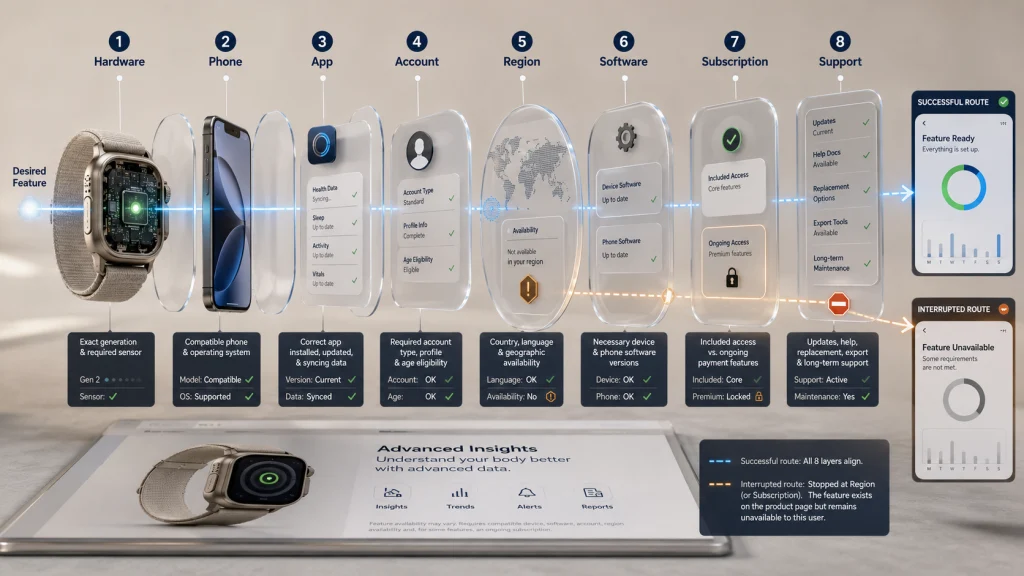
A feature can exist on a product page and still remain unavailable to a particular user. The limiting factor may be the hardware version, phone model, country, account, software version, age requirement, subscription, or current support status.
| System layer | Question to verify |
|---|---|
| Hardware | Does this exact device generation contain the required sensor or capability? |
| Phone | Is the phone model and operating system currently supported? |
| App | Is the required app available, updated, and able to sync the intended data? |
| Account | Does the feature require a specific account type, profile detail, or age eligibility? |
| Region | Is the feature available in the user’s country and language? |
| Software | Does it require a particular device or phone software version? |
| Subscription | Which views, reports, or coaching features require ongoing payment? |
| Support | Are updates, replacement options, export tools, and help documentation still maintained? |
Verify these layers with current official documentation before relying on a feature. Compatibility copied from an old review, a different country, or another device generation may no longer describe the system you will use.
Separate missing data, measurement error, algorithm differences, and meaningful change
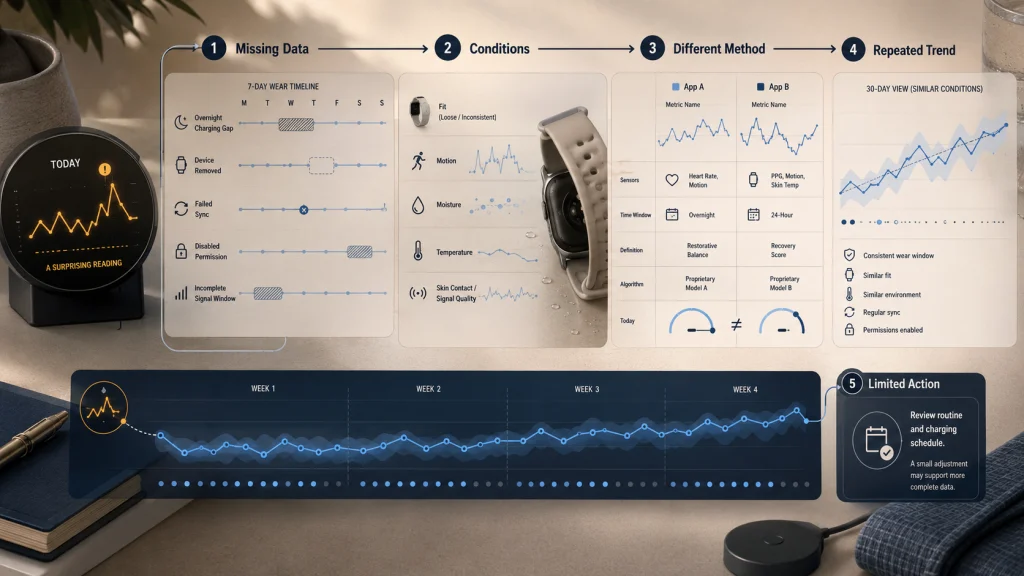
An unusual dashboard result becomes easier to handle when the possibilities are checked in order.
- Check whether data is missing. The device may have been removed, uncharged, unsynced, blocked by permissions, or unable to collect enough signal.
- Check the measurement conditions. Motion, fit, contact, temperature, moisture, or temporary signal quality may explain one implausible value.
- Check whether the comparison uses the same method. Two platforms may define the same-looking metric with different sensors, time windows, or algorithms.
- Then look for repeated change. A pattern measured under similar conditions is more useful than one isolated result, but context still determines what action is reasonable.
This sequence keeps a charging gap from becoming a health story and keeps two unlike metrics from being treated as direct competitors.
Decide what action a metric can reasonably support
A tracked metric earns attention when it leads to a proportionate action. A step trend may support a planned walk. A route record may help compare two familiar paths. Repeated charging gaps may justify a different charging time. A sleep estimate may prompt a review of bedtime consistency without explaining why sleep felt poor.
Before acting, ask four questions:
- Was the device worn and configured consistently enough to create a usable record?
- Is this one result or a repeated pattern measured in a similar way?
- Does the feature support general awareness, or does it have a specific medical intended use?
- What low-risk action follows without diagnosing, prescribing, or changing care?
If there is no reasonable action, the metric may not deserve daily attention. Turning off a nonessential alert or reviewing a trend weekly can be more useful than reacting to every change. For many users, relief comes not from collecting more numbers but from knowing which numbers can be safely ignored.
Symptoms and safety override the dashboard
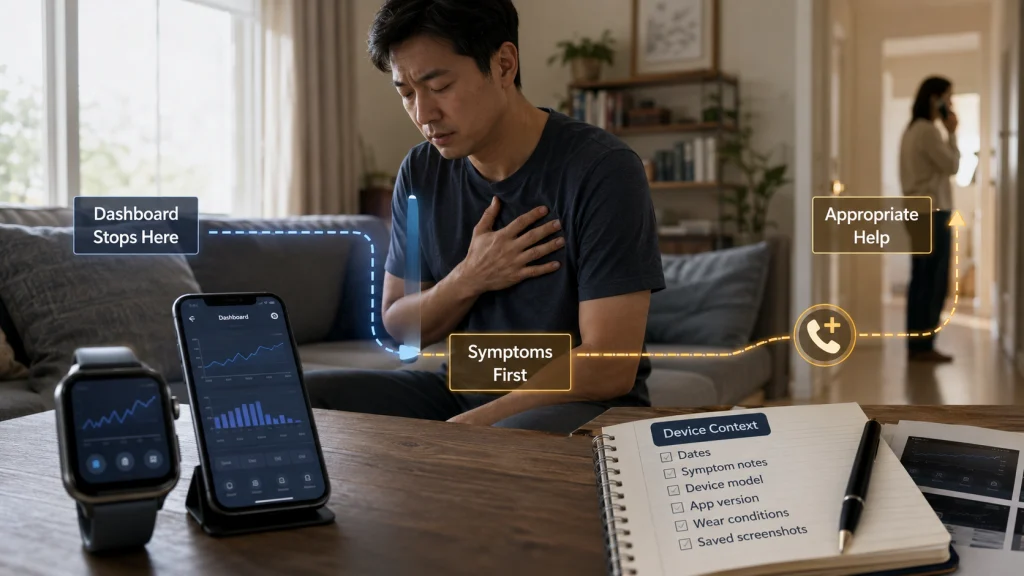
A consumer wearable, app, score, estimate, alert, or trend is not a diagnosis, treatment plan, or replacement for professional evaluation. It should not be used to clear someone for exercise, change medication, explain a severe symptom, or decide that a concerning symptom is harmless.
Safety warning: Seek appropriate medical attention for urgent or severe symptoms. Do not delay action because a dashboard appears normal, and do not assume that an unusual consumer reading identifies the cause.
For a nonurgent but persistent concern, save the dates, symptoms, device model, app version, wear conditions, and screenshots that may help describe what happened. Present them as consumer-device context, not as a self-made diagnosis.
Implanted devices, condition-specific monitoring, rehabilitation, medication decisions, and individualized exercise clearance require qualified guidance outside the scope of this article.
Choose the question before trusting the score
Name the question you want the wearable to answer, select the matching route, and verify the system requirement most likely to block success. That requirement may be fit, charging, phone compatibility, region, subscription access, permission settings, export, or the way the device fits daily life.
Then name the limitation and one reasonable next step. The most useful outcome may be adjusting a routine, checking a permission, changing how often you review the app, or deciding that a device adds more friction than value.
Explore the seven wearable routes
Use the guide that matches the first decision you need to make. Each route focuses on one part of the system without turning every wearable question into a device comparison.
| Your first question | Use this guide | What it helps you decide |
|---|---|---|
| How do I make daily wear and setup workable? | How to use a fitness tracker | Fit, charging, care, water, goals, notifications, and daily use |
| Which form factor suits me? | Smartwatch, tracker, and ring differences | Screen needs, comfort, controls, battery routine, and wearing style |
| How should I track movement and routes? | Fitness tracker activity tracking | Steps, workouts, distance, pace, elevation, and GPS behavior |
| What can sleep and recovery data support? | Wearable sleep and recovery tracking | Sleep estimates, readiness, recovery, stress scores, and trend limits |
| How should I view everyday health metrics? | Smartwatch health metrics | Heart rate, rhythm-related features, oxygen estimates, temperature, and boundaries |
| How do I control and preserve the data? | Fitness tracker data management | Accuracy, syncing, permissions, privacy, subscriptions, export, and deletion |
| Will a tracker fit my situation? | Fitness tracker lifestyle fit | Work, accessibility, mobility, travel, motivation, and household use |
FAQs
⌚ Do I need a smartwatch to track everyday health?
No. The suitable form factor depends on the question, the features required, comfort, charging, and how much screen interaction you want. A simpler tracker, ring, phone app, or no device may fit the job better.
📊 Should I trust one unusual wearable reading?
Treat one unusual value as a reason to check fit, wear time, movement, permissions, sync status, and measurement conditions. A repeated pattern may deserve more attention, but it still should not be treated as a diagnosis.
🧭 Why does my GPS route look incomplete?
The route may be affected by location permissions, signal conditions, delayed workout start, phone connection, battery settings, or software behavior. Compare the same route under similar conditions before deciding the device is consistently inaccurate.
🌙 Can a wearable tell me why I slept badly?
It may show estimates and trends that help organize a routine question, but it cannot establish the cause of poor sleep from a score alone. Persistent or safety-relevant sleep problems require qualified evaluation.
🔐 Is wearable health data automatically private?
No. Review account permissions, connected apps, sharing, export, deletion, and subscription terms. Do not assume every consumer app follows the same privacy rules as a clinical record system.
🔋 How much does charging affect tracking?
Charging gaps can remove the exact period you hoped to review, especially overnight or during long activities. A workable charging routine is part of data quality, not merely a convenience.
🧩 Why do two wearable apps show different numbers?
The apps may use different sensors, definitions, time windows, or algorithms. Compare trends within the same system before treating two unlike values as a direct disagreement.