Learning how to use a fitness tracker starts with a narrow purpose, not every available feature. Confirm phone and account compatibility, pair only the services you need, set the correct wrist and fit options, create a safe charging and cleaning routine, verify water limits, and reduce alerts before judging the device. A seven-day review can reveal whether missing data comes from the setup rather than the person. Consumer wearables support everyday tracking, but they do not diagnose symptoms or replace appropriate medical care.
The same new tracker can become two very different tools
In the first setup, every permission is accepted, every phone alert is mirrored to the wrist, the default goal remains unchanged, background connections stay active, and overnight tracking begins without a charging plan. The device is technically ready within minutes, but it starts asking for attention before the user has decided what it is for.
In the second setup, the user writes one purpose, checks compatibility, enables only the required permissions, chooses a comfortable fit, schedules charging, and turns on one or two useful alerts. Fewer features are active, yet the device is easier to understand and maintain.
Successful setup means removing unnecessary functions as well as turning features on. In retail demonstrations, I saw the first ten minutes of pairing receive most of the attention, while long-term use depended on band fit, charging location, wrist settings, phone permissions, notification load, cleaning, software updates, and planned removal windows.
A device can be fully connected and still be practically unusable when every phone alert is copied to the wrist. Use the broader wearable decision guide when the main question is still about device type, metrics, data limits, or lifestyle fit. This page focuses on making an already chosen device workable day to day.
Write one reason for using the device
“Track my health” is too broad to guide a clean setup. A useful purpose connects the device to one ordinary action, such as noticing long periods of sitting, recording planned walks, reducing phone interruptions, or creating a consistent wear and charging routine.
Write the purpose in one sentence:
Purpose statement: I will use this device to __________ so I can __________.
For example, “I will use this device to notice long desk periods so I can take the movement breaks I already planned” is specific enough to guide alerts and goals. “I will use every feature to improve my health” gives no basis for deciding which permissions, notifications, or measurements deserve attention.
The purpose can change later. Beginning narrowly does not waste the device. It creates a setup that can be evaluated before more features are added.
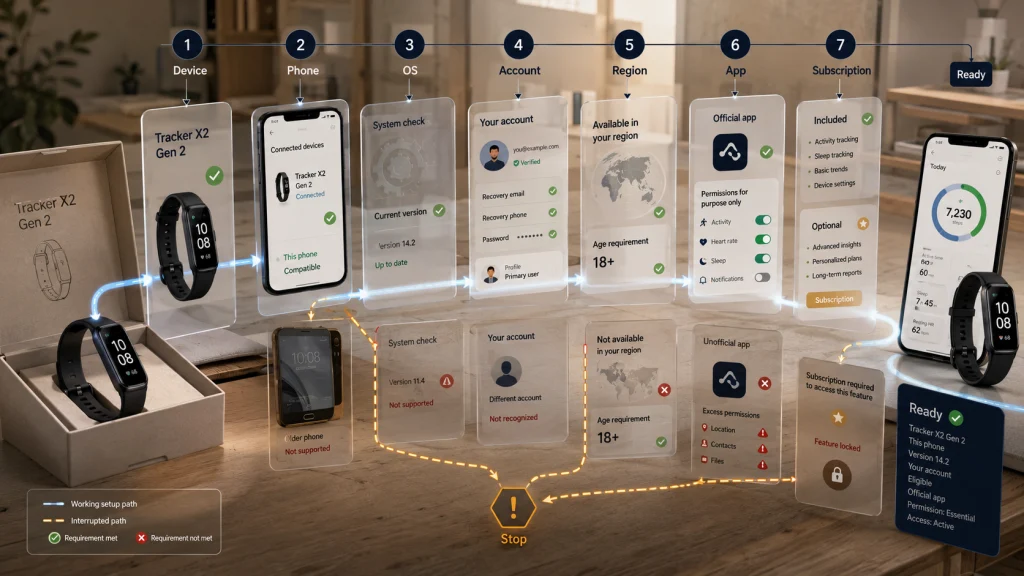
Verify the full compatibility stack before pairing
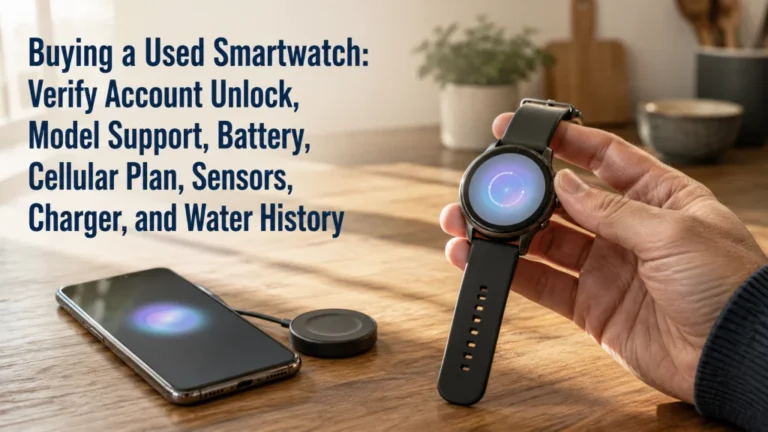
A device name alone does not establish compatibility. The complete system may include a particular phone, operating-system version, account, country, age requirement, app, software update, and subscription level.
| System layer | What to verify in current official instructions |
|---|---|
| Exact device | The model and generation named on the packaging or device information screen |
| Phone | Supported phone type, hardware requirements, and connection method |
| Operating system | The minimum and currently supported software versions |
| Account | Who owns the account, which email is used, and whether the profile can be recovered |
| Region and age | Whether the app or feature is available for the user’s country and profile |
| Required app | The official app, permissions needed for the stated purpose, and update status |
| Subscription | Which views or services require ongoing payment and what remains without it |
Do not blend instructions from different ecosystems or assume that a menu shown in an older video still exists. Check current official setup material for the exact device and phone combination immediately before pairing.
Account ownership deserves special attention. The person who will use the device should know which account holds the history, recovery information, subscription, and connected services. A convenient shared login can create confusion later when the phone changes or the data needs to be transferred.
Route initial pairing and baseline settings carefully
Initial setup should create a stable connection without activating every optional service. Charge the device first when its instructions require it, update the phone and device software as directed, use the official app, and keep the device near the phone during pairing.
Enter profile details accurately when they are required for the intended features, but do not grant unrelated permissions simply to move through the setup faster. Read each request in context. Location, notifications, background activity, contacts, microphone access, or connected-app permissions may serve different functions.
Use the detailed guide to setting up a fitness tracker for the sequence of account, app, pairing, updates, essential permissions, wrist choice, and baseline settings.
If pairing fails, stop before repeatedly resetting accounts or creating duplicates. Confirm the exact phone and software requirements, charger status, connection settings, existing device associations, and official troubleshooting path.
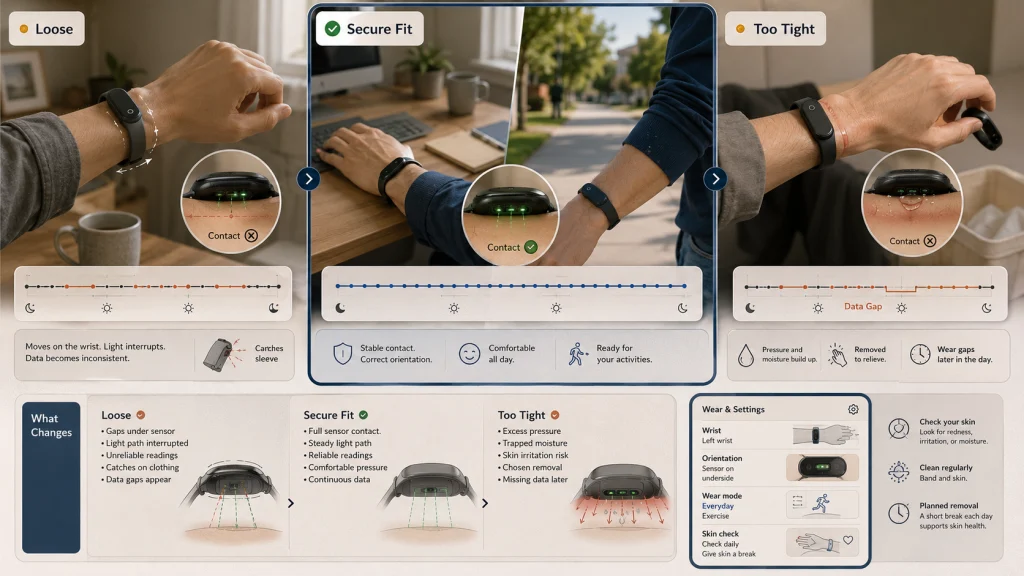
Fit affects comfort, wear consistency, and sensor contact
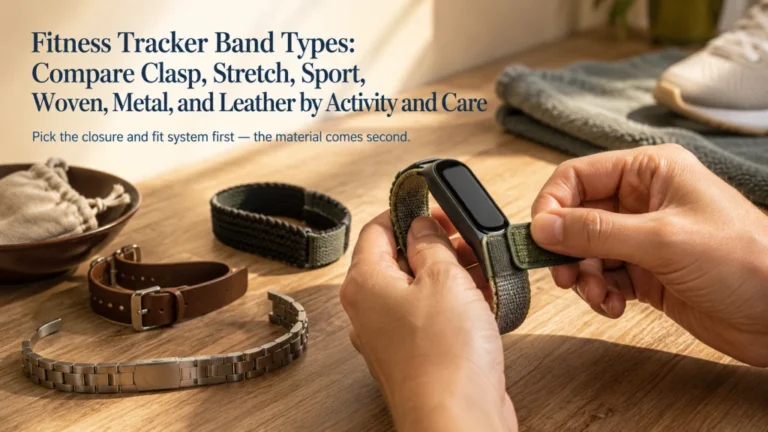
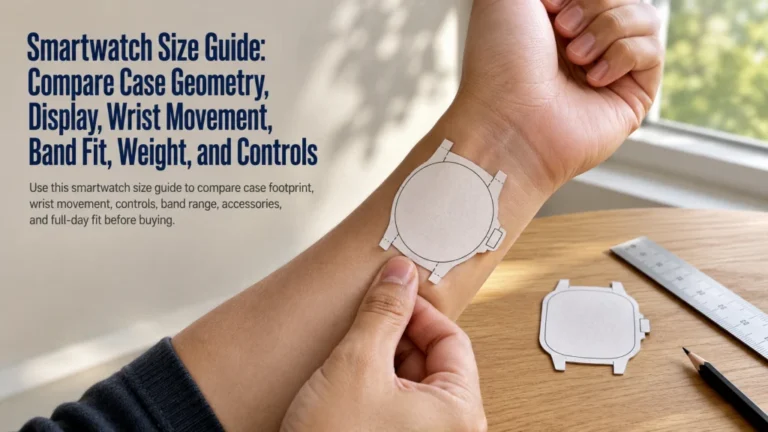
A band that slides freely may lose consistent contact. A band that is too tight may trap moisture, leave pressure marks, or make the device unpleasant to wear. The correct fit is secure enough for the intended use while remaining comfortable and following the device instructions.
Confirm the selected wrist in the app, the device orientation when that setting exists, and the recommended band position. Exercise may call for a slightly different fit than ordinary wear, but it should never require excessive tightness.
Wrist position, band tension, exercise fit, and skin checks are covered in how to wear a fitness tracker correctly.
Comfort is part of data continuity. If the device is removed because it pinches, catches on clothing, or irritates the skin, the record will contain gaps even when pairing and permissions are correct.
Clean the device without damaging the band or contacts
Sweat, soap residue, lotion, sunscreen, dust, and moisture can collect under the band or around sensors and charging contacts. Cleaning is part of ordinary use, not a cosmetic extra.
Follow the instructions for the exact device and band material. Remove the device when required, use only permitted methods, avoid abrasive tools or unapproved chemicals, and dry both the skin and device before wearing or charging again.
For the separate steps covering the skin, band, sensor surface, charging contacts, drying, and replacement, use how to clean a fitness tracker.
Do not ignore persistent redness, swelling, blistering, pain, or broken skin. Stop wearing the device and seek appropriate guidance when the problem is severe, worsening, or does not settle after removal and ordinary care.
Build charging around dry, predictable removal windows
A charging routine works when it protects safety and data continuity. Waiting until the battery is nearly empty often removes the device during the walk, work period, or night the user hoped to track.
Use the correct charging equipment and follow current instructions for the power source, contact alignment, ventilation, and temperature. Never connect wet charging surfaces. Keep the charger away from sinks, damp counters, bedding, direct heat, and places where the cable may be crushed or pulled.
A practical removal window and a safe charging location can be planned with how to charge a fitness tracker.
A short planned charge during an existing routine may be easier to maintain than occasional long charges. The correct pattern depends on the device instructions and the periods the user values most.
Water resistance is model-specific and condition-specific
A water-resistance label does not answer every question about showers, swimming, soap, steam, pressure, salt water, temperature, or an aging seal. Permitted use must be checked for the exact device and band.
A shower adds soap, shampoo, heat, steam, and spray pressure. Swimming adds depth, repeated motion, pool chemicals or salt, and possible button use while wet. Those conditions may not match the printed rating.
Before exposing the device, compare the rating with the actual activity in can you shower with a fitness tracker.
When the rule is unclear, remove the device and verify it first. Do not rely on another model, an earlier generation, or a general claim that all trackers can handle water.
Continuous wear is not the same as useful wear
Keeping a device on all day and night may sound like the best way to avoid missing data, but skin comfort, charging, drying, cleaning, work conditions, and personal preference create reasonable removal windows.
The useful question is which periods matter for the stated purpose. Someone tracking planned walks may not need overnight wear. Someone reviewing overnight patterns may charge during the day. Work involving machinery, chemicals, heat, protective equipment, or repeated hand washing may add further limits.
Should you wear a fitness tracker all day explains how to balance wear time with skin checks, cleaning, charging, comfort, and activity restrictions.
Removing the device is not a failure. A planned gap can make long-term use easier than forced continuous wear.
Replace default targets with one or two practical goals
Default targets may not reflect the user’s routine, mobility, job, recovery needs, schedule, or reason for wearing the device. A useful goal supports a behavior the person can understand and act on.
A desk worker may value a limited number of movement prompts. Someone recording planned walks may care more about completing those sessions than reaching a daily step total. A person with a physical job may need fewer reminders rather than more.
Use how to set fitness tracker goals to review the baseline, choose a controllable target, and decide when it should be adjusted.
A consumer goal is not exercise clearance, a treatment plan, or proof that more activity is always appropriate. Keep it proportionate to ordinary lifestyle use and any professional guidance already in place.
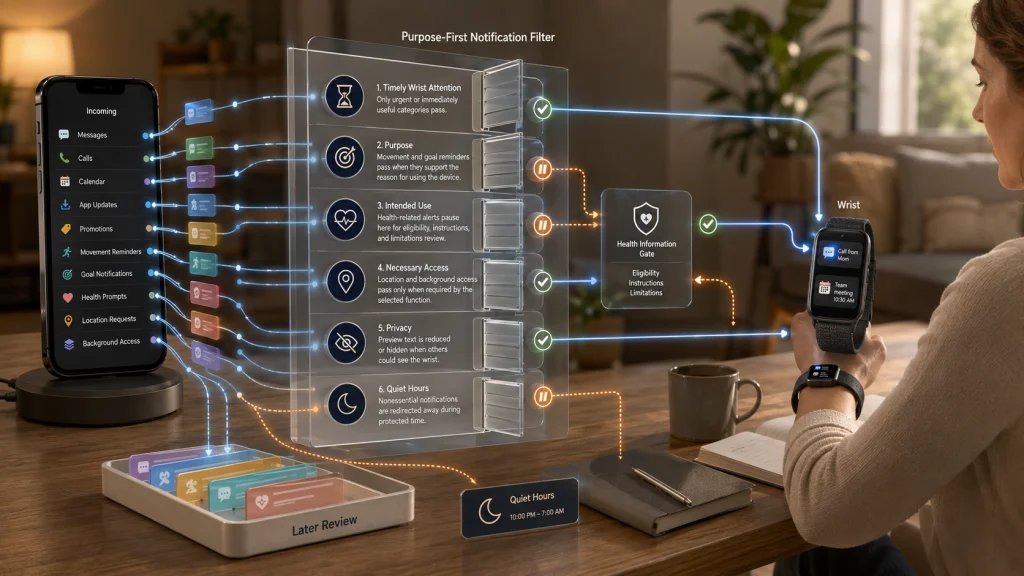
Reduce mirrored alerts before they become daily noise
A new wearable may copy messages, calls, calendar notices, app updates, reminders, and health-related prompts to the wrist. What begins as convenience can quickly become another source of interruption.
Start with the purpose statement. Keep alerts that need timely wrist attention, leave the rest on the phone, and silence promotional or duplicate categories. Then check vibration, sound, preview text, quiet hours, and who may see the screen.
| Low-noise setup check | Decision |
|---|---|
| Phone alerts mirrored to the wrist | Keep only categories that need timely wrist attention |
| Movement and goal reminders | Use only those connected to the stated purpose |
| Health-related alerts | Read the intended use, limits, and eligibility before enabling them |
| Location and background access | Grant access only when a chosen function requires it |
| Preview text and sharing | Check what appears on the wrist and who can see it |
| Quiet hours | Prevent nonessential interruptions during protected time |
More detailed control of mirrored alerts, reminders, privacy, and quiet hours appears in fitness tracker notifications.
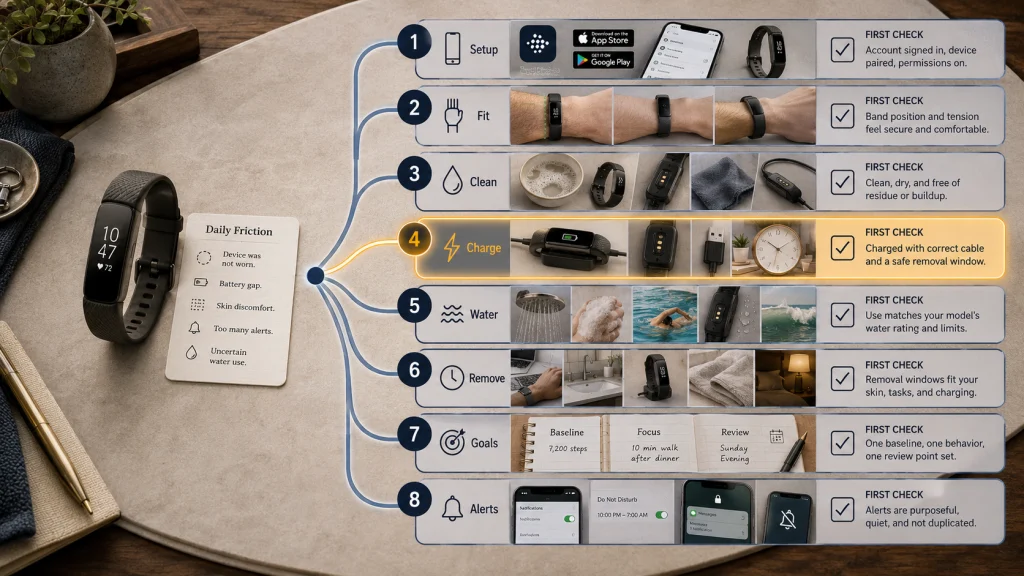
Route each daily-use question to the right next step
Use the table when the device feels difficult to maintain but the source of the friction is unclear.
| Daily-use question | Detailed guide | First check |
|---|---|---|
| How should the account, app, and pairing be completed? | Initial setup | Exact device, phone, software, account, and required permissions |
| Where and how tightly should the device sit? | Wear and fit | Wrist setting, position, band tension, comfort, and exercise guidance |
| How should sweat, skin, band, and contacts be cared for? | Cleaning and care | Band material, permitted method, drying, and skin condition |
| When and where should charging happen? | Charging routine | Correct charger, dry contacts, heat, cable condition, and removal window |
| Can the device be used in a shower or pool? | Water exposure | Exact rating, allowed activity, soap, heat, pressure, and aftercare |
| Should it remain on all day and overnight? | Removal windows | Purpose, skin comfort, charging, work limits, and cleaning |
| Which targets should replace the defaults? | Practical goals | One baseline, one controllable behavior, and one review point |
| Which alerts belong on the wrist? | Notification control | Purpose, urgency, duplication, quiet hours, and privacy |
Follow one route at a time. A fit problem, charging gap, and notification problem may occur together, but each needs a separate change if the result is going to be understandable.
Keep deeper device questions in the right area
Daily setup can make a device usable, but it does not answer every question about category choice, workout records, overnight scores, health metrics, privacy, or lifestyle fit.
| Question beyond daily setup | Use this guide |
|---|---|
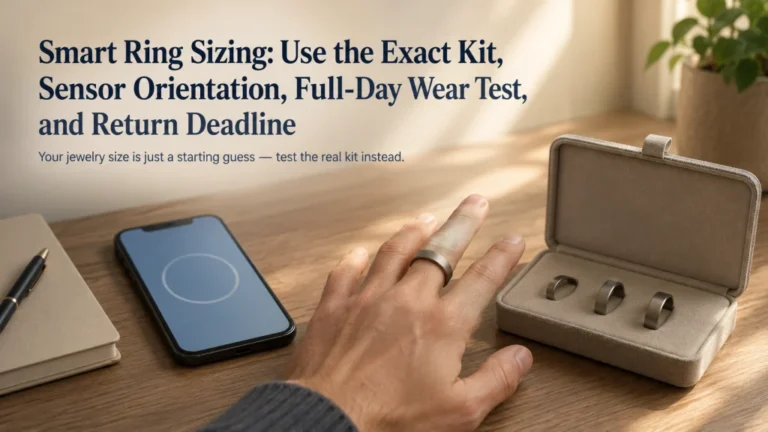
| Should the device be a watch, slim tracker, or ring? | Comparing wearable form factors |
| How should steps, workouts, pace, distance, elevation, or GPS be used? | Activity and GPS tracking |
| What can sleep, recovery, readiness, or stress scores support? | Sleep and recovery tracking |
| How should heart rate and other everyday metrics be viewed? | Everyday health metrics |
| How should syncing, accuracy, permissions, privacy, subscriptions, export, and deletion be managed? | Wearable data management |
| Will the device fit work, mobility, travel, accessibility, motivation, or family use? | Lifestyle and situation fit |
Setup should not become metric interpretation. Missing data may begin with fit or charging, but accuracy disputes, privacy review, and medical meaning require a different decision process.
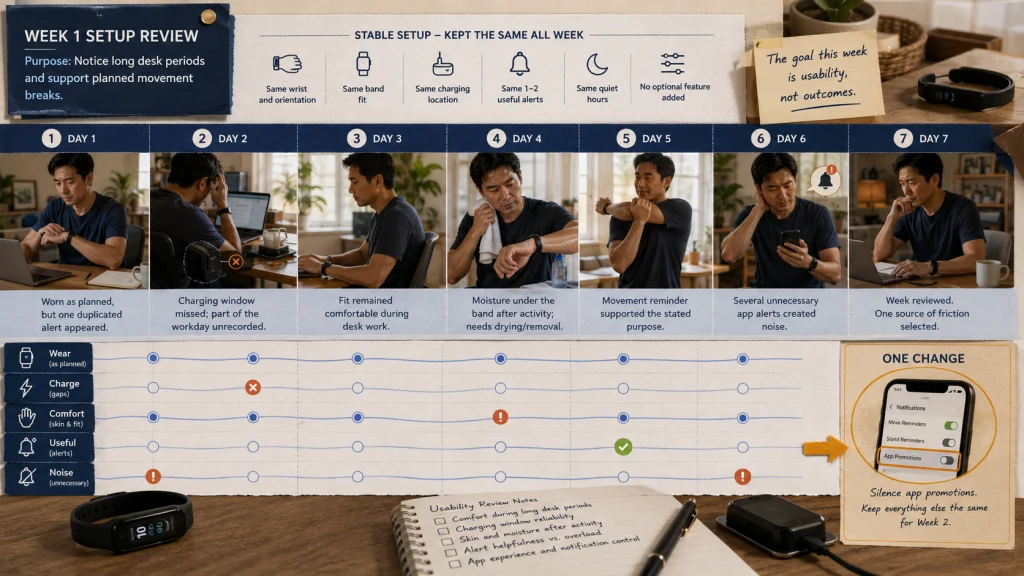
Run a seven-day low-noise setup review
Use the first week to evaluate whether the setup is practical, not whether the dashboard proves a health outcome. Keep the stated purpose visible and avoid adding optional features halfway through the review.
| Day | Worn as planned? | Charging gap? | Skin and comfort | Useful alerts | Unnecessary noise | Setup change needed |
|---|---|---|---|---|---|---|
| 1 | _____ | _____ | _____ | _____ | _____ | _____ |
| 2 | _____ | _____ | _____ | _____ | _____ | _____ |
| 3 | _____ | _____ | _____ | _____ | _____ | _____ |
| 4 | _____ | _____ | _____ | _____ | _____ | _____ |
| 5 | _____ | _____ | _____ | _____ | _____ | _____ |
| 6 | _____ | _____ | _____ | _____ | _____ | _____ |
| 7 | _____ | _____ | _____ | _____ | _____ | _____ |
At the end of the week, remove one source of friction before adding a new feature. Tighten or loosen the routine rather than the band, choose a better charging window, silence one notification category, correct one permission, or schedule one cleaning period.
Practical tip: If the device spent the week in a drawer, the first question is not whether the metrics are accurate. It is whether the setup, fit, charging burden, or purpose made the device worth wearing.
Keep symptoms and medical decisions outside the setup process
A consumer wearable, app, score, alert, trend, or estimate is not a diagnosis, medical clearance, treatment plan, or replacement for professional evaluation. Initial setup should not include interpreting health metrics as proof that a symptom is harmless or that exercise is safe.
Safety warning: Urgent or severe symptoms require appropriate medical attention regardless of what the device displays. Do not delay care because an alert did not appear or a reading looks normal.
Health-related notifications should be enabled only after the user understands the feature’s intended purpose, eligibility, instructions, and limitations. A setup screen cannot establish what a result means for an individual.
Finish with a device that asks for less attention
Write the purpose, confirm the compatibility stack, complete the minimum pairing steps, set a comfortable fit, establish cleaning and dry charging routines, verify the exact water rule, choose one or two goals, and reduce mirrored alerts.
After seven days, keep only the features that support the stated job without creating unnecessary noise, discomfort, charging gaps, or maintenance friction. A successful setup is not the one with the most functions active. It is the one the user can understand, wear, care for, and control.
FAQs
⌚ What should I do first with a new fitness tracker?
Write one reason for using it, then verify the exact phone, operating system, app, account, and region requirements. Pair only after the device, phone, charger, and account are ready.
📲 Should I accept every permission during setup?
No. Grant permissions that are required for the features tied to your stated purpose. Review location, notifications, background access, contacts, microphone, and connected-app requests separately.
🖐️ How tight should a fitness tracker be?
It should follow the exact device guidance, remain secure for the intended activity, and feel comfortable. A sliding device may lose contact, while excessive tightness can trap moisture or irritate the skin.
💧 Can I charge the tracker after washing it?
Only after the device and charging contacts are fully dry and the official instructions allow charging. Keep the charger away from damp counters, sinks, bedding, and direct heat.
🚿 Does water resistance mean I can shower with it?
Not automatically. Verify the exact model’s permitted activities and limits for soap, steam, hot water, pressure, swimming, salt water, and aftercare.
🔕 Which notifications should stay on?
Keep alerts that require timely wrist attention and support the device’s purpose. Silence duplicate, promotional, nonurgent, and distracting categories, then set suitable quiet hours.
🚨 Can the setup tell me whether a symptom is serious?
No. Setup and consumer readings cannot diagnose a symptom or provide medical clearance. Urgent or severe symptoms require appropriate medical attention regardless of the dashboard.