Learning how to set fitness tracker goals starts with choosing one repeatable behavior, not accepting every default target on the dashboard. Use your recent ordinary routine as the starting reference, create full, standard, and minimum versions, and decide in advance what action follows a missed or completed target. Review the pattern over a chosen window instead of reacting to one day, then adjust only one variable at a time. Simplify or stop tracking when goals create distress, compulsive checking, pain, unsafe behavior, or pressure to ignore qualified guidance.
Turn Six Default Goals Into One Behavior and One Question
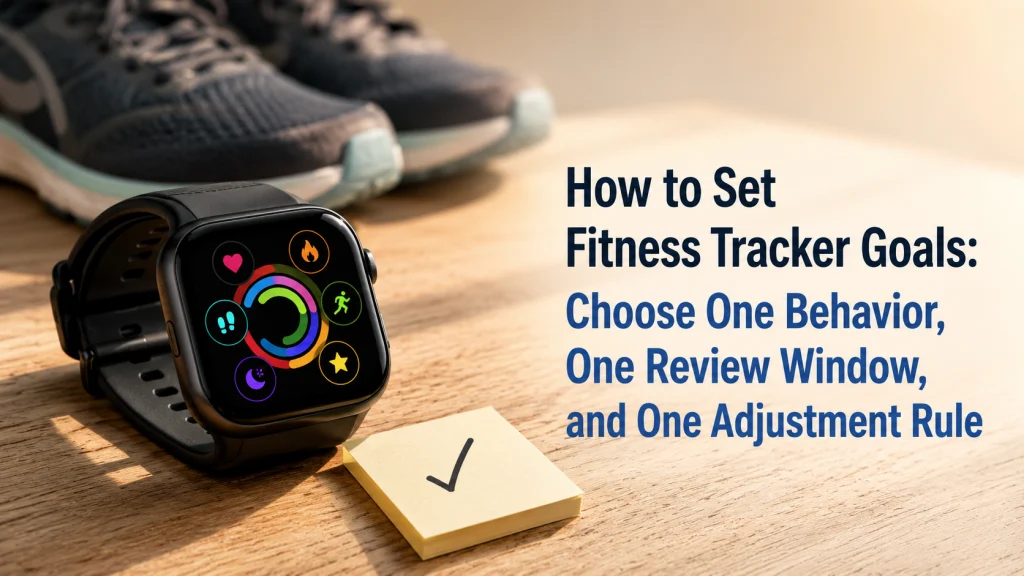
Open a new wearable dashboard and six targets may compete for attention at once: steps, active minutes, standing, calories, sleep, and a streak. Each has its own ring, badge, color, reminder, and unfinished status.
On an ordinary difficult day, that screen can make one missed walk feel like six separate failures. The problem is not always a lack of motivation. The device may simply be asking for more decisions than the routine can support.
All six goals can look equally important, even when only one connects to a behavior you genuinely want to repeat.
- Steps
- Active minutes
- Standing
- Calories
- Sleep
- Streak
Take the planned walk after lunch on workdays.
One Review Question
Did the goal help the walk happen more consistently without adding unnecessary pressure?
A wearable target is useful only when it changes a repeatable decision. A brighter ring or more ambitious number does not automatically create a better routine.
Starting rule: Choose one behavior the device can observe well enough for practical use, then write one question you will use to review it.
The wearable technology guide explains what consumer devices can and cannot do. The guide to using a fitness tracker covers the wider setup, wear, charging, notification, and data decisions around the goal feature.
Separate Behavior, Outcome, Estimate, Reminder, Streak, and Review
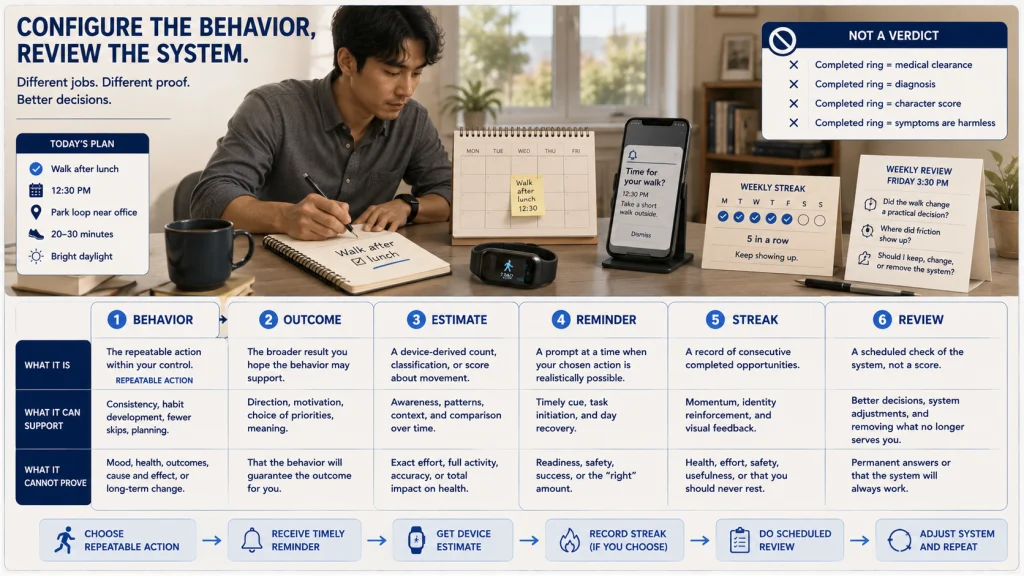
Wearable apps often place several different ideas under the word goal. Separating them prevents a device estimate from becoming a verdict about success.
| Term | What It Means | Example |
|---|---|---|
| Behavior goal | A repeatable action within the person’s control | Take the planned walk after lunch. |
| Outcome goal | A broader result the person hopes the behavior may support | Feel less stuck at the desk during the workday. |
| Device estimate | A sensor-derived count, classification, or score | The device’s estimate of movement during the day |
| Reminder | A prompt intended to support the behavior at a useful moment | A quiet alert before the usual lunch break |
| Streak | A record of consecutive completed periods | Several workdays with the planned walk recorded |
| Review | A scheduled check of whether the system is useful and sustainable | Ask whether the goal changed the decision and where friction appeared. |
The behavior is the part you are configuring. The outcome may matter, but the wearable cannot guarantee it. The estimate can add context, yet it is not a diagnosis, medical clearance, or perfect measurement of effort.
Choose One Behavior the Wearable Can Observe Consistently Enough
A useful goal sits at the intersection of three things: the behavior matters to you, it fits an existing routine, and the device can observe it consistently enough to support a practical review.
Good starting behaviors are specific without becoming rigid:
- Begin the planned walk after a recurring meal or work break.
- Record the exercise sessions already chosen elsewhere in the routine.
- Respond to one movement prompt during a long desk period.
- Wear the device during a selected activity window that has a clear purpose.
- Review one activity trend at a scheduled time instead of checking it repeatedly.
Avoid beginning with six behaviors because the dashboard offers six categories. Multiple targets make it difficult to see which prompt, routine, or obstacle changed the result.
Use the broader guide to fitness tracker activity tracking when you need to understand which movement metrics the device records. Metric availability does not determine which behavior deserves priority.
Use Recent Ordinary Routine as the Starting Reference
Default targets are usually detached from the person’s current schedule, work demands, recovery needs, equipment access, and reason for tracking. A better starting reference comes from recent ordinary days.
Look back at a period that reflects normal life rather than a vacation, illness, unusually busy week, new-device excitement, or short burst of motivation. Ask:
- Which behavior already happens sometimes?
- Which cue usually comes before it?
- Which days or settings make it easier?
- Where does the behavior usually stop?
- Which obstacle appears repeatedly?
- What amount of change would be noticeable without requiring a complete schedule redesign?
The starting target should be a reference for testing the system, not a public-health prescription or proof of what the body should achieve. This article does not prescribe a universal step target, activity duration, calorie burn, standing total, sleep duration, or heart-rate zone.
Editorial observation: A reasonable behavior goal can disappear inside a crowded dashboard. When sleep cards, calorie estimates, rings, streaks, and coaching panels all compete for the first screen, the chosen lunch walk may receive less attention than metrics the reader never intended to manage.
Create Full, Standard, and Minimum Versions
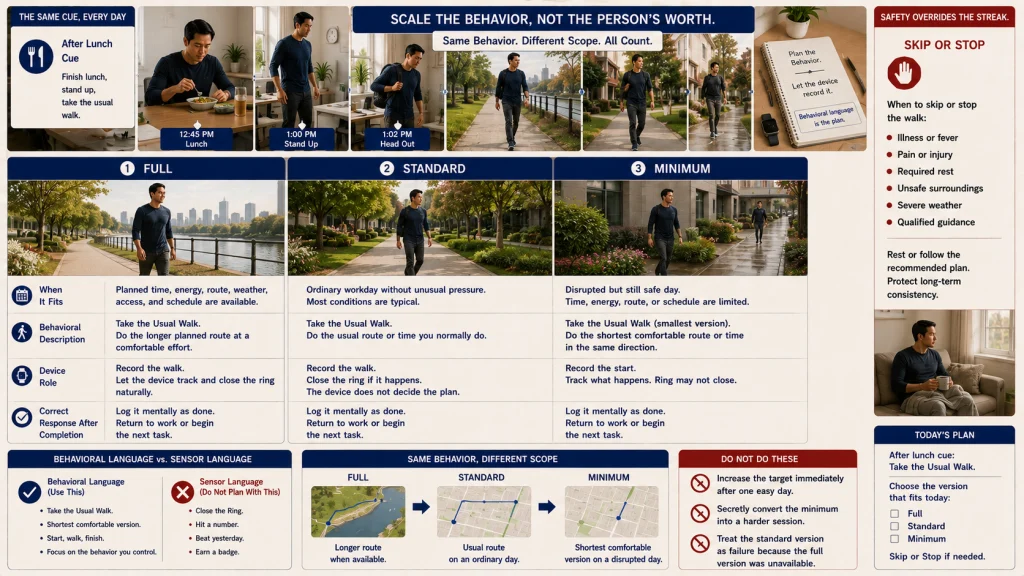
A single all-or-nothing target makes ordinary schedule variation look like failure. Three versions preserve the identity of the behavior while allowing the routine to scale.
| Version | When It Fits | Behavior Template |
|---|---|---|
| Full | The planned time, energy, setting, and access are available. | Complete the full version of the chosen behavior. |
| Standard | The ordinary routine is available without unusual pressure. | Complete the version expected on a normal day. |
| Minimum | The day is disrupted, but a small safe version remains reasonable. | Complete the smallest version that still represents the same decision. |
Write the three versions in behavioral language rather than sensor language. For example:
Full: Take the longer planned walk when the full break is available.
Standard: Take the usual walk after lunch.
Minimum: Begin a short, comfortable version of the same walk when the schedule is compressed.
The minimum version is not a secret route to maintaining every streak. It is useful only when it remains appropriate, safe, and connected to the original behavior. Rest, illness, pain, injury, medical guidance, and unsafe conditions can make skipping the behavior the correct choice.
Decide What Action Follows a Missed or Met Target
A goal should lead to a small decision. Without an action rule, a missed target produces guilt and a completed target produces only a badge.
| Result | Useful Response | Avoid |
|---|---|---|
| Target met comfortably | Keep the system stable until the scheduled review. | Increasing the target immediately because one day felt easy |
| Minimum version used | Record which constraint made the smaller version appropriate. | Treating the day as either complete success or total failure |
| Target missed once | Note the obstacle and continue the routine at the next planned opportunity. | Compensating with an unsafe, painful, or unusually demanding effort |
| Target missed repeatedly | Review the cue, timing, target size, environment, or usefulness of the goal. | Adding more reminders before understanding the friction |
| Target met but feels unhelpful | Ask whether the behavior still serves the intended purpose. | Keeping it only to protect a streak or complete the dashboard |
The action rule should be written before the first difficult day. That keeps the wearable from inventing the response through celebratory animations, warnings, or an automatic target increase.
Remove Duplicate Reminders, Badges, and Competing Goals
A goal can be simple while the surrounding alert system remains noisy. One behavior may trigger a movement reminder, coaching prompt, ring warning, app notification, weekly summary, and streak message. By the time the useful cue appears, the wrist may already feel like a source of interruption rather than support.
Use this reminder cleanup:
- Keep one reminder connected to a moment when action is possible.
- Turn off duplicate prompts that ask for the same behavior.
- Hide or ignore unrelated goals during the first review window.
- Disable celebration, streak, or coaching messages that create pressure without changing the next action.
- Keep urgent phone or calendar alerts separate from activity-goal prompts.
- Check whether a premium dashboard adds targets you did not choose.
Use the guide to filtering fitness tracker notifications when wrist interruptions extend beyond the goal feature.
Visibility rule: Keep one action prompt and one place to review the result. Badges and celebrations are optional; they do not need to occupy the same attention as the behavior itself.
Review the Trend Over a Chosen Window
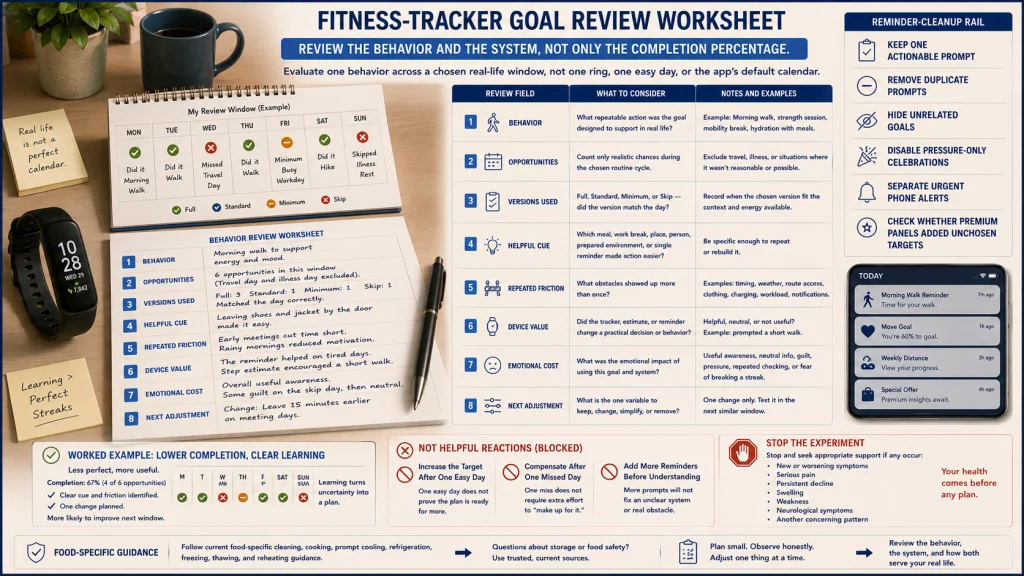
A single missed day can feel unusually loud when the app turns it into a broken ring or ended streak. Yet that day may also contain bad weather, travel, caregiving, illness, poor sleep, or no realistic opportunity to complete the behavior.
Wait long enough to see ordinary life rather than reacting to every score. Choose a review window that contains several real opportunities and fits the repeating schedule or routine cycle. The app’s default calendar does not have to decide when the evidence is ready to review.
| Review Worksheet | Question |
|---|---|
| Behavior | What repeatable action was the goal designed to support? |
| Opportunities | How many realistic opportunities occurred during the window? |
| Versions used | When did the full, standard, or minimum version fit? |
| Helpful cue | Which routine, place, person, or reminder made the action easier? |
| Repeated friction | Which obstacle appeared more than once? |
| Device value | Did tracking or the reminder change a practical decision? |
| Emotional cost | Did the goal create useful awareness, neutral information, pressure, guilt, or repeated checking? |
| Next adjustment | What single variable should remain, change, or be removed? |
Review the behavior and the system, not only the completion percentage. A lower completion rate with clear learning may be more useful than a perfect streak built around an easy but irrelevant target.
Adjust Only One Variable at a Time
When the goal is not working, resist changing the target, reminder time, behavior, metric, minimum version, and review window all at once. That makes it impossible to see which change helped.
Choose one adjustment:
- Cue: Move the reminder to a moment when action is possible.
- Target size: Make the standard version closer to the recent routine.
- Minimum version: Clarify the smallest acceptable version or remove it when it encourages unsafe effort.
- Environment: Prepare the clothing, route, space, or charging routine that blocks the behavior.
- Metric: Replace a weak proxy with a more direct observable behavior.
- Visibility: Remove competing goals, alerts, or dashboard cards.
- Review question: Change the question if the current one does not lead to a useful decision.
Keep the adjustment stable until the next planned review unless pain, danger, distress, or qualified guidance requires an earlier stop.
Route Medical and Training Targets Outside the Goal Feature
A wearable can display activity, sleep, heart rate, calories, and other estimates. Displaying a metric does not mean the app can prescribe the medically, physically, or nutritionally appropriate target.
Keep these decisions outside this general workflow:
- Exercise type, progression, recovery, or rehabilitation programming
- Heart-rate zones or cardiac exercise limits
- Calorie intake, calorie-burn targets, or weight-management prescriptions
- Sleep-duration targets or interpretation of overnight health symptoms
- Goals related to pregnancy, diabetes, eating disorders, injury, chronic disease, or another individualized condition
- Using a wearable score as medical clearance or evidence that symptoms are harmless
The guide to wearable sleep and recovery tracking addresses what overnight estimates can contribute to a later sleep question. For stored trends, exports, retention, and review burden, use the guide to fitness tracker data management.
Urgent or severe symptoms require appropriate medical attention regardless of whether the wearable reports a completed goal, normal-looking trend, or reassuring score.
Stop or Simplify When Tracking Creates Distress or Compulsive Behavior
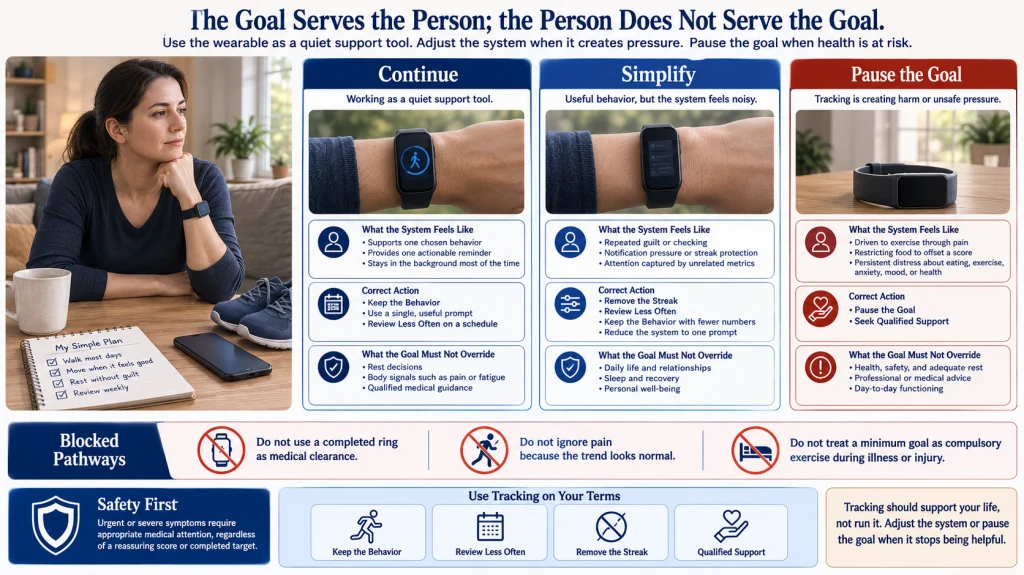
A tracker can begin as a quiet reminder and gradually start to feel like a judge that is always present. When the day is reorganized to protect a ring, hide a missed target, or erase the feeling of falling behind, the goal is no longer serving its original purpose.
Simplify or stop when the system repeatedly creates guilt, panic, avoidance, secret compensation, unsafe effort, sleep disruption, or constant checking.
Distress boundary: Pause the goal if you feel driven to exercise through pain, ignore rest or medical advice, restrict food to offset a score, repeatedly check the dashboard, hide missed targets, or organize the day primarily around protecting a streak. Seek qualified support when distress is persistent, worsening, or connected to eating, exercise, anxiety, mood, or another health concern.
Possible simplifications include:
- Remove the streak display.
- Turn off achievement notifications.
- Use activity-only or selected-window wear.
- Review the data less often.
- Keep the behavior while removing the numeric target.
- Pause the feature entirely.
The future guide to using a fitness tracker for motivation can evaluate whether prompts remain supportive over time. Weight-related goals require separate qualified guidance and should not be created by copying a default wearable target.
Choose the Behavior, Starting Reference, Minimum, Review Question, and Adjustment
Reduce the dashboard to one repeatable behavior and one review question. Use recent ordinary routine as the starting reference rather than accepting a universal number or marketing default.
Write full, standard, and minimum versions, then decide what happens after a completed, reduced, or missed target. Remove duplicate reminders and review the pattern over a window that fits the real routine.
At the review, change one variable or remove the goal. A useful wearable target should make the next decision clearer and then recede into the background. It should not turn a score, badge, ring, or streak into a judgment about the person wearing it.
FAQs
🎯 How do I set fitness tracker goals without using the defaults?
Choose one behavior connected to an existing routine, use recent ordinary days as the starting reference, define full, standard, and minimum versions, and write one review question.
📊 Is a behavior goal different from an outcome goal?
Yes. A behavior goal is a repeatable action you can choose. An outcome goal is a broader result you hope the behavior may support. The wearable cannot guarantee the outcome.
👟 Should I copy a universal step target?
No universal target is prescribed here. Begin with recent ordinary routine and use qualified guidance when the appropriate target depends on health, rehabilitation, training, or another individualized need.
🪜 Why use full, standard, and minimum versions?
They allow the same behavior to scale with ordinary schedule variation. The minimum version should remain safe and useful, and skipping may be correct when rest, pain, illness, or guidance requires it.
🔔 How many goal reminders should I keep?
Keep only the reminder that reaches you when action is possible. Remove duplicate prompts, unrelated goals, and achievement messages that add pressure without changing the next decision.
📅 How long should the review window be?
Choose a window that contains enough ordinary opportunities to reveal a pattern. It can follow a repeating schedule or routine cycle rather than a universal duration selected by the app.
🔧 What should I change when the goal is not working?
Adjust one variable, such as the cue, target size, minimum version, environment, metric, reminder visibility, or review question. Keep the rest stable until the next review.
🚩 When should I stop using a wearable goal?
Pause or simplify when tracking causes persistent distress, compulsive checking, unsafe effort, guilt, food restriction, sleep disruption, or pressure to ignore pain, rest, or qualified guidance.