A smartwatch size cannot be chosen from wrist circumference or case width alone. Shape, lugs, thickness, curvature, weight, controls, display area, band range, sleeve contact, desk contact, charger clearance, and the return window all affect fit. Build a paper footprint or use an official try-on tool, then test movement and interaction before buying. Choose the smallest configuration that supports the actions you actually need without creating avoidable contact or adjustment throughout the day.
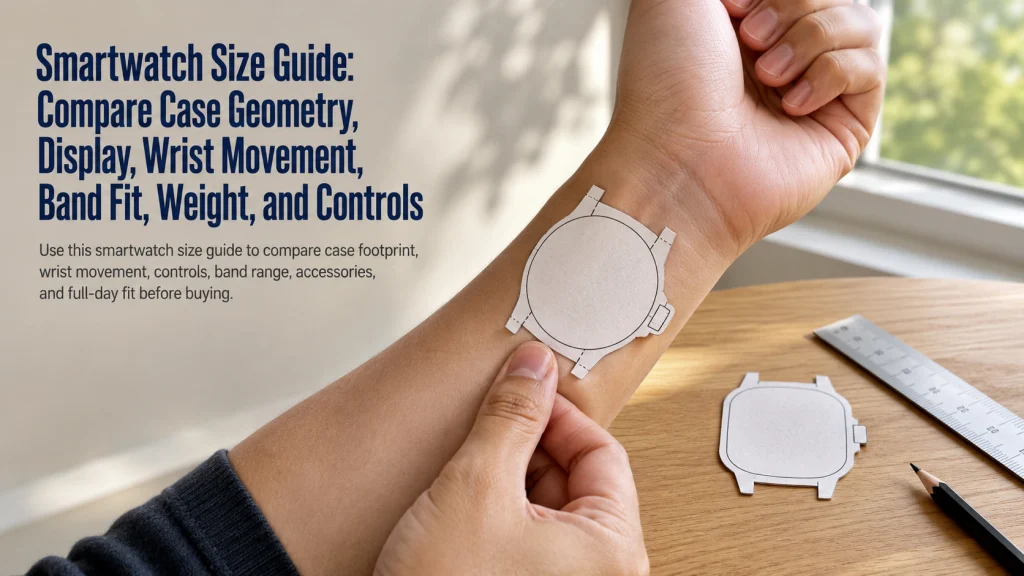
See why two watches with the same width can occupy different wrist space
Place two watches side by side. Both cases are listed with the same width, yet one has a rounded body with short connections while the other has a taller shape, extended lugs, a thicker profile, and a crown positioned where the wrist bends.
Watch A: compact footprint
- Same listed case width
- Shorter top-to-bottom body
- Integrated or short band connections
- More curved underside
- Controls sit farther from the wrist crease
Watch B: extended footprint
- Same listed case width
- Taller body across the wrist
- Lugs extend beyond the central case
- Thicker or flatter underside
- Crown sits closer to the bending hand
Viewed from above, the two cases can appear nearly equal. During typing, lifting a bag, or pulling on a jacket, the second shape may feel noticeably larger because more hardware reaches beyond the number printed in the specification.
A smaller case can still feel larger when its lugs extend beyond the wrist or the crown presses as the hand bends. That mismatch often appears after purchase, when a watch that looked tidy in a mirror begins catching a cuff or meeting the desk edge throughout the day.
One millimeter number does not describe the full wrist footprint.
Define case width, height, thickness, lugs, display, band range, and total weight
Size labels describe several different measurements. Each one changes how the watch sits, moves, and responds during use.
- Case width: The side-to-side measurement of the watch body, excluding or including controls depending on how the specification is defined.
- Case height: The top-to-bottom body measurement that can affect how much of the wrist is covered.
- Thickness: The distance the case rises above the wrist, including sensor housing when relevant.
- Lugs or band connections: The structures that extend the effective footprint beyond the central case.
- Display area: The usable screen space, which is not always the same as the outer case size because bezel and shape differ.
- Band range: The minimum and maximum wearable length supported by the included or compatible band.
- Total weight: The combined weight of the case and the exact band configuration being worn.
Case material, band material, and protective accessories can also change the feel, but this article does not compare material performance or make medical comfort claims. Exact dimensions and included band ranges should be checked in the current manufacturer specifications for the specific configuration.
Once those measurements are clear, the next question is whether the extra screen area supports anything the wearer will actually do.
Use the broader wearable form comparison when the decision still includes a fitness tracker or smart ring.
List the interactions that require a larger display or easier controls
A larger watch is useful only when the extra space supports a repeated interaction. Write down what must happen on the wrist before deciding that more display is automatically better.
| Interaction | Does more display help? | What else matters? |
|---|---|---|
| Reading notifications | More text may fit at once. | Text size, contrast, glance time, and whether the phone is nearby. |
| Starting workouts | Larger touch targets may be easier to find. | Buttons, crown position, gloves, sweat, and one-handed control. |
| Using timers | A larger layout may reduce taps. | Whether the timer can be started by button, voice, or shortcut. |
| Viewing maps | More area can show additional route context. | Brightness, app design, phone dependence, and how often maps are viewed. |
| Typing or replying | Extra space may support larger controls. | Voice input, canned replies, phone use, and actual frequency. |
| Checking simple metrics | A small display may already be enough. | Complication layout, font choice, and whether detailed review happens on the phone. |
Mark each interaction as frequent, occasional, or unnecessary. Extra screen space used once a month should not outweigh a case that rubs against clothing or needs constant repositioning. The paper test turns that tradeoff into something visible before money is committed.
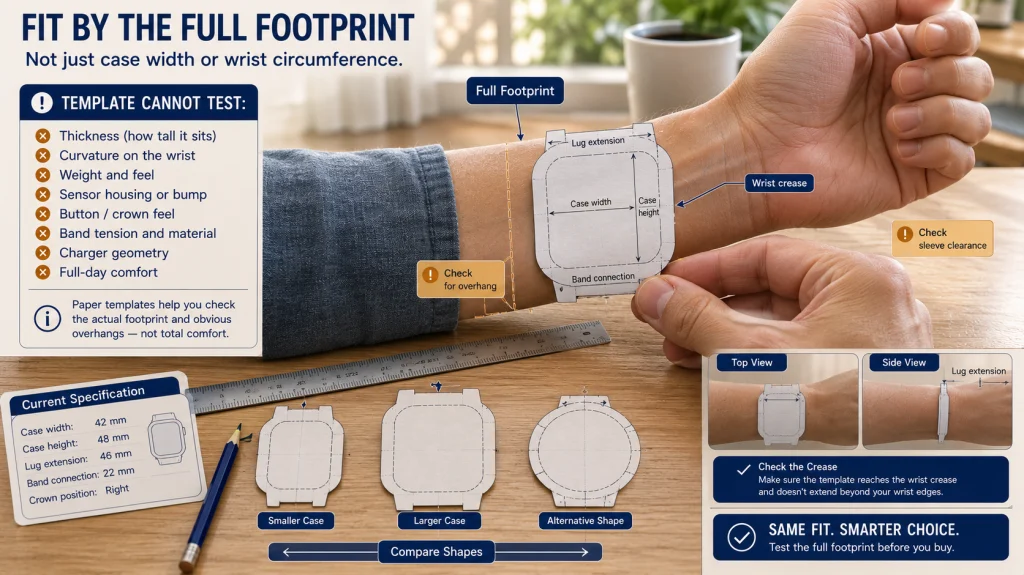
Make a paper footprint or use the manufacturer’s try-on tool
A paper template cannot reproduce weight, curvature, buttons, or software, but it can reveal obvious overhang before purchase.
- Find the current case width and height for the exact configuration.
- Draw a rectangle or shape with those outer dimensions on paper.
- Add any visible lug extension or band connection that increases the footprint.
- Cut out the template and place it on the wrist where the watch would sit.
- Bend the wrist toward the hand and check whether the template reaches the crease.
- Look from above and from the side for overhang, sleeve contact, and desk clearance.
- Repeat with the smaller, larger, or alternative-shape configuration.
Use an official digital or in-store try-on tool when available, but treat it as one step rather than proof of comfort. A screen image cannot reproduce thickness, weight, or the small irritation of a control meeting the hand dozens of times during an ordinary day.
Paper-template limit: The template shows footprint only. It cannot test the band, total weight, sensor housing, button feel, charger, or full-day comfort.
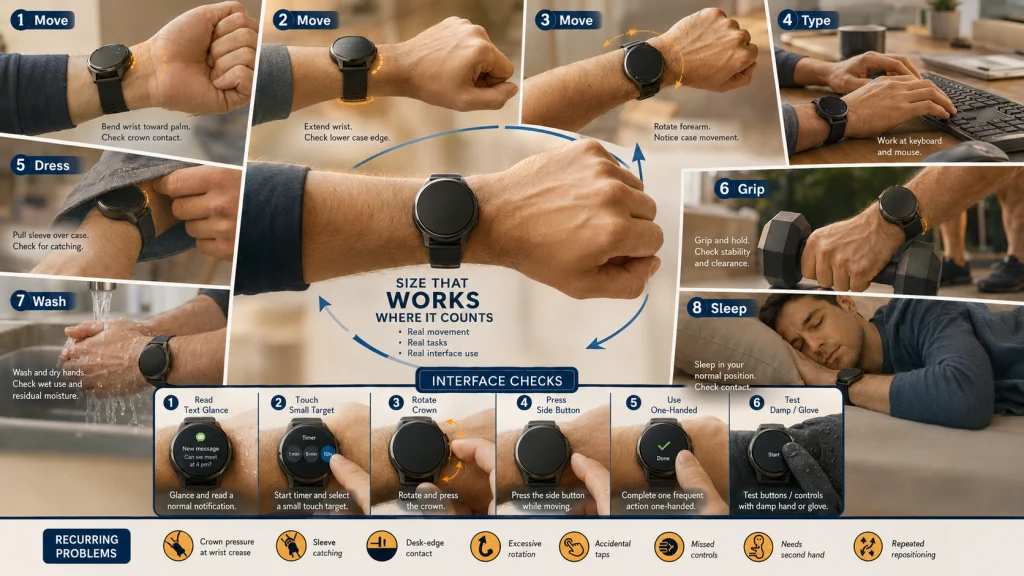
Test wrist flexion, crown contact, sleeves, desk work, exercise, and sleep positions
A watch can look proportional while the arm is still and become intrusive as soon as the wrist bends. Test the movements that repeat during an ordinary day.
Wrist-movement checklist:
- ☐ Bend the wrist toward the palm without the crown or case pressing into the hand.
- ☐ Extend the wrist without the case edge digging into the skin.
- ☐ Rotate the forearm and check whether the watch shifts excessively.
- ☐ Type at a desk and rest the wrist near the keyboard or mouse.
- ☐ Pull a shirt, jacket, or coat sleeve over the case.
- ☐ Grip exercise equipment, a bicycle handle, tools, bags, or cookware used regularly.
- ☐ Lie in the usual sleep position and check case, crown, and band contact.
- ☐ Wash and dry the hands without the case repeatedly striking the sink or counter.
Do not use one brief mirror check as the full test. Fit reveals itself through repeated bending, leaning, gripping, dressing, and resting the arm. A watch can feel invisible while standing still and become impossible to ignore during two hours at a keyboard.
After the body-movement test, keep the same candidate on the wrist and move directly into the interface test. A case that clears the hand still has to make its controls worth the space it occupies.
Test text, buttons, crown, touch targets, and one-handed use
The correct size must support the actions that justify wearing a screen on the wrist. Test the interface rather than assuming that the largest display is automatically the easiest.
| Interaction test | What to do | What to notice |
|---|---|---|
| Text glance | Read a typical notification without bringing the watch unusually close. | Whether the text is usable with preferred display settings. |
| Touch target | Start a timer, open an app, and select a small control. | Missed taps, accidental taps, and whether the phone would be easier. |
| Crown rotation | Rotate and press the crown with the watch in its normal position. | Finger access, wrist contact, and accidental activation. |
| Side button | Press the button while standing, sitting, and moving. | Whether the case shifts or requires a second hand. |
| One-handed use | Complete a frequent action without bracing the watch against a surface. | Whether the interaction is realistic during the day. |
| Glove or damp-hand test | Try the controls in conditions that match real exercise or work when appropriate. | Whether buttons or alternate controls become more important. |
Accessibility and comfort needs are individual. This workflow does not diagnose vision or dexterity conditions or guarantee that one size is appropriate for a medical need.
If the controls work but the watch keeps rotating or needs excessive tightness, the remaining problem may be the band rather than the case.
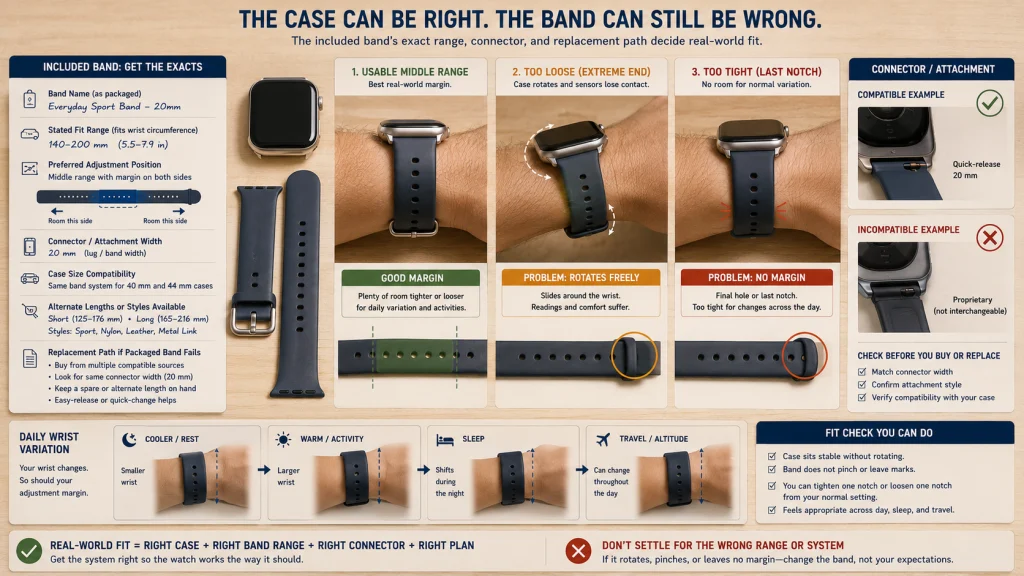
Confirm the exact band range and attachment system
A suitable case can still fail when the included band does not settle into a usable position. Check the exact band packaged with the exact case size, not a general family description. This is a common source of disappointment because the display may feel right while the attachment leaves the watch sliding, pinching, or sitting off-center.
Band-range card:
- Included band: Record the band name, size, and stated fit range.
- Usable adjustment: Confirm that the preferred setting is not at the final hole, last notch, or extreme end of the mechanism.
- Attachment width: Check whether smaller and larger cases use the same connector or different compatible bands.
- Replacement access: Confirm that alternate lengths or attachment styles exist if the included band fails.
- Case movement: The watch should not rotate freely or require excessive tightness to stay in place.
- Daily variation: Leave room for ordinary changes during heat, activity, sleep, and travel.
Use the band attachment guide when material, clasp, adjustment style, and replacement method are the main decision. Use the wearable fit guide when adjusting an already-owned device rather than selecting a new case.
Compare a smaller case, larger case, and alternative shape
| Configuration | Potential advantage | Potential tradeoff | Choose it when |
|---|---|---|---|
| Smaller case | Less wrist coverage, lower sleeve and desk contact, and potentially less weight. | Smaller display, touch targets, controls, or battery enclosure depending on the exact product. | The required interactions remain usable without the larger footprint. |
| Larger case | More display area or easier access to selected controls. | More height, thickness, overhang, crown contact, or sleeve interference. | The additional interface space supports frequent actions and the footprint remains comfortable. |
| Alternative shape | Different curvature, lug arrangement, display proportions, or control position. | The same width can still create a longer or thicker footprint. | Shape solves a contact problem that changing width alone does not solve. |
Choose between complete configurations rather than isolated numbers. A compact rectangular case can stretch farther along the arm than a wider rounded one, while an integrated connection may wrap more naturally than extended lugs. This is why the best comparison is often “which whole shape disappears during use?” rather than “which diameter looks smaller?”
Use the smartwatch and fitness tracker comparison when even the smallest smartwatch remains more interface than the goal requires. Use the smart ring and smartwatch comparison when screen-free collection is still under consideration.
Account for the charger, protective case, and screen protector only when actually used
Accessories can change the geometry that was tested. A protective shell can add bulk, resist button presses, or catch on clothing. A raised screen protector can alter edge gestures or crown access. A charger can require space beneath the case or around the band.
Test the configuration you will actually wear. Do not reject a suitable watch because of an accessory you do not need, and do not approve a bare watch when it will always be placed inside a thicker protective case.
Check whether the chosen band can remain attached during charging and whether the charger sits flat on the intended nightstand, desk, or travel surface. A watch that fits the wrist but creates a difficult daily charging routine may still be the wrong configuration.
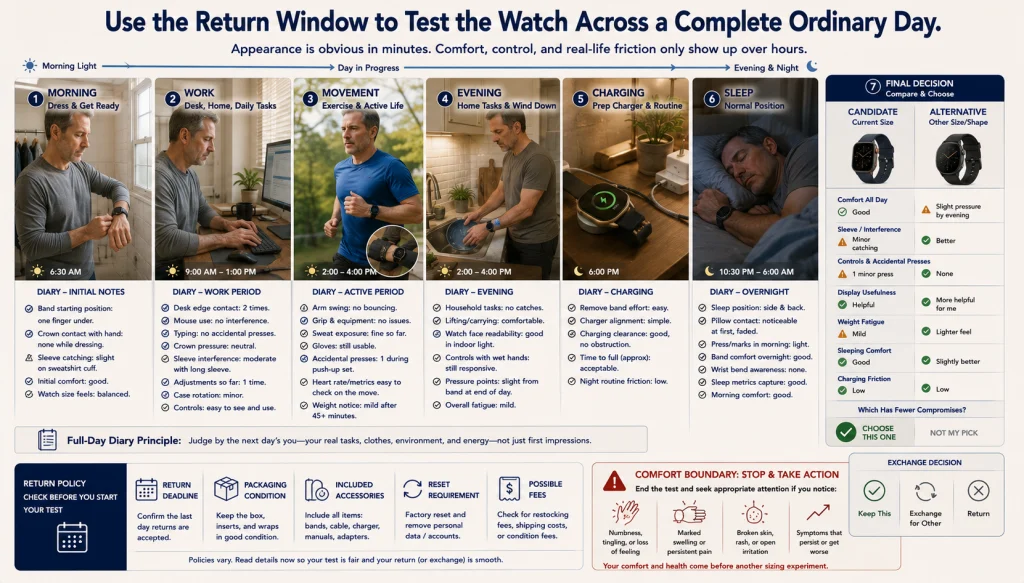
Use the return window for a full-day fit test
The first ten minutes reveal appearance. A full day reveals whether the watch keeps asking for attention through adjustment, charging friction, clothing interference, or awkward controls. The relief of choosing well is usually quiet: the device stops becoming the main event.
| Return-window diary | What to test | What to record |
|---|---|---|
| Morning | Band position, ordinary swelling, breakfast, dressing, and sleeves | Initial fit, crown contact, and clothing interference |
| Desk or household work | Typing, mouse use, counters, tools, carrying, and hand washing | Desk contact, rotation, accidental button presses, and adjustment frequency |
| Exercise or active movement | Arm swing, grip, sweat, gloves, and live controls | Case movement, touch reliability, and whether the display size helps |
| Evening | Long wear, relaxed wrist position, chores, and charging preparation | Pressure points, fatigue from weight, and charger friction |
| Sleep | Usual sleep position, bedding, wrist bend, and overnight band tension | Case, crown, band, and pillow contact |
| Final decision | Repeat the required interactions and compare the alternative size | Which configuration needs fewer compromises across the full day |
Confirm the return deadline, packaging condition, included accessories, reset requirements, and possible fees before beginning the test. Do not wait until the final day to decide whether the case or band needs to be exchanged.
Comfort boundary: Remove the watch if it causes numbness, marked swelling, broken skin, persistent worsening discomfort, or another concerning symptom. Seek appropriate medical attention when symptoms require it rather than trying to solve them through case size alone.
Test footprint, movement, interaction, band, and return
Complete the decision in five lines:
- Footprint: Record width, height, thickness, lugs, curvature, and crown position.
- Movement: Check wrist flexion, sleeves, desk contact, exercise, hand washing, and sleep.
- Interaction: Test text, touch targets, crown, buttons, and one-handed actions.
- Band: Confirm the exact included range, attachment system, adjustment margin, and replacement path.
- Return: Use the full-day diary before the exchange or return deadline.
A complete decision might read: “The smaller configuration makes messages slightly less spacious, but every frequent action remains usable and the watch fades into the background during work, clothing changes, exercise, and charging. The larger option looks easier in the store, yet the extra interface does not justify how often the hardware demands attention.”
Use the broader wearable technology guide when size is only one part of the purchasing decision.
The best size is not the largest case the wrist can carry. It is the smallest complete configuration that supports the required interactions and then recedes into the routine instead of interrupting it.
FAQs
⌚ Can wrist circumference determine smartwatch size?
Wrist circumference can help with band selection, but it cannot determine case comfort by itself. Case height, thickness, lugs, curvature, controls, weight, and wrist movement also matter.
📐 Is case width the full watch footprint?
No. The footprint can extend through case height, lugs, band connections, crown position, and curvature. Compare the complete geometry rather than one number.
🖥️ Is a larger display always easier to use?
A larger display can help selected interactions, but size alone does not guarantee easier use. Buttons, crown access, touch targets, text settings, and the frequency of each action also matter.
✂️ Can a paper template predict comfort?
It can reveal obvious footprint and overhang problems. It cannot reproduce weight, thickness, curvature, controls, band tension, or full-day contact.
👔 How should I test sleeve clearance?
Wear the shirts, jackets, or work clothing used regularly and move the wrist through ordinary tasks. Check whether the sleeve catches the case or presses the crown.
🔘 What if the crown presses into my hand?
Try the permitted orientation, alternative case size, or a different shape and control position. Do not assume a smaller width alone will solve the contact.
🔗 Should the band fit range affect case choice?
Yes. Different case sizes may ship with different bands or attachment options. Confirm the exact included range and replacement path for the configuration being purchased.
📦 How long should I test a watch before returning it?
Use as much of the return window as needed to complete a full-day test without missing the deadline. Include work, movement, clothing, exercise, charging, and sleep when those uses matter.