Fitness tracker notifications become manageable when every wrist alert has a known source, a required action, a delivery mode, a privacy rule, and a backup. Separate phone mirrors from device reminders, alarms, health features, app alerts, and system faults before deciding what belongs on the wrist. Keep timely action alerts, send low-priority information quietly to notification history when the platform allows it, and turn off interruptions that do not change a decision. Test lock, connection, focus, and do-not-disturb states, then review the real alert load over seven days.
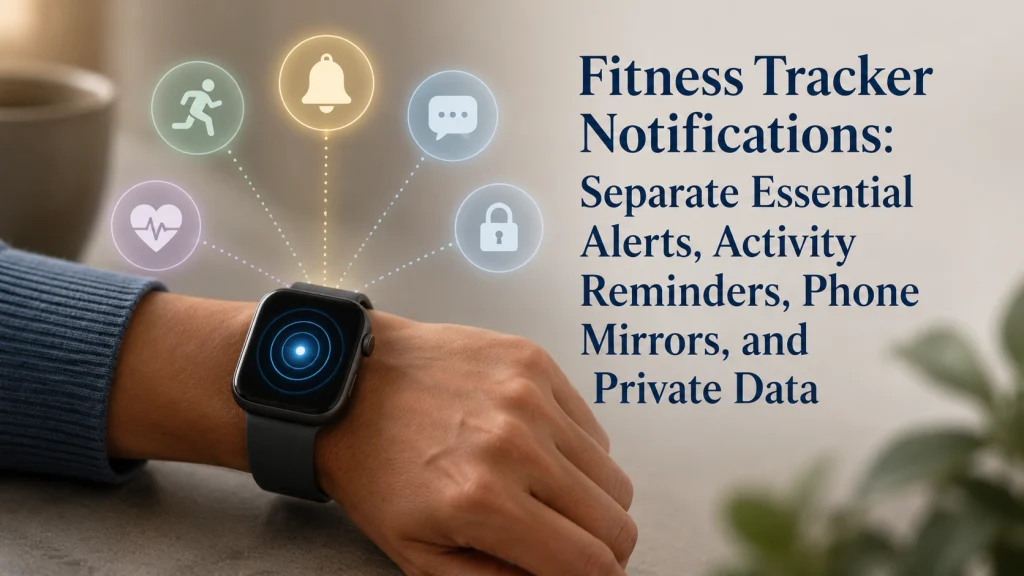
One Wrist Vibration Can Come From Five Different Sources
The wrist vibrates once during a conversation. The wearer glances down, breaks eye contact, and still cannot tell whether the tap came from a mirrored text, an activity reminder, a calendar alarm, a health feature, or a warning that the device needs attention.
That small moment captures the real problem. The physical cue may feel identical while the meaning, urgency, privacy, reliability, and next action are completely different.
The same short vibration interrupts the current task.
The source changes the urgency, privacy, expected action, and backup.
A message, call, calendar event, or app notice begins on the phone.
The wearable prompts movement, a routine, or another selected behavior.
A scheduled time cue may require a prompt response.
A consumer sensor or health setting surfaces a reading or pattern.
The device, battery, connection, account, or software needs attention.
Identify the source before changing vibration strength or enabling more alerts.
When every source uses the same wrist channel, an important alarm can disappear into a day of low-value taps. The solution is not necessarily stronger vibration. It is a smaller, more legible alert system.
Starting rule: Before changing notification volume or haptic strength, identify the source and the action each alert is supposed to trigger.
The wearable technology guide explains the limits of consumer devices. The guide to using a fitness tracker places notification control beside setup, charging, wear time, goals, and data review.
Define Phone Mirrors, Device Reminders, Alarms, Health Alerts, App Alerts, and System Faults
The word notification is too broad to guide a useful decision. Classify the alert before deciding whether it deserves sound, vibration, a private preview, quiet storage, or no wrist delivery.
| Alert Type | Where It Begins | Typical Purpose | Reliability Boundary |
|---|---|---|---|
| Phone mirror | A phone app, message, call, or calendar event | Bring phone information to the wrist | Depends on phone settings, permissions, connection, app behavior, lock state, and platform rules |
| Device reminder | The wearable or its companion app | Prompt movement, a selected routine, charging, or another device behavior | May be silenced, delayed, unavailable, or changed by modes and settings |
| Alarm | A scheduled alarm on the phone, watch, tracker, or calendar | Mark a time that may require immediate attention | Still depends on battery, sound or haptic settings, device state, and correct configuration |
| Health alert | A consumer health or sensor feature | Surface a reading, threshold event, or pattern defined by the feature | Not a diagnosis, dependable emergency channel, or substitute for symptoms and qualified care |
| App alert | A wearable app or service running on the device | Provide information or request an app-specific action | Availability and behavior vary by device, app, operating system, account, and subscription |
| System fault | The device, battery, connection, storage, sensor, account, or update process | Show that the system needs attention | The alert may explain only part of the problem and may not appear if the device cannot communicate |
Apple states that notification routing between an iPhone and Apple Watch depends on device state, and app alerts can be allowed, sent quietly to Notification Center, or turned off according to the available settings. Google’s Fitbit guidance likewise shows that phone permissions, connection, background access, and do-not-disturb or sleep modes can affect wrist delivery. Review the Apple notification guidance or Google’s Fitbit instructions for the current ecosystem-specific behavior.
Do not copy an Apple menu path into a Fitbit setup or assume two models behave the same because both vibrate on the wrist.
List Every Current Wrist Alert and the Action It Requires
A useful inventory records what actually appeared during ordinary use. Do not rely only on the list of apps that have permission, because one app may produce several alert types while another permission may never create a useful wrist action.
| Alert Inventory Field | What to Record |
|---|---|
| Source | Phone mirror, device reminder, alarm, health feature, wearable app, or system fault |
| App or feature | The specific service that created the alert |
| Typical timing | When and where it usually appears |
| Required action | Act now, check later, acknowledge, troubleshoot, or no action |
| Urgency | Time-sensitive, useful but delayable, informational, or unnecessary |
| Privacy level | Public, personal, financial, workplace, location, health-related, or otherwise sensitive |
| Current delivery | Sound, vibration, full preview, hidden preview, quiet history, phone only, or off |
| Backup | Phone alarm, calendar, human contact, emergency process, or another channel |
Write the action in plain language. “Read later” means the alert may not need to interrupt the wrist. “Leave now for the appointment” may deserve timely delivery. “No action” is a strong candidate for removal.
Keep Only Alerts That Require a Timely Wrist Action
The wrist is valuable because it can reach the wearer without requiring the phone to be opened. That advantage disappears when the channel is filled with information that can wait.
An alert deserves active wrist delivery when all three conditions are present:
- The information is useful at the moment it arrives.
- A realistic action can be taken from the wrist or immediately afterward.
- Delay would create a meaningful practical consequence.
Examples may include a selected calendar departure alarm, a call from a small approved group, a work alert during a defined shift, or a device fault that prevents a planned function. The exact set depends on the person’s responsibilities, schedule, privacy needs, and backup channels.
Convenience alone is not enough. A shopping promotion may be convenient to see, but it rarely needs to interrupt a meeting, meal, drive, conversation, or rest period.
Editorial observation: Notification demonstrations emphasize how quickly information reaches the wrist. Daily usefulness depends on less visible conditions such as phone lock state, watch lock, connection, permissions, focus modes, preview privacy, haptic recognition, and battery cost. Turning off low-value mirrors can make a remaining alert easier to recognize without making the vibration stronger.
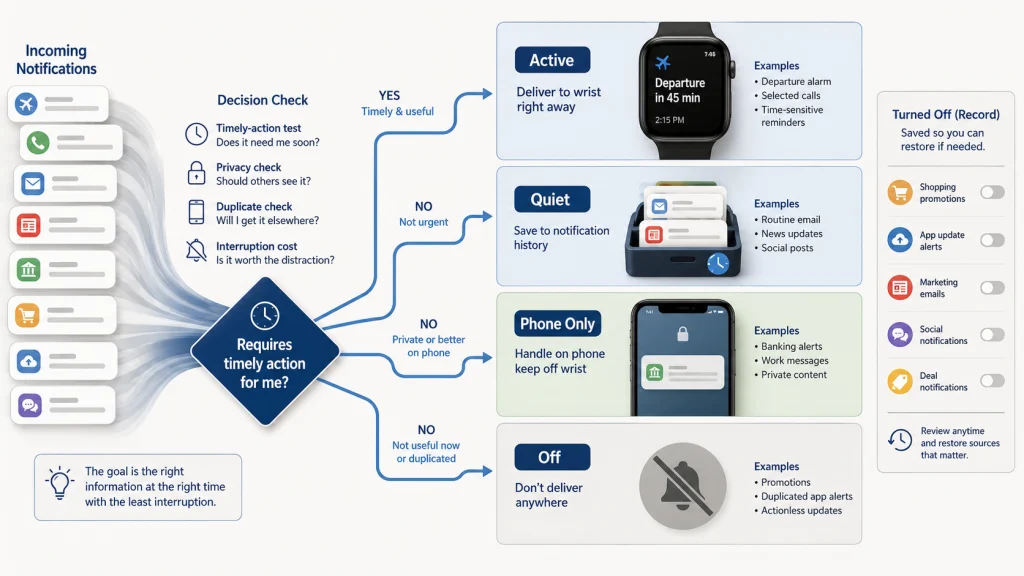
Send Low-Priority Alerts Quietly or Turn Them Off
Not every alert needs a binary choice between loud interruption and complete removal. Some platforms provide a quiet notification history or notification center, while others offer different combinations of phone-only delivery, silent appearance, app-level control, or off.
| Delivery Choice | Use It When | Main Tradeoff |
|---|---|---|
| Allow active wrist alert | The information requires timely action and the interruption is justified. | More vibration, attention cost, preview exposure, and possible battery use |
| Quiet delivery or notification history | The information is useful later but does not deserve immediate interruption. | It may remain unread or be buried in a larger list. |
| Phone only | The content is easier, safer, or more private to handle on the phone. | The wearer must intentionally check the phone. |
| Off | The alert has no useful action, duplicates another channel, or creates more cost than value. | The information will not be surfaced through that wrist channel. |
Begin with the most repetitive low-value mirrors. Promotions, social reactions, routine app updates, non-urgent email, and duplicate news alerts often create volume without changing a timely decision.
Keep a note of what was turned off. If an alert is later missed, the record makes it easier to restore the correct source rather than re-enabling every app.
Configure Private Previews and Lock-Screen Behavior
A wrist display is visible during meetings, public transport, exercise classes, checkout lines, medical visits, and conversations. A message that feels private on a locked phone can suddenly appear beside a coworker, friend, or stranger. A useful notification can still expose more information than the moment requires.
Use this privacy-preview checklist:
- Decide whether the wrist should show the full message, sender only, app name only, or no preview.
- Test what appears when the watch or tracker is unlocked.
- Test what appears when the wearable is locked or removed from the wrist.
- Review message, email, workplace, financial, location, authentication, and health-related previews separately.
- Check whether notification history remains visible after the first alert disappears.
- Review who can read the screen when the wrist is resting on a table or exercise equipment.
- Confirm that hiding a preview does not remove a time-sensitive cue needed for the chosen action.
- Repeat the test after major operating-system, phone, app, account, or device changes.
Privacy does not always require turning the alert off. A sender name or generic prompt may provide enough context without displaying the message body, health detail, location, or account content.
For a broader permissions review, use the guide to fitness tracker app permissions. The guide to fitness tracker data privacy covers collection, sharing, and account-level questions beyond the visible alert.
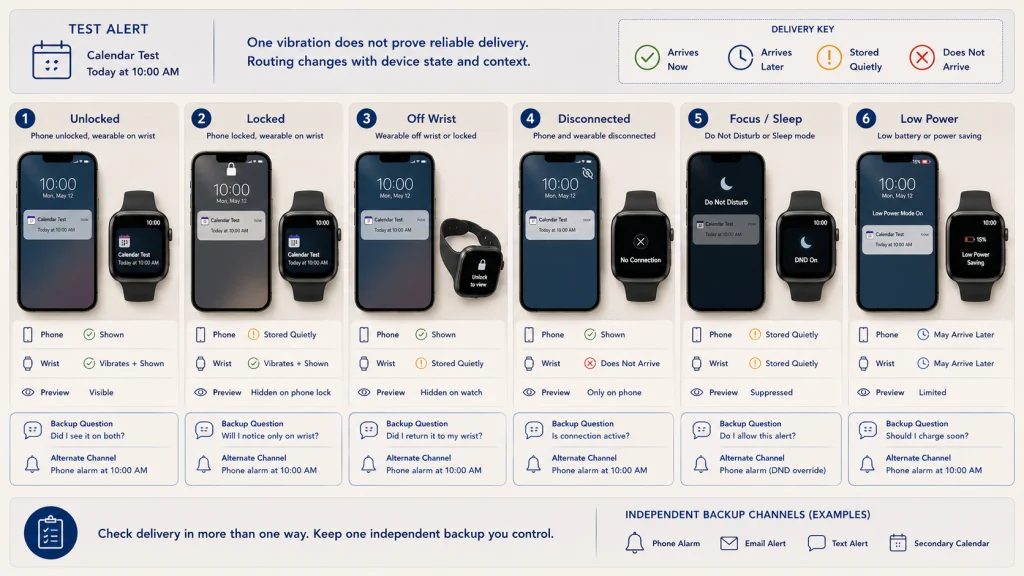
Test Locked, Unlocked, Disconnected, and Do-Not-Disturb States
A notification system that works during setup may fail at the exact moment the phone is left in another room, the watch locks, the connection drops, or a focus mode begins. That can feel random until the delivery path is tested deliberately. Use the states that occur in real life rather than assuming one successful vibration proves the path.
| Test State | What to Send | What to Observe | Backup Question |
|---|---|---|---|
| Phone unlocked and active | A harmless test message or calendar alert | Whether the alert appears on the phone, wrist, both, or neither | Is this routing expected for the platform? |
| Phone locked | The same test alert | Delivery, vibration, preview detail, and delay | Can the essential action still be recognized? |
| Wearable locked or off wrist | The same test alert | Where the alert is routed and what remains visible | Does the phone become the primary channel? |
| Connection interrupted | A harmless alert while the devices are intentionally separated | Whether delivery stops, delays, reroutes, or appears after reconnection | What channel covers a time-sensitive event? |
| Do not disturb, focus, sleep, or quiet mode | A harmless alert during the selected mode | Whether it is silenced, stored, blocked, or allowed as an exception | Which alerts should bypass the mode, if the platform and situation support that choice? |
| Low battery or power-saving state | No urgent test is needed | Which functions change and whether expected alerts remain available | What independent alarm or contact process remains? |
Use only harmless test messages and ordinary calendar items. Do not test emergency response by delaying care, creating a false crisis, or assuming that a passed test guarantees future delivery.
The guide to setting up a fitness tracker covers the initial pairing and permission workflow. Return to current official instructions when a device, phone, operating system, account, or companion app changes.
Separate Goal Reminders From the Goal Itself
A movement reminder, ring warning, streak notice, and completed-goal celebration can all refer to the same behavior. Turning off one prompt does not necessarily remove the behavior goal, and keeping the goal does not require every related interruption.
Write the system in three lines:
Behavior: What action is the person trying to repeat?
Useful cue: Which one reminder arrives when action is possible?
Review: When will the trend be checked without repeated wrist interruptions?
The guide to setting fitness tracker goals explains how to choose the behavior, starting reference, minimum version, review question, and adjustment rule. This article controls the interruption layer around that goal.
Remove reminders that arrive when the behavior cannot be performed, duplicate another cue, or pressure the wearer to protect a streak through pain, illness, rest, or unsafe conditions.
Do Not Treat Consumer Notifications as Guaranteed Medical or Emergency Alarms
A consumer wearable may surface health-related information, but notification delivery can still depend on power, wear state, sensor conditions, permissions, connectivity, account status, software, supported features, and user settings.
Medical and emergency boundary: Do not rely on a fitness tracker notification as the only method for emergency monitoring, medication timing, urgent symptom response, or another safety-critical need. A missing alert does not prove that nothing happened, and a reassuring alert or score does not establish that symptoms are harmless. Urgent or severe symptoms require appropriate medical attention regardless of wearable data.
This article does not interpret irregular-rhythm notices, oxygen estimates, fall features, high or low readings, sleep alerts, or another health signal. The guide to smartwatch health metrics separates consumer measurements from clinical interpretation.
Use the safety or medical process appropriate to the actual risk. A phone alarm, human check-in, clinician-directed tool, monitored service, or emergency system may have a different role from an ordinary wrist reminder.
Review Haptic, Sound, Battery, Interruption, and Missed-Alert Tradeoffs
Stronger haptics may make an alert easier to notice while making every tap feel more demanding. More active apps may increase awareness while adding battery use, screen exposure, and alert confusion. Silence may protect focus, but it can also create anxiety when a chosen alarm has no backup.
| Tradeoff | Useful Review Question |
|---|---|
| Haptic recognition | Can the wearer distinguish the important alert without raising every vibration? |
| Sound | Is audible delivery appropriate for work, sleep, public settings, and privacy? |
| Battery | Does the alert load or screen activity interfere with the planned charging routine? |
| Interruption | How often does the wrist break attention without producing a useful action? |
| Missed alerts | Which missed item had a real consequence, and what delivery or backup change addresses it? |
| Privacy | Did the alert expose content that was unnecessary for the immediate action? |
| Wear burden | Is the person wearing the device longer only because an alert might appear? |
The guide to deciding when to wear a fitness tracker can separate useful wear windows from charging, cleaning, private time, restricted activities, and intentional gaps.
Do not solve a high-volume alert problem by increasing haptic strength first. Reduce low-value sources, then test whether the remaining alerts are recognizable.
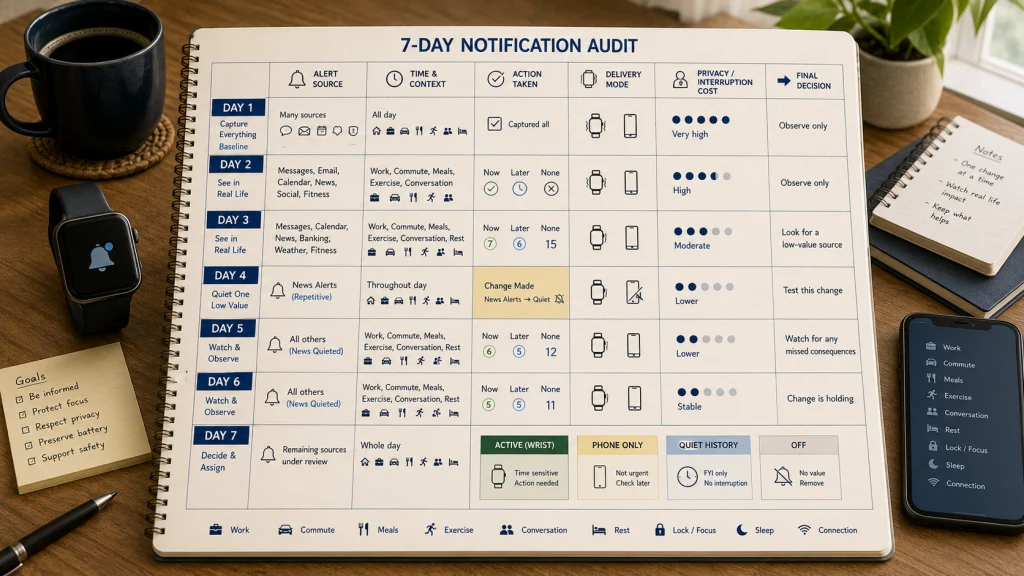
Run a Seven-Day Notification Audit
By the time someone decides to audit notifications, the wrist may already feel noisy enough that every vibration is irritating. The answer is not to erase everything in one frustrated session. Capture ordinary work, home, movement, social, and rest periods, then learn which interruptions actually change a useful decision.
| Day | Alert Source | Time and Context | Action Taken | Delivery Mode | Privacy or Interruption Cost | Decision |
|---|---|---|---|---|---|---|
| 1 | Record every source that reaches the wrist. | Work, commute, meal, exercise, conversation, rest, or sleep window | Acted now, checked later, dismissed, or no action | Sound, vibration, preview, quiet history, or phone only | None, low, moderate, or high | Keep unchanged for baseline |
| 2 to 3 | Continue the inventory. | Note lock, focus, sleep, and connection states. | Record useful and unnecessary actions. | Record what actually happened. | Note exposure, distraction, and confusion. | Mark likely quiet or off candidates. |
| 4 | Select the most repetitive low-value source. | Use an ordinary day. | Remove or quiet one source. | Keep essential alerts unchanged. | Observe whether the wrist feels calmer. | Continue one change. |
| 5 to 6 | Watch for missed consequences. | Include different daily settings. | Use the phone or history for delayed items. | Test the chosen mode. | Note whether important alerts are easier to recognize. | Keep, restore, or refine. |
| 7 | Review the full alert system. | Compare active and quiet periods. | Identify which alerts changed decisions. | Confirm source, delivery, privacy, and backup. | Review interruption and missed-alert costs. | Write the next single adjustment. |
At the end of the week, each alert should have one of four outcomes: active wrist delivery, quiet history, phone only, or off. Revisit the audit after a new device, operating-system update, phone migration, app change, work schedule, health feature, or privacy need.
The guide to fitness tracker data management can help control the reports, histories, and stored information that remain after the immediate wrist alert is gone.
Identify the Source, Action, Delivery, Privacy, and Backup
Begin with the vibration itself. Identify whether it came from the phone, device, alarm, health feature, app, or system fault, then write the action it is supposed to trigger.
Keep active wrist delivery for alerts that require timely action. Send delayable information quietly when the ecosystem supports it, keep private or complex items on the phone, and turn off interruptions with no useful response.
Test the real delivery path across lock, connection, focus, sleep, and power states. The goal is a wrist that gets your attention for a reason, then lets you return to the person, task, or quiet moment in front of you. A smaller alert system is easier to recognize, protect, and back up when one device or connection fails.
FAQs
⌚ What are fitness tracker notifications?
They may be mirrored phone messages, device reminders, alarms, health-feature notices, wearable-app alerts, or system warnings. The source determines what settings, privacy rules, reliability limits, and backup apply.
📳 Why does one vibration feel impossible to identify?
Several sources may use similar haptics. Reduce low-value mirrors, keep fewer active alerts, and test whether the remaining vibration is recognizable before increasing strength.
🔕 Should I turn off smartwatch notifications?
Turn off alerts that do not require an action, duplicate another channel, expose unnecessary information, or create more interruption than value. Keep a backup for genuinely time-sensitive needs.
📥 What is quiet delivery?
On platforms that provide it, quiet delivery sends information to notification history or a notification center without the usual immediate sound, vibration, or screen interruption. Available controls vary by ecosystem and software version.
🔒 How can I protect message previews?
Choose the least detail needed for the action, then test unlocked, locked, off-wrist, and notification-history states. Review sensitive message, workplace, financial, location, authentication, and health content separately.
📡 Why are alerts delayed or missing?
Possible causes include phone settings, app permissions, lock state, connection loss, background restrictions, focus modes, sleep modes, battery state, software changes, or unsupported feature behavior. Use the current official instructions for the exact ecosystem.
🎯 Can I keep a goal but remove its reminders?
Often, yes. The behavior goal, reminder, streak, and celebration may be separate controls. Keep the useful cue and remove duplicate pressure where the platform permits.
🚨 Can a wearable alert replace an emergency alarm?
No guaranteed delivery should be assumed. Consumer wearables and apps can fail, disconnect, lose power, or behave differently across states. Use an appropriate medical or emergency process for safety-critical needs.