A used smartwatch should pass ownership transfer, compatibility, support, hardware, charger, cellular, recall, and return checks before payment. A factory-reset screen is not proof that the previous owner’s account lock has been removed or that the watch can be paired legitimately. Test the exact device with the intended phone when possible, inspect battery behavior and physical damage, and treat water resistance as uncertain after unknown use or repair. Walk away when ownership, support, condition, or a practical return path cannot be verified.
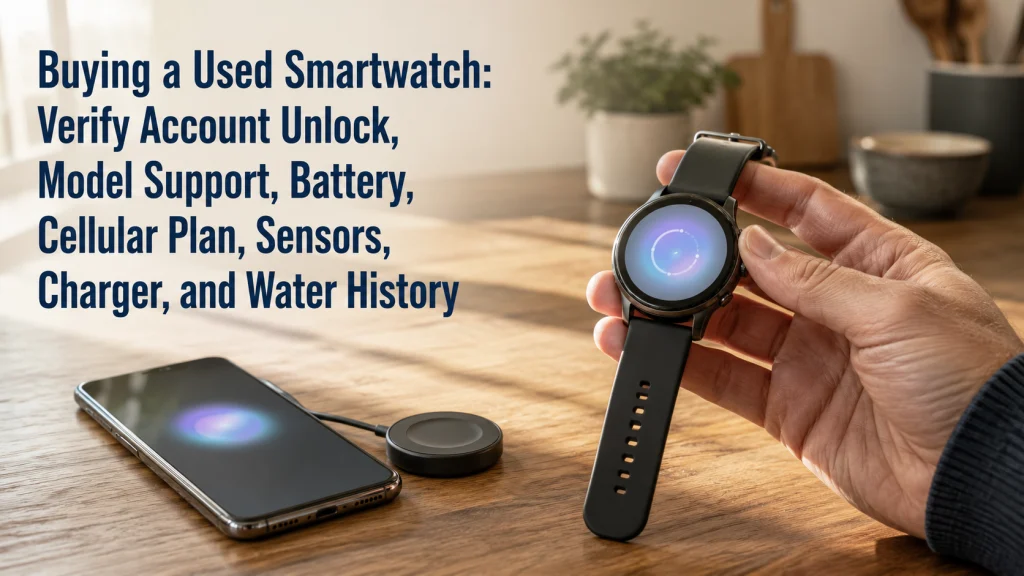
Compare an erased watch with a genuinely transferable watch
Two used watches look identical on the table. Both have clean screens, polished cases, and the same factory-reset welcome page. One feels like the obvious bargain until setup reaches a request for the previous owner’s account. The other has been unpaired, removed from the prior account, cleared of its cellular plan, and successfully connected to the buyer’s phone. The difference appears only after the money is almost committed.
Erased but still locked
- Factory-reset screen is visible
- Previous account remains attached
- Setup requests prior credentials
- Cellular status is unclear
- Buyer cannot complete legitimate ownership
Transferable and testable
- Previous owner completed unpairing
- Account protection has been removed
- Cellular plan has been cleared or cancelled
- Exact model remains supported and compatible
- Buyer can pair and test before finalizing
A cosmetically clean watch can be unusable when the previous owner’s account remains attached. Listings naturally foreground the parts a camera can show: a polished screen, a tidy band, a high battery percentage. The more consequential problems often sit off-screen, such as an ownership lock, unsupported software, a missing proprietary charger, an inactive eSIM profile, repair history, damaged seals, or a return window that closes before the buyer can test everything.
A factory-reset screen is not proof of transferable ownership.
The safest purchase begins by slowing down at the exact moment a low price creates pressure to decide quickly.
Record the exact model, serial, variant, case size, cellular status, and charger
Start with the device identity rather than the seller’s broad label. “Smartwatch,” “GPS watch,” or even a family name may cover several generations, sizes, radios, chargers, and support periods.
Write down the full used-watch configuration:
- ☐ Exact manufacturer, model, generation, model number, and serial where available
- ☐ Case size, band connector size, and GPS-only or cellular-capable variant
- ☐ Region or carrier variant when relevant
- ☐ Included charger, cable, adapter, and bands
- ☐ Repair, replacement, or refurbishment history
- ☐ Seller-provided proof of purchase or legitimate ownership
- ☐ Return period and condition requirements
Compare the model number shown in the watch or companion app with the listing and packaging. A mismatched box or charger does not automatically prove a problem, but it does require an explanation before payment. This is where a buyer often discovers that “same watch” actually means a different case size, cellular variant, region, or generation.
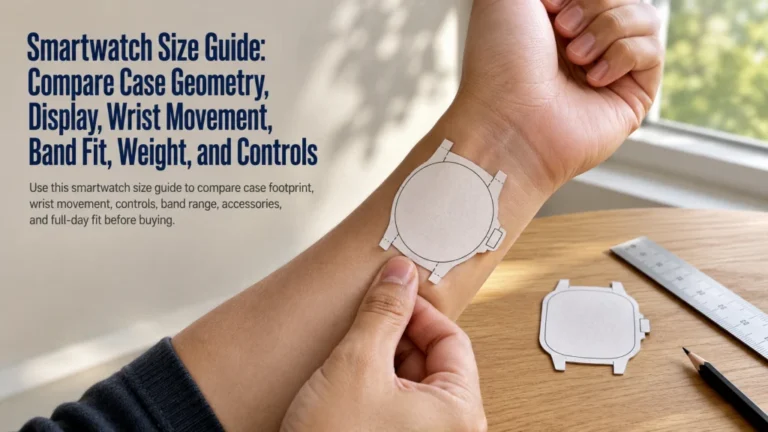
Use the smartwatch size guide when case dimensions, wrist footprint, or band range still need to be checked after the exact model is identified.
Verify phone, operating-system, app, region, and software support
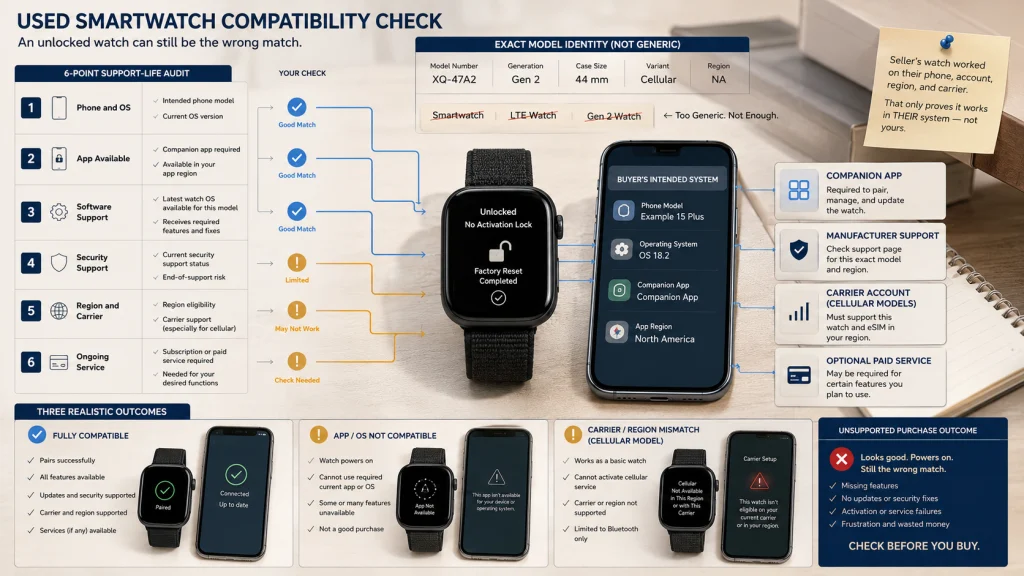
A watch can be unlocked and physically sound yet remain a poor purchase because the intended phone, operating system, account region, or required app no longer supports it.
| Support-life audit | What to verify now | Why it matters |
|---|---|---|
| Phone compatibility | Exact phone model and operating-system version | The watch may require a platform, app, or software version the buyer does not have |
| Companion app | Current app availability in the buyer’s region | Setup, sync, updates, and account controls may depend on the app |
| Watch software | Latest version available to the exact model | An old model may stop before current features or compatibility requirements |
| Security support | Current manufacturer support page for the exact model | Published support periods can end even when the hardware still powers on |
| Region and carrier | Radio bands, cellular activation, account region, and carrier eligibility | A cellular model may not activate on the intended plan or location |
| Subscription or service | Features requiring an active plan or paid service | The used price may not include the ongoing service needed for a desired feature |
Check current official documentation by exact model immediately before buying. A watch can still look current on the wrist while its app, security updates, or phone compatibility are nearing the end. The seller’s successful connection only proves that the watch works in the seller’s system, not the buyer’s.
Use the wearable service-life guide when support age, battery decline, and replacement timing are the main concerns. Use the wearable technology guide when a supported used watch is being compared with another device category.
Require the seller to unpair and remove the watch from the prior account
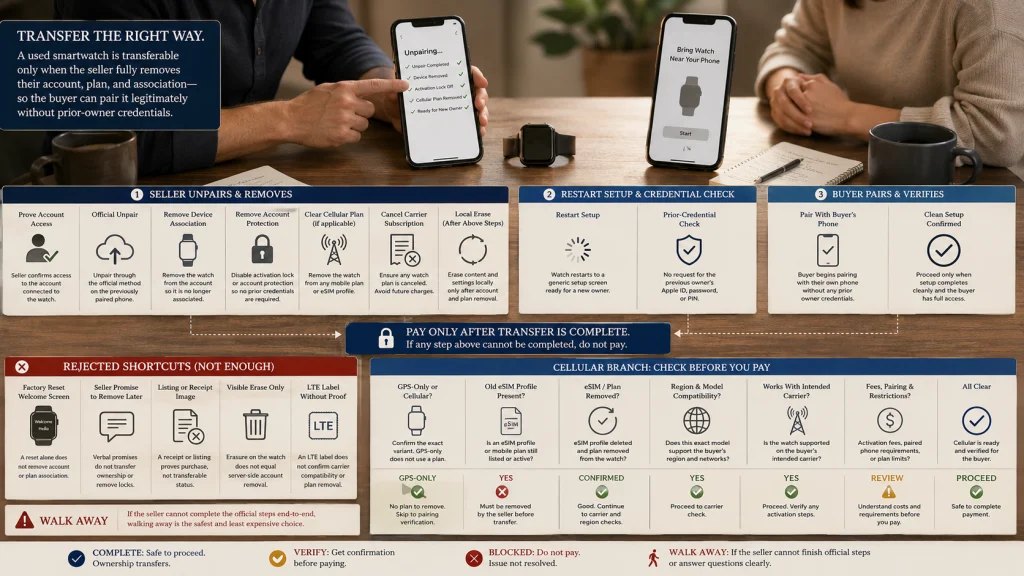
The seller should complete the manufacturer’s transfer process while they still have access to the account and paired phone. The buyer should not accept a promise that the account will be removed later.
Ownership-transfer checklist:
- Confirm the seller can access the account associated with the watch.
- Have the seller unpair or disconnect the watch using the official method.
- Have the seller remove account protection or the device association.
- Remove the active cellular plan from the watch when applicable.
- Erase personal data only after the ownership-removal steps are understood.
- Restart setup and check whether the previous owner’s credentials are requested.
- Pair with the buyer’s intended phone before payment when the sale format allows it.
- Stop the purchase if the seller cannot complete the official transfer.
The seller’s presence matters because legitimate account removal may require their password, paired phone, web account, or another authenticated step. Once the sale ends, that cooperation may be difficult to recover. The buyer should never be asked to bypass the protection or trust that access will be fixed later.
After legitimate transfer, use the wearable setup guide for ordinary configuration. Setup begins only after ownership has been proven and transferred.
Understand why erase or factory reset may not remove account protection
Erasing local apps, settings, and data can return a watch to a welcome screen without removing server-side ownership protection. During setup, the watch may still request the previous owner’s account, password, PIN, or another credential.
This distinction protects legitimate owners when a device is lost or stolen. It also means the buyer cannot judge transfer readiness from the screen alone.
Use a simple purchase gate:
- Welcome screen only: Not enough evidence.
- Seller says it was reset: Not enough evidence.
- Seller completed official account removal: Necessary evidence.
- Buyer can begin pairing without prior-owner credentials: Strong practical confirmation.
A marketplace listing, receipt image, or convincing explanation does not replace a successful official transfer. The purchase is ready only when the watch no longer depends on the previous owner’s credentials. Anything less leaves the buyer paying for uncertainty rather than ownership.
Remove cellular plans and inspect eSIM status
A cellular-capable watch can retain plan information or remain associated with the seller’s carrier account even after the visible data has been erased. The seller may need to remove the plan from the watch and contact the carrier to cancel or transfer the subscription.
Cellular cleanup before payment:
- Confirm whether the watch is GPS-only or cellular-capable.
- Have the seller remove the active mobile plan using the official process.
- Confirm whether the carrier subscription has been cancelled separately.
- Check that no prior eSIM profile blocks new activation.
- Verify the exact model and region work with the buyer’s intended carrier.
- Review any activation fee, paired-phone requirement, or plan restriction.
- Treat cellular activation as unverified until the carrier accepts the exact device.
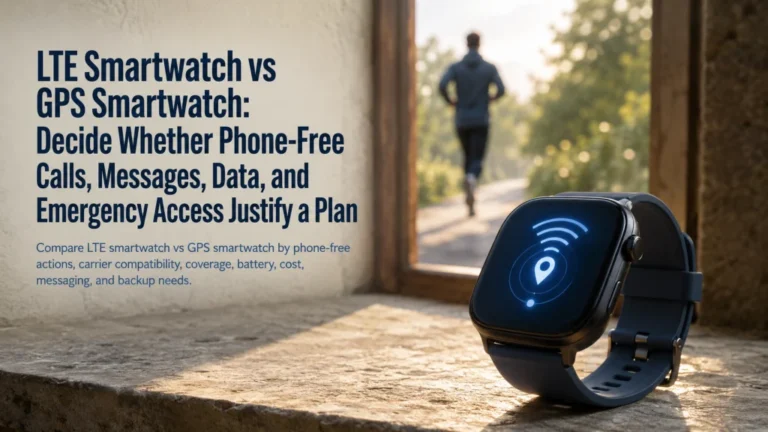
A watch advertised as “LTE” may still be the wrong regional variant, unsupported by the intended carrier, or unable to activate under the buyer’s phone plan. Use the LTE and GPS smartwatch comparison when cellular service is changing the purchase decision.
Once ownership and service are clear, the watch still has to prove that its controls, charger, audio, location, and sensors behave normally.
Test pairing, charging, controls, audio, location, and sensors within safe limits
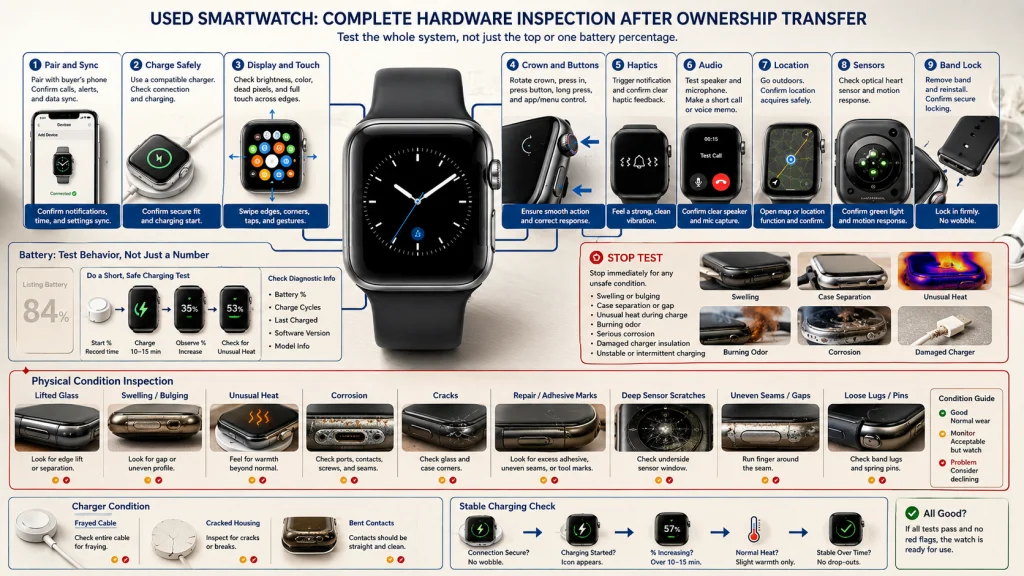
After the seller completes the official transfer, the next question is whether the watch can enter the buyer’s system normally. A short setup test can expose account prompts, app incompatibility, and connection failures without requiring the buyer to load unnecessary personal data before the sale is final.
| Hardware inspection map | Test | Watch for |
|---|---|---|
| Pairing and sync | Connect to the intended phone and companion app | Prior-owner prompts, failed discovery, repeated disconnects, unsupported software |
| Charging | Use the included compatible charger and observe connection | Intermittent charging, unusual heat, damaged contacts, loose cable |
| Display and touch | Open menus, scroll, tap edges, adjust brightness | Dead zones, flicker, discoloration, burn-in, lifting glass |
| Crown and buttons | Rotate and press every control | Sticking, double input, looseness, grinding, missing feedback |
| Haptics | Trigger a basic notification or timer | Weak, inconsistent, rattling, or absent vibration |
| Speaker and microphone | Use a brief recording, assistant, or test call where supported | Distortion, blocked openings, very low volume, failed input |
| Location | Allow a short safe outdoor location test | Failure to obtain a location when the feature should be available |
| Optical and motion sensors | Confirm that sensor menus respond and collect ordinary non-medical data | Deep scratches, missing lights, repeated errors, unstable case contact |
| Band attachment | Remove and reinstall the band as designed | Loose lugs, bent pins, incomplete locking, damaged release mechanisms |
Sensor readings should not be used to diagnose health, prove medical accuracy, or provide exercise clearance. The test only checks whether the hardware responds normally enough for a purchase decision.
Use the wearable charging guide after purchase to build a safe routine around the correct charger.
Inspect swelling, heat, corrosion, cracks, seals, sensors, bands, and charger damage
A used watch can look clean from the top while showing its history underneath. Remove the band when permitted, inspect the case edges and sensor surface under good light, and examine the charger separately.
Start with the battery and case seams. Lifted glass, separation, bulging, or pressure from inside the case can indicate swelling, while unexpected heat during charging is a reason to stop the test. Then check charging contacts, speaker openings, buttons, lugs, and seams for corrosion.
Inspect the glass, case corners, sensor windows, and antenna areas for cracks or chips. Uneven seams, excess adhesive, tool marks, and poorly seated parts can point to repair work that was not disclosed. Deep scratches on the underside may affect comfort, sealing, or sensor behavior.
Finish with the band and charger. Loose pins, worn slots, damaged lugs, frayed cables, cracked housings, bent contacts, or an unstable charging connection can turn a seemingly small bargain into an immediate replacement expense.
Battery percentage in a listing is not a battery-health guarantee. Observe how the watch charges, whether it becomes unusually hot, how quickly the percentage changes during a short test, and whether supported diagnostic tools report useful information.
Physical condition also changes how confidently any original water-resistance claim can be carried into secondhand ownership.
Treat original water resistance as uncertain after unknown use or repair
A watch may have carried a water-resistance rating when new, but age, impact, worn seals, battery replacement, screen repair, corrosion, and unknown service history can change the practical protection.
Ask whether the watch was used for swimming, showering, salt water, high-speed water activity, or work around chemicals. Ask whether the case, screen, battery, buttons, or sensors were repaired.
Do not test a used watch by submerging it before purchase. Passing one water exposure would not prove that the seals remain reliable, while a failed test could damage the device and create a dispute.
Plan future water use from the exact current manufacturer guidance and the known repair history. When that history is missing, treat water exposure as a purchase risk rather than a guaranteed feature.
Check recalls, repair eligibility, warranty, security support, and return period
Before paying, search the exact model and serial where supported across the manufacturer, official recall database, carrier, and seller’s refurbishment program. A family name is too broad when only a particular model, batch, accessory, or battery is affected.
Confirm:
- Whether the exact device or charger appears in a current recall or safety notice
- Whether any recall remedy has already been completed
- Whether the manufacturer still accepts the model for paid or covered repair
- Whether remaining warranty follows the device or the original buyer
- Whether security and software support remain active
- Whether the seller provides a written return window
- Which conditions, restocking fees, or setup steps can void the return
A short return period changes the test plan. Pairing, charging, battery observation, microphone, speaker, controls, location, and account transfer should be checked immediately rather than saved for the final day. The relief of getting the watch home can make testing feel less urgent, but the return clock may already be running.
Use the wearable data-management guide to understand account and data responsibilities after legitimate ownership begins.
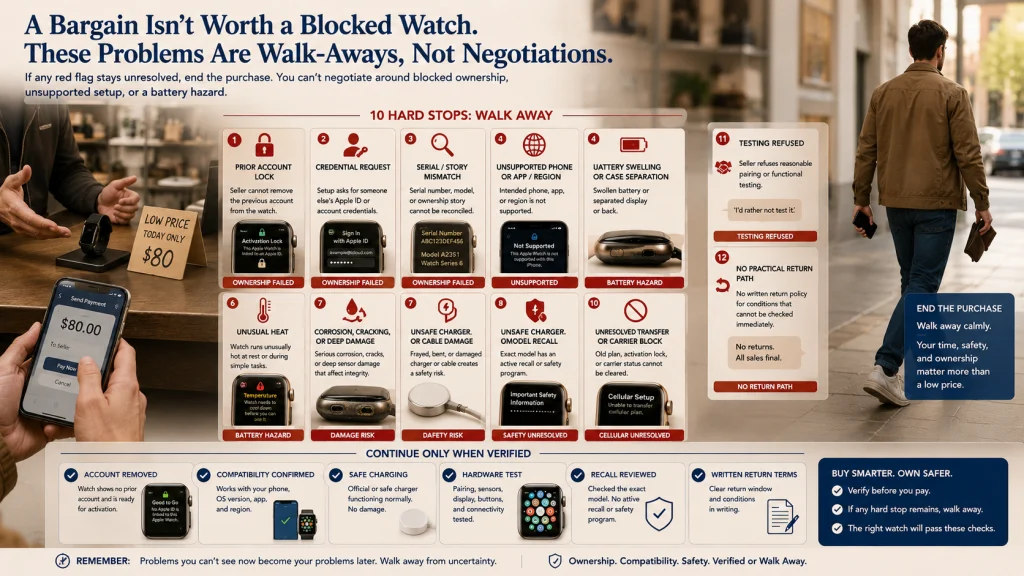
Walk away from ownership lock, unsupported compatibility, swelling, heat, or no return path
Hard walk-away list:
- The seller cannot remove the watch from the prior account.
- Setup requests credentials that belong to someone else.
- The serial, model, or ownership story cannot be reconciled.
- The intended phone, app, region, or operating system is unsupported.
- The battery is swollen, the case is separating, or the watch becomes unusually hot.
- There is significant corrosion, cracking, deep sensor damage, or unsafe charger damage.
- The exact device is recalled and the required remedy is unresolved.
- The cellular plan cannot be removed or the carrier status cannot be verified.
- The seller refuses a reasonable pairing or functional test.
- There is no practical return path for a condition that cannot be tested before payment.
A low price does not compensate for blocked ownership, unsupported setup, or a battery hazard. These are purchase gates, not negotiation points.
Verify transfer, support, hardware, charger, cellular cleanup, recall status, and an exit condition
Finish the decision in seven lines:
- Transfer: The prior owner has unpaired the watch and removed account protection.
- Support: The exact model works with the buyer’s current phone, app, region, and operating system.
- Hardware: Pairing, display, controls, audio, location, sensors, and band attachment have been tested.
- Battery and charger: No swelling, unusual heat, damaged charger, or unstable charging is present.
- Cellular: The old plan and eSIM association have been cleared where applicable.
- Recall and return: Current recall status, repair eligibility, warranty, and return conditions are known.
- Exit condition: Any failed ownership, safety, support, or return gate ends the purchase.
A complete decision might read: “The seller removed the watch from the prior account and I paired it to my phone without being asked for their credentials. The exact model still supports my operating system, the charger is correct, the cellular plan is cleared, and the controls and audio passed a basic test. The case shows no swelling, heat, corrosion, or separation. I have a written return period and will walk away if the model or recall check does not match the listing.”
Use the wearable phone-transfer guide when an already owned device is moving to a new phone. Use the wearable data-deletion guide when preparing a legitimate device for resale or account closure.
Use the broader wearable category comparison when the risks and support life of a used watch are changing the device choice.
The best used watch is not the cleanest listing photo or the lowest price. It is the one that lets the buyer leave the meeting with legitimate ownership, working compatibility, a safe charger, known support, and a clear way back if a hidden problem appears. That confidence is worth more than the temporary relief of securing a bargain quickly.
FAQs
🔒 Is a factory-reset smartwatch ready to sell?
Not necessarily. A reset can erase local data while account protection remains active. Confirm official account removal and test pairing without the previous owner’s credentials.
📱 Should I pair a used watch before paying?
Pairing is one of the strongest practical checks when the sale format allows it. It can reveal account locks, phone incompatibility, app problems, and unsupported software.
🔋 Can battery percentage prove battery health?
No. A percentage shows the current charge, not the remaining battery condition. Check supported diagnostics, charging behavior, unusual heat, swelling, and short-term drain.
📶 What happens to the seller’s cellular plan?
The seller should remove the plan from the watch and may need to cancel it with the carrier. Confirm eSIM and carrier eligibility before expecting cellular activation.
💧 Is a used smartwatch still water resistant?
Original water resistance cannot be guaranteed after age, impact, repair, corrosion, or unknown history. Avoid submersion tests and plan water use from current official guidance and known service history.
🛠️ Should repair history affect the price?
Yes, because repairs may affect seals, parts, warranty, and future service eligibility. Ask what was repaired, who performed the work, and whether documentation exists.
📅 How much software support should remain?
There is no universal minimum for every buyer. Verify the exact model’s current security and software support, then decide whether the remaining period fits the intended use and price.
🚩 What problems should end the purchase immediately?
Walk away from an unresolved account lock, unsupported compatibility, swelling, unusual heat, serious corrosion, unresolved recall, unverifiable ownership, or no practical return path.