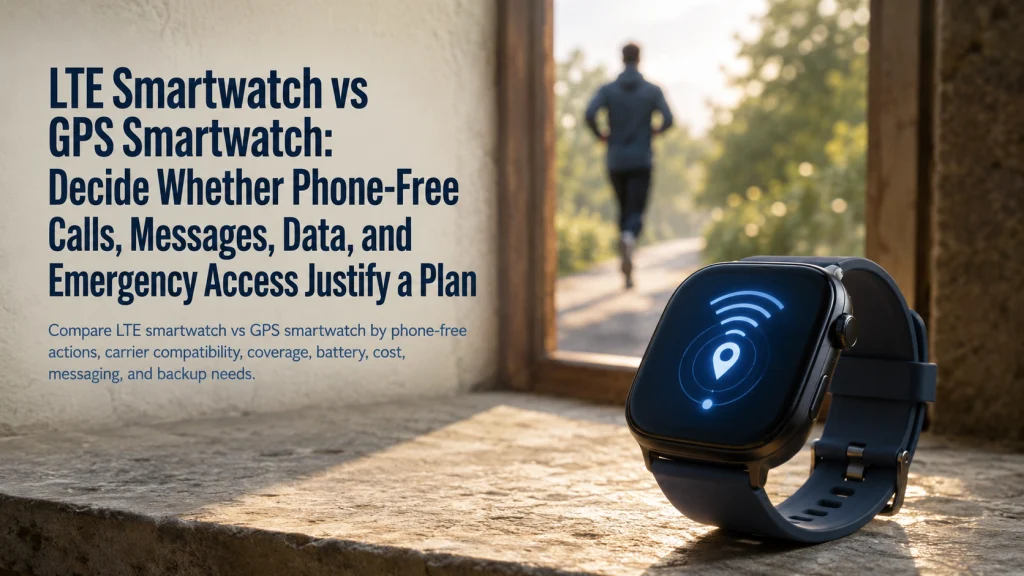
An LTE smartwatch and a GPS smartwatch can share the same location hardware while handling phone-free communication very differently. GPS records or supports location, while cellular service depends on the exact watch variant, phone, carrier, account, region, activation, and plan. Before paying for LTE hardware or a recurring plan, list the actions that must work away from the phone and test each one separately. The right configuration may be active LTE, inactive LTE hardware, GPS-only hardware, a carried phone, or no watch-based cellular plan at all.
Separate route recording, data streaming, and phone-free calling
Imagine leaving the phone at home for a walk. Three actions are planned: record the route, stream data, and call someone.
| Phone-free action | Primary system involved | What it does not prove |
|---|---|---|
| Record a GPS route | Satellite location hardware and the watch’s recording software | It does not prove that the watch has active mobile-network service. |
| Stream data away from Wi-Fi | Active cellular service, supported apps, account access, and coverage | It does not prove that every app or region is supported. |
| Place a call away from the phone | Supported cellular setup, account, network conditions, and calling behavior | It does not guarantee service in every place or emergency situation. |
The first action can rely on GPS hardware without mobile service. The second and third require a network path when the phone and usable Wi-Fi are unavailable.
GPS location hardware and mobile-network service solve different problems.
Define GPS, Bluetooth, Wi-Fi, LTE, eSIM, carrier plan, and phone-online dependence
Retail labels often place several connectivity terms beside one another, which makes them look interchangeable. They describe different parts of the system.
- GPS: Location hardware that can support route recording, navigation, distance, or position features. It does not activate mobile service.
- Bluetooth: A short-range connection commonly used between the watch and companion phone.
- Wi-Fi: A local network connection that can support selected watch functions when a usable network is available.
- LTE or cellular: Mobile-network capability built into a compatible watch variant.
- eSIM: A digital network identity used by supported cellular watches instead of a removable physical SIM.
- Carrier plan: The service arrangement that activates supported cellular behavior on the watch.
- Phone-online dependence: A condition in which some watch behavior still depends on the paired phone, account, or related service remaining connected elsewhere.
Buying LTE hardware does not create cellular service until the exact carrier and account support activation. An LTE-capable watch without an active plan can behave much like a non-cellular configuration, depending on the device and available Bluetooth or Wi-Fi connections.
Use the broader wearable form comparison when the real question is whether a smartwatch is the right device category at all.
List the actions that must work away from the phone
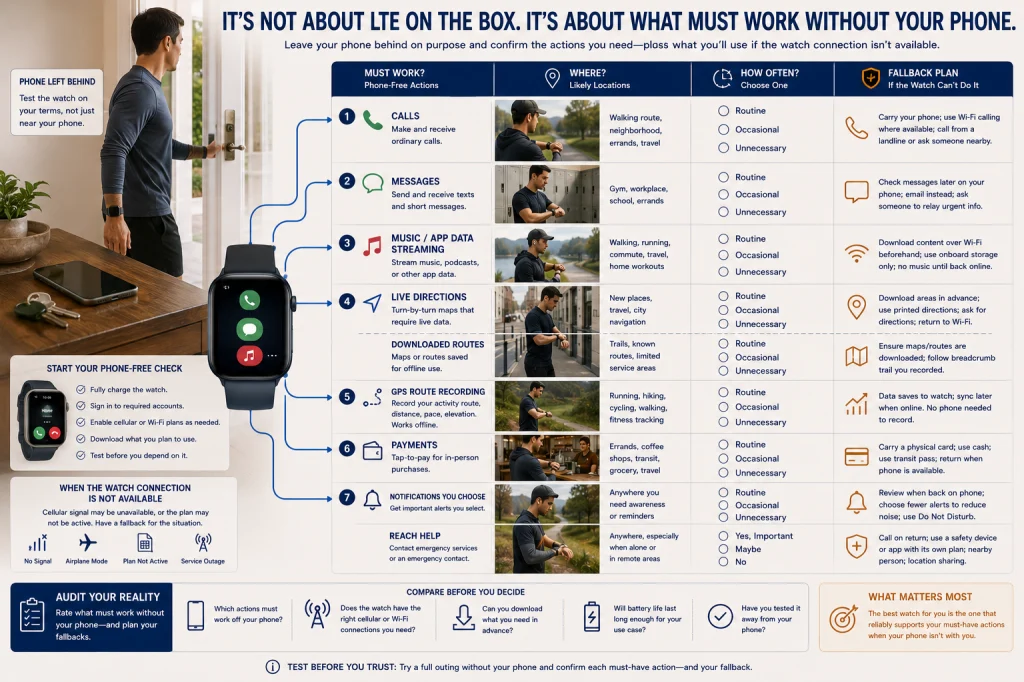
Start with behavior rather than specifications. The useful question is not whether the watch says LTE on the box. It is which action must still work when the phone is in a locker, left at home, out of battery, or outside Bluetooth range.
| Phone-free feature audit | Must work? | Where? | Fallback |
|---|---|---|---|
| Place or receive ordinary calls | Yes, no, or occasional | Walking route, gym, workplace, errands, or travel | Carry the phone, use available Wi-Fi, or wait until reconnected |
| Send or receive messages | Yes, no, or selected contacts only | Daily route and likely weak-signal areas | Phone connection, Wi-Fi, or delayed delivery |
| Stream music, audio, or app data | Yes, no, or downloaded content is enough | Exercise, commute, or outdoor use | Offline downloads or the phone |
| View maps or directions | Live data, downloaded map, or route recording only | Known routes, unfamiliar streets, or travel | Phone map, printed direction, or familiar route |
| Use payments | Required or optional | Daily errands or emergency backup | Physical card, cash, or phone wallet |
| Receive selected notifications | Immediate, delayed, or unnecessary | Phone-free periods | Review later on the phone |
| Reach help in an emergency | Desired, but never assumed | Likely use locations | Phone, nearby person, dedicated safety system, or local emergency access |
Mark the actions that occur weekly, not just the ones that sound reassuring during purchase. If the phone is already carried everywhere, an active watch plan may add little practical independence.
Verify the exact watch variant and supported phone
Two watches with the same case design can have different radios and activation options. A product family may include GPS-only hardware, LTE-capable hardware, different regional variants, and models tied to different phone ecosystems.
Record the complete model name and variant before checking any service claim. Then confirm the supported companion phone, operating-system version, account requirements, region, and setup process shown in current documentation.
Do not assume that “GPS plus Cellular,” “LTE,” and “cellular-ready” produce the same behavior across brands. The hardware label only begins the compatibility check.
Editorial observation: Retail displays often combine GPS, LTE, eSIM, Wi-Fi calling, emergency features, and carrier promotions in one small space. Separating the hardware purchase from service activation prevents a reassuring label from becoming an expensive assumption.
Verify carrier, account type, region, number-sharing, and fees
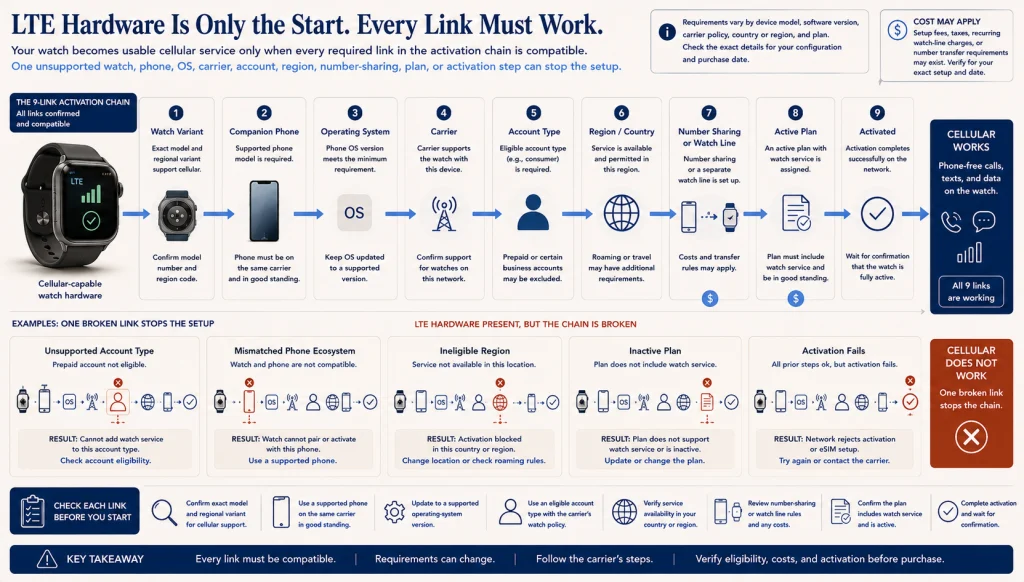
Cellular service works only when every required link in the activation chain fits. One unsupported link can stop the setup even when the watch contains LTE hardware.
Watch variant → Supported phone → Operating system → Carrier → Account type → Eligible region → Number-sharing or watch line → Active plan → Successful activation
Check whether the phone and watch must use the same carrier or account. Some consumer, prepaid, family, business, employer-managed, or legacy account types may follow different rules. Number-sharing, a separate watch line, activation fees, taxes, and recurring charges can also vary.
Do not publish or rely on a remembered carrier list. Verify eligibility directly for the model, phone, account, region, and date of purchase.
Test calls, messages, streaming, maps, payments, and notifications separately
“Works without the phone” is too broad to be useful. One feature may work over LTE, another over Wi-Fi, another through downloaded content, and another only while the paired phone remains available online elsewhere.
Run a controlled test after activation:
- Turn off Bluetooth or leave the phone at home.
- Confirm the watch has the expected network connection.
- Place and receive an ordinary call.
- Send and receive messages through the services that matter.
- Test streaming or use downloaded content.
- Open maps and distinguish live directions from simple route recording.
- Test payments only where the service is supported and a backup payment method is available.
- Check which notifications arrive and which remain dependent on the phone.
Perform the test in ordinary locations rather than only beside the home router. A setup that works in the kitchen may behave differently on the usual walking route, inside a concrete building, or at the workplace.
Understand why messaging may still depend on the companion phone or account
Cellular activation does not make every communication service completely independent. Message delivery can depend on the message type, paired phone status, account sync, cloud service, app support, network connection, and software version.
A watch may handle some messages directly while other conversations wait for the phone to reconnect or remain online elsewhere. A successful test with one contact or one service does not prove that every message behaves the same way.
Write down the exact communication path that matters, then test that path. “Can the watch receive messages?” is less useful than “Can this account receive and reply to messages from these contacts while the paired phone is at home and online?”
Check coverage, roaming, emergency limitations, and workplace or travel use
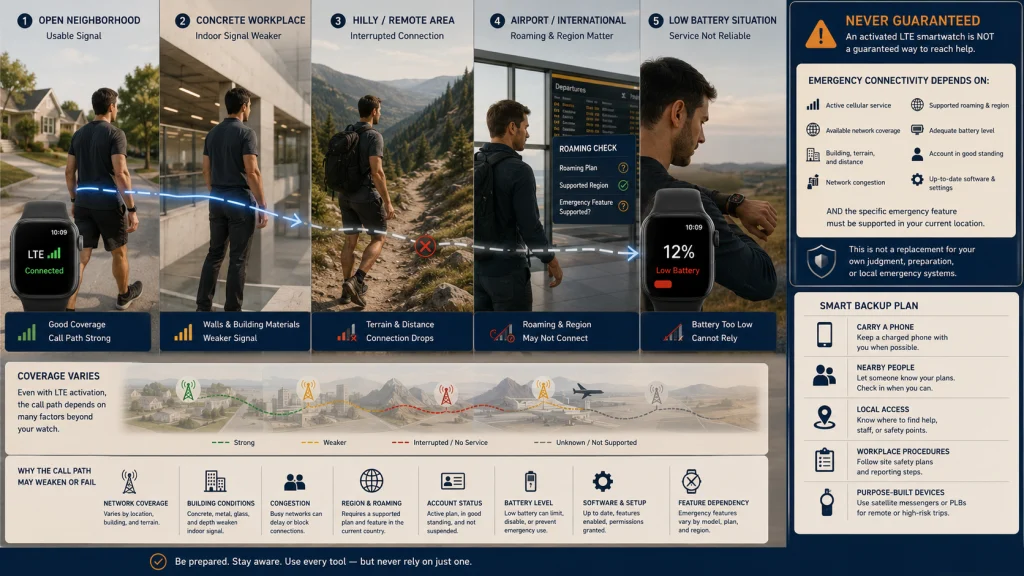
LTE hardware does not create signal where the supported network is unavailable. Buildings, terrain, distance, network congestion, regional restrictions, and carrier coverage can change the real phone-free experience.
Roaming and international behavior require a separate check. A watch plan that works at home may not support the same services in another country or region. Travel also changes charging access, account verification, emergency numbers, and local network conditions.
Workplaces can add restrictions of their own. Employer-managed phones, secure buildings, weak indoor coverage, device policies, and network rules may limit what the watch can do.
Emergency-limit warning: No smartwatch should be treated as guaranteed emergency contact. Cellular activation, coverage, battery, account status, software, region, location, and the exact emergency feature can all affect behavior. Keep an appropriate backup plan for the situation.
Use the smartwatch travel guide when roaming, regional support, emergency behavior, and charging need trip-specific review.
Compare battery, setup, cancellation, resale, and long-term cost
Cellular use can add battery demand, but the amount varies with signal strength, calling, streaming, navigation, notifications, and software behavior. Avoid category-wide battery promises. Test the intended phone-free routine on the exact watch.
Activation also adds account work. Setup, troubleshooting, number-sharing, billing, cancellation, transfer, and resale may require both the carrier and device account.
| Cost worksheet | One-time cost | Monthly or recurring cost | Exit or replacement cost |
|---|---|---|---|
| LTE-capable hardware premium | Difference between cellular and non-cellular variants | None if service remains inactive | Possible resale difference |
| Activation | Setup, activation, or account fee if applicable | Watch line, number-sharing, taxes, or service charges | Cancellation or transfer requirements |
| Data and services | Initial app or account setup | Optional subscriptions or data-related services | Loss of features after cancellation |
| Battery and charging | Charger or travel charging setup | Usually no separate service cost | Replacement charger or earlier battery-related replacement |
| Resale | Account cleanup and device reset | Service must not continue after transfer | Carrier lock, unpaid balance, or account issue may reduce usefulness |
Calculate the annual service burden, not only the hardware difference at checkout. Use the wearable subscription guide when recurring fees and cancellation deserve a deeper review, or the wearable data management guide when account transfer and stored information are the larger concern.
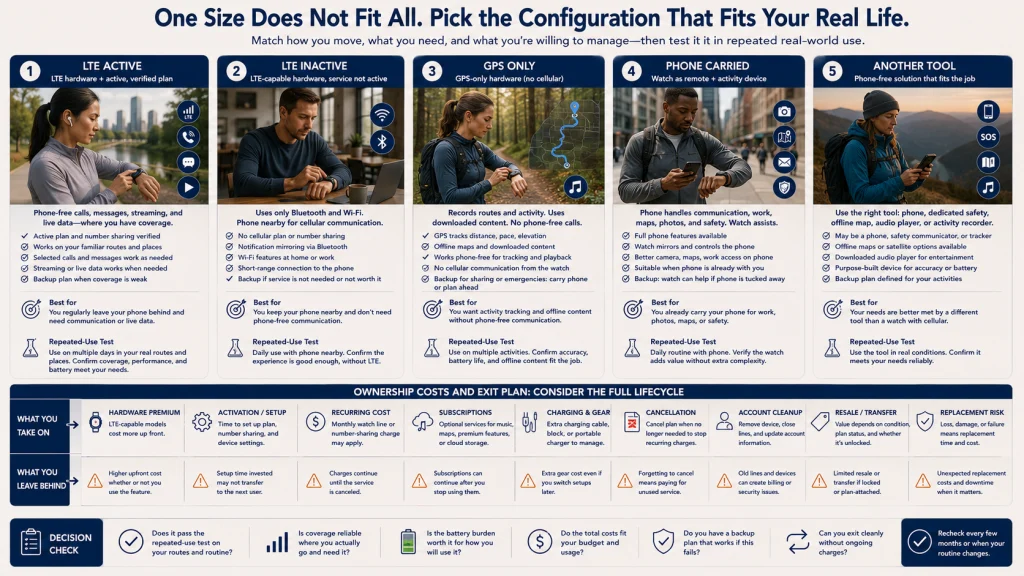
Compare five watch and phone configurations
Scenario 1: LTE hardware with an active plan
The wearer regularly leaves the phone behind and needs selected calls, messages, streaming, or live data on familiar routes. The watch, phone, carrier, account, region, and plan have been verified, and the likely coverage and battery burden are acceptable. Active LTE may solve a repeated problem rather than a hypothetical one.
Scenario 2: LTE hardware without an active plan
The wearer wants the cellular-capable variant for possible future activation or resale but currently uses Bluetooth and Wi-Fi. The extra hardware cost is acceptable, and there is no assumption that LTE features work before service is activated.
Scenario 3: GPS-only hardware
The phone is usually nearby, and the watch is mainly used for route recording, downloaded content, activity screens, payments, or selected functions supported through Bluetooth or Wi-Fi. Phone-free mobile service is not a routine requirement.
Scenario 4: The phone is carried
The wearer already carries the phone for photography, maps, communication, work access, or safety. The watch acts as a convenient remote display and activity device. A separate watch plan may duplicate a connection that is already present.
Scenario 5: Another phone-free alternative fits better
The real need is a reliable emergency device, workplace communication tool, travel solution, or dedicated activity recorder. A phone, purpose-built safety system, offline map, downloaded audio, or another device may fit the job better than adding cellular service to a watch.
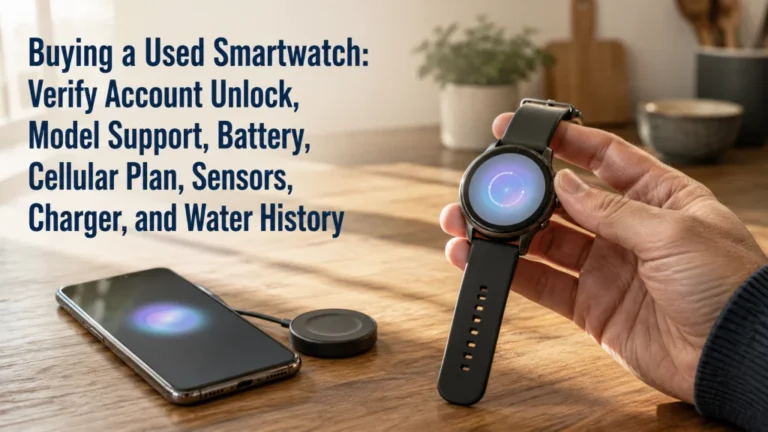
Use the smartwatch and fitness tracker comparison when the unresolved question is whether a simpler wrist device would be enough. Use the used smartwatch guide when account locks, battery condition, activation eligibility, and resale are part of the purchase.
Choose the phone-free action, verify the carrier chain, calculate cost, and define a backup
Complete the decision in four lines:
- Phone-free action: Name the exact call, message, data, map, payment, or notification behavior that must work away from the phone.
- Carrier chain: Confirm the watch variant, phone, operating system, carrier, account, region, activation path, and plan.
- Cost: Add the hardware premium, activation, recurring service, optional subscriptions, charging, cancellation, and resale risk.
- Backup: State what happens when the watch has no signal, low battery, account failure, unsupported roaming, or unavailable emergency service.
A complete decision might read: “I need ordinary calls and selected messages during phone-free walks. My exact watch and phone are eligible on my account, and I have tested the route where I will use them. The annual cost is acceptable, and I will still carry a phone or use another backup when coverage or battery is uncertain.”
Use the broader wearable technology guide when connectivity is only one part of the device decision. Use the activity tracking guide when the real question concerns route recording and exercise data rather than mobile service.
An LTE case is not the same as an active connection, and GPS is not another name for cellular. Choose the configuration only after the phone-free action, compatibility chain, likely coverage, long-term cost, and backup plan all agree.
FAQs
🛰️ Does GPS mean a smartwatch can work without a phone?
GPS can support location and route functions without proving that mobile service is active. Phone-free calls, messages, and live data depend on the exact watch, connections, account, and available network path.
📶 Does buying an LTE watch activate cellular service?
No. LTE hardware must still be supported by the phone, carrier, account type, region, and service plan, then activated successfully.
📱 Must the phone and watch use the same carrier?
That requirement varies by device, carrier, account, and region. Check the current activation documentation for the exact configuration before purchase.
💬 Will every message work when the phone is left at home?
Not necessarily. Message behavior can depend on the service, paired phone status, account, network, software, and app. Test the exact message path you need.
🗺️ Can a GPS-only watch record a route?
A watch with suitable GPS hardware and software can record supported routes without an active cellular plan. Live maps, streaming, messaging, and other services have separate requirements.
🔋 Does LTE always reduce battery life?
Cellular activity can add battery demand, but the result varies with signal, calls, streaming, navigation, notifications, software, and the exact device. Test the intended routine instead of relying on a category-wide promise.
✈️ Will smartwatch LTE work while traveling?
Roaming, regional support, service availability, and emergency behavior vary. Verify the exact destination, carrier, watch, plan, and software before the trip.
🚨 Can an LTE smartwatch replace an emergency device?
No smartwatch guarantees emergency contact. Coverage, battery, activation, account status, region, software, and the exact emergency feature can all affect behavior, so keep an appropriate backup.