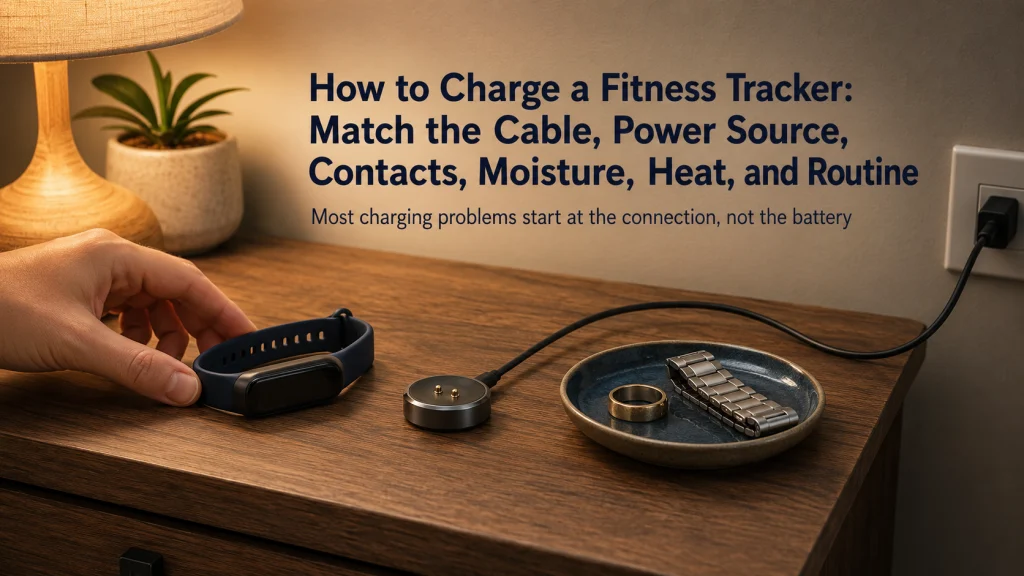
Learning how to charge a fitness tracker starts at the connection between the exact device, charger, cable, power source, and charging surface. Confirm compatibility, clean and dry both sides of the connection, remove metal objects, and place the setup where heat can escape. Verify that the device is actually charging, then build a routine around the features you use and the charging windows you can repeat. Stop immediately when you find unusual heat, swelling, odor, sparks, corrosion, damage, or an applicable recall.
Charging Problems Often Begin at the Interface
Four charging setups can fail before the battery receives useful power. One uses a cable that looks correct but has the wrong pin pattern. One connects while moisture remains on the device contacts. One leaves a metal band or piece of jewelry across a magnetic puck. One places the charger under bedding where heat cannot escape.
Each situation can look like a battery problem. That can be frustrating when the device is needed for a workout, overnight tracking, or the next day’s routine. The actual failure may be compatibility, moisture, conductive debris, alignment, ventilation, or a damaged accessory rather than the battery itself.
| Interface failure | What you may notice | First response |
|---|---|---|
| Wrong or incompatible charger | No indicator, repeated connection sounds, unstable charging, or unusually slow progress | Stop and verify the exact model, cable, charger, and power requirements. |
| Wet contacts | Moisture, a charging warning, corrosion, or unreliable connection | Disconnect power and dry every contact before trying again. |
| Metal on magnetic contacts | Jewelry, a metal band, filings, or another object sits between or near exposed pins | Unplug the charger and clear the charging area. |
| Charger covered by bedding | The device, puck, cable, or adapter feels warmer than expected | Disconnect it and move the setup to an open, stable surface. |
Key decision: Check the complete charging interface before assuming the internal battery has failed.
The wearable technology guide explains where consumer devices fit within everyday wellness. For pairing, permissions, alerts, wearing, and other setup decisions, use the guide to using a fitness tracker day to day.
Identify the Exact Device, Charger, Cable, and Power Requirement
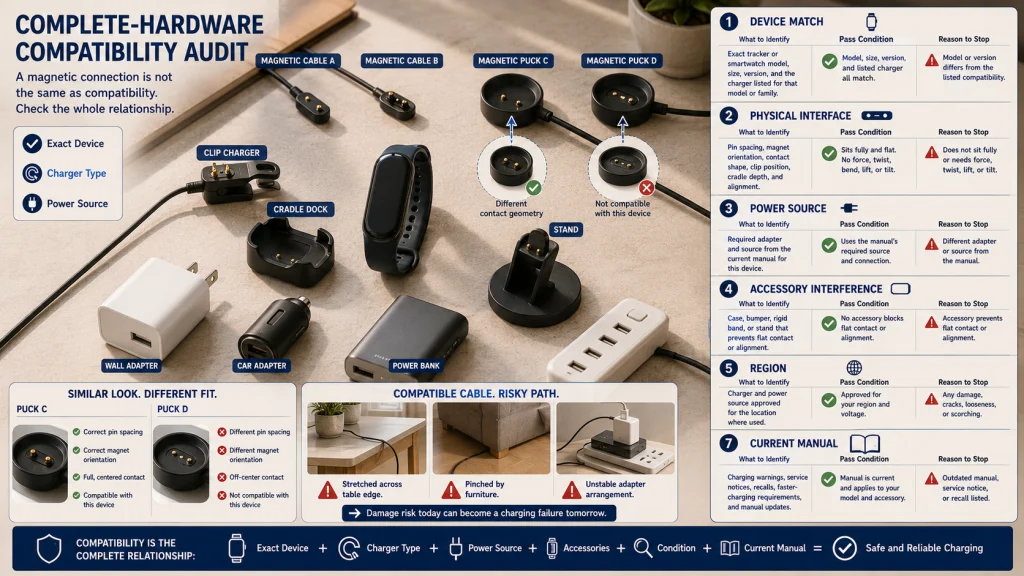
Begin with the model number and the charger intended for that exact device. Wearable chargers can appear interchangeable while magnet orientation, pin spacing, contact shape, cradle depth, cable electronics, and regional requirements differ.
Record the complete setup:
- Exact tracker or smartwatch model and size.
- Charging style, such as magnetic cable, puck, clip, cradle, or wireless surface.
- Cable model or identifying markings.
- Required power source and adapter type from the current manual.
- Whether a case, bumper, band, or accessory stand changes alignment.
- Any current charging warning, service notice, or recall affecting the model or accessory.
| Compatibility check | What to confirm |
|---|---|
| Device match | The charger is listed for the exact model or model family. |
| Physical interface | Pins, magnets, clip shape, and cradle position align without force. |
| Power conditions | The adapter and source meet the exact manual requirements. |
| Accessory interference | The case, band, or stand does not lift, tilt, or block the device. |
| Regional or certification limits | The charger is approved for the device and location where it is used. |
| Condition | The cable, connector, puck, pins, adapter, and insulation are undamaged. |
Guidance reviewed July 30, 2026: Charger designs and compatibility can change. Confirm the current manual before replacing a cable, using a multi-device stand, or enabling a faster charging feature.
Use the Supplied or Explicitly Compatible Charger
Use the charger supplied with the device or one that the manufacturer explicitly lists as compatible. Similar shape is not enough. A magnetic connection can hold while the contacts remain misaligned, and a cable can fit a power adapter while failing the device’s charging requirements.
Apple’s current charging setup guidance directs users to place the charger on a flat surface in a well-ventilated area and use the included magnetic charger or a compatible charger. Google’s Fitbit guidance similarly requires a model-appropriate cable and a safety-certified power source.
Check these points before connection:
- The cable is intended for the exact device.
- The power source is approved or safety-certified as required.
- The adapter, extension, shared USB source, or multi-port charger is not damaged or overloaded.
- The connector enters without twisting, forcing, or bending.
- The cable is not pinched by furniture, a drawer, or a charging stand.
- No exposed conductor, cracked insulation, bent pin, or loose housing is present.
Editorial observation: Cable length and adapter placement can make a compatible charger impractical. If the cable is pulled tight across a table edge or the adapter depends on an unstable extension, the daily setup creates damage risk even when the connector itself is correct.
Do not publish or follow a universal wattage rule. Some devices and fast-charging features have exact accessory requirements, while others regulate power differently. The current device manual controls the choice.
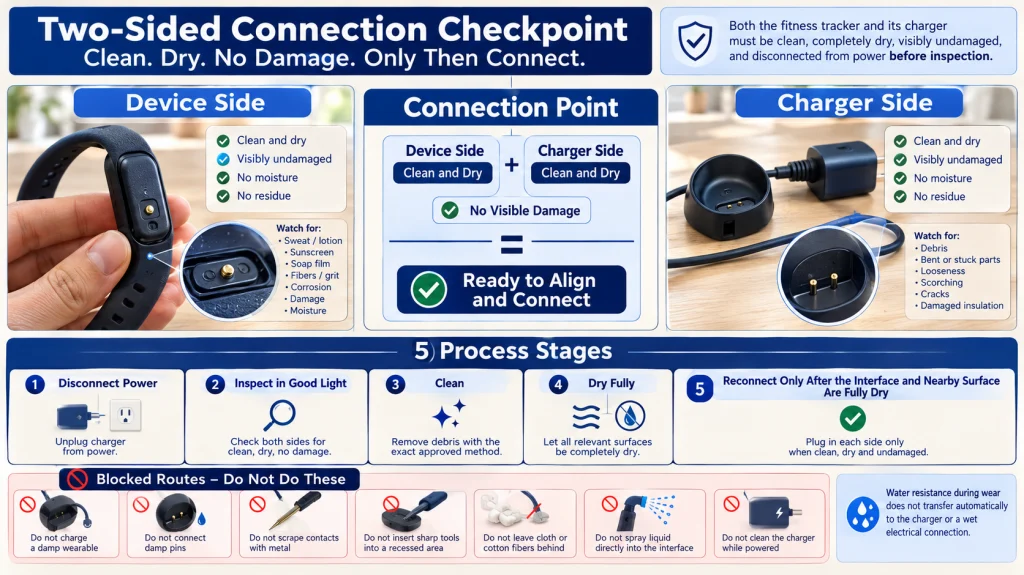
Clean and Dry Both Sides of the Charging Connection
A thin layer of sweat, lotion, sunscreen, soap, or debris can interfere with charging even when the contacts look clean. Moisture can also increase electrical and corrosion risk. Disconnect the charger from power before cleaning either side.
Wipe the case around the charging area. Clean the contacts only by the approved model-specific method. Check for film, fibers, debris, corrosion, damage, and remaining moisture.
Inspect the puck, cradle, clip, or pins. Check the cable connector, insulation, and adapter housing. Keep every powered part dry and free from bent parts, looseness, scorching, or debris.
Connection point: Device side clean and dry + charger side clean and dry + no visible damage = ready to align and connect.
Dry-contact rule: Do not charge a damp device or connect damp charger pins. Do not scrape contacts with metal or insert sharp objects into a recessed charging area. Dry the device, charger, cable, and nearby surface completely before reconnecting power.
Use the separate guide to cleaning a fitness tracker for material-specific methods, sensor surfaces, contacts, openings, bands, and complete drying.
Remove Jewelry, Metal Debris, and Magnetic Interference
Magnetic chargers can attract small conductive objects. A metal watch band, ring, bracelet, pin, coin, paper clip, shaving fragment, or workshop debris can sit across the charging surface without being obvious at first glance.
Before plugging in the charger:
- Clear the surface around the puck, pins, cradle, or clip.
- Move loose jewelry and metal bands away from exposed contacts.
- Inspect magnetic surfaces for filings or tiny fragments.
- Keep cards, storage media, and objects affected by magnets away when the manual requires it.
- Reconnect power only after the charging interface is clear.
Do not brush metal debris across exposed contacts while the charger remains powered. Unplug it first, then use the exact accessory cleaning method.
Practical check: Run a clean cloth over the empty charging surface before placing the device. A smooth pass can reveal grit or fragments that are difficult to see under indoor light.
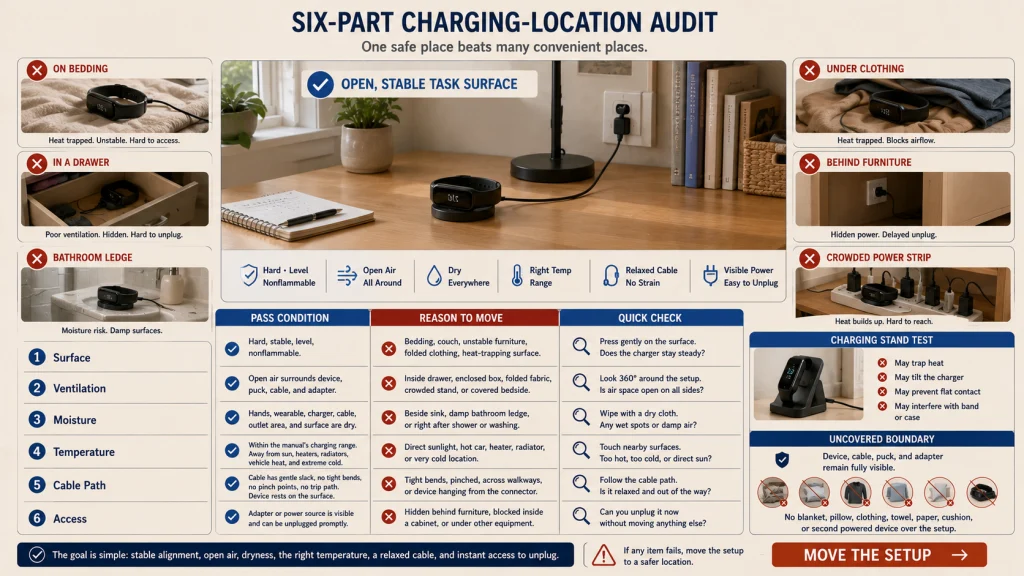
Use a Stable, Ventilated, Nonflammable Charging Surface
The charging location should support alignment and allow heat to escape. A bed, couch, pile of clothing, direct sunlight, bathroom ledge, unstable shelf, or crowded drawer can create avoidable heat, moisture, fall, or cable problems.
Google’s current Fitbit safety guidance says the device and charging components should be well ventilated, should not be covered by a blanket or pillow, and should not be charged while wet.
| Location audit | Pass condition | Reason to move the setup |
|---|---|---|
| Surface | Hard, stable, level, and nonflammable | Soft bedding, unstable furniture, or a surface that traps heat |
| Ventilation | Open air around the device, puck, cable, and adapter | Drawer, enclosed box, folded fabric, or crowded stand |
| Moisture | Dry hands, device, charger, cable, and nearby area | Sink, damp counter, wet bathroom, or post-shower surface |
| Temperature | Within the exact charging range in the manual | Direct sun, vehicle interior, heater, radiator, or extreme cold |
| Cable path | Loose enough to avoid tension and clear of walking paths | Pinched cable, tight bend, trip hazard, or hanging device |
| Access | The adapter can be unplugged promptly if a problem begins | Blocked outlet, inaccessible power strip, or hidden adapter |
Editorial observation: A charging station can reduce clutter while trapping heat or preventing the device from sitting flat on its exact charger. Test the stand with the normal band and case attached, then confirm that the device remains aligned and uncovered.
Do Not Cover the Device, Cable, Puck, or Adapter
A charger can become covered accidentally when it sits beside a bed or couch. A blanket shifts, clothing is placed on the table, or the device slides beneath a pillow. The setup may continue drawing power while ventilation is reduced.
Keep every powered component visible:
- Do not place the device or charger under bedding, clothing, towels, paper, or cushions.
- Do not charge while the device is pressed against the body.
- Do not wrap excess cable tightly around the adapter or puck while charging.
- Do not place a warm adapter inside a closed storage compartment.
- Do not stack another powered device on top of the wearable charger.
Normal warmth and unsafe heat cannot be separated by one universal temperature number in a general article. If the setup feels noticeably different from its usual charging pattern, disconnect it and inspect the location and hardware before trying again.
Confirm the Charging Indicator and Physical Alignment
A magnetic click or physical fit does not prove that charging began. Look for the exact screen symbol, light, vibration, sound, or app status described in the manual.
Use this connection sequence:
- Place the charger on the prepared surface.
- Connect it to the approved power source.
- Position the device without forcing or twisting it.
- Confirm that pins, contacts, magnets, or cradle edges align fully.
- Wait for the correct charging indicator.
- Recheck after a few minutes if the device was deeply discharged or the indicator was delayed.
If the indicator appears and disappears when the table moves, band tension changes, or the cable is touched, inspect alignment and accessory interference. A rigid band or bulky case can lift one edge of the device from the charger.
Troubleshooting order: Recheck compatibility, dryness, cleanliness, power source, cable condition, accessory interference, and alignment before assuming battery failure. If those checks do not restore a stable connection, stop repeating the same attempt and use the official support process.
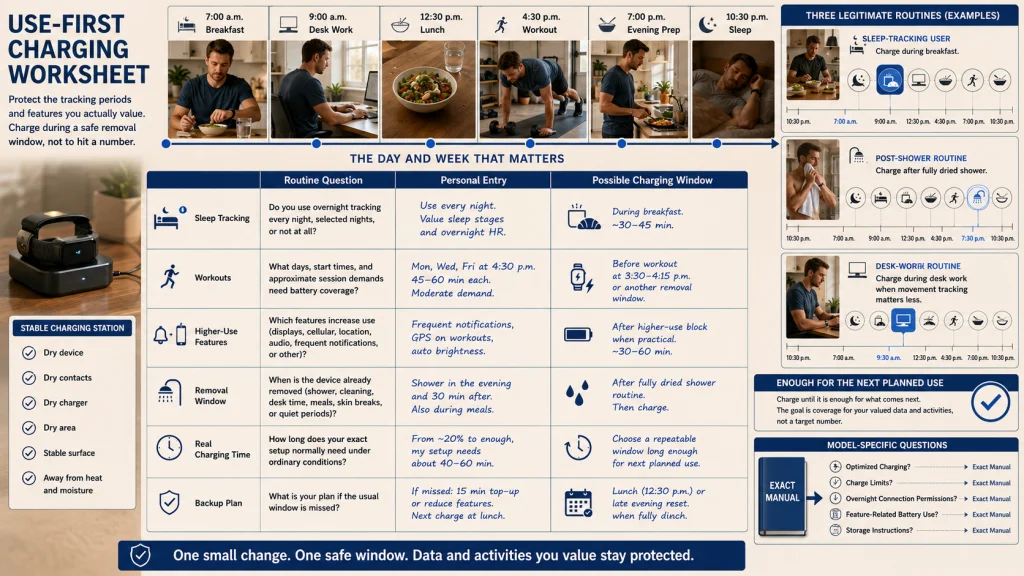
Build a Routine From the Features You Actually Use
A charging routine should protect the tracking periods you value without forcing the battery to reach an arbitrary percentage. The difficult moment is often not charging itself, but discovering just before bed or a planned workout that the battery is nearly empty. Start with actual use, not advertised battery life.
| Routine question | Your entry | Possible charging window |
|---|---|---|
| Do you track sleep overnight? | Yes, no, or only on selected nights | Shower, breakfast, desk work, or evening preparation |
| Which workouts need tracking? | Days, start times, and session length | Charge before the workout or during a non-tracking block |
| Which alerts or features use more battery? | Display, cellular, location, audio, frequent notifications, or other enabled functions | Choose a window after the higher-use block |
| When is the device normally removed? | Showering, cleaning, desk time, meals, or quiet periods | Attach charging to an existing removal event |
| How long does your exact setup usually need? | Record real charging time under normal conditions | Use a repeatable window long enough for the next planned use |
| What is the backup when the window is missed? | Short top-up, reduced features, or a later removal period | Choose one fallback that does not require charging in bed |
A person who tracks sleep may charge during breakfast. Someone who removes the device during a shower may use that time if the watch, contacts, and charger can be fully dried first. Another person may charge during desk work when movement tracking matters less.
The guide to planning wear and removal windows can help you choose a repeatable period without treating continuous wear as the only successful routine. For sleep-related features, use the wearable sleep and recovery guide to decide which overnight data is worth protecting.
Avoid Universal Percentage and Overnight Rules
A fixed lower and upper battery percentage is not a universal wearable rule. Neither is a universal instruction to charge overnight or never charge overnight. Devices differ in battery size, charging controls, optimized charging features, heat management, manuals, and normal use.
Use these model-specific questions instead:
- Does the manufacturer recommend a particular charger or charging duration?
- Does the device offer optimized charging or a charge limit?
- What happens when charging is complete?
- Does the manual permit remaining connected overnight?
- Which features are expected to increase battery use?
- What storage instructions apply when the device will be unused?
The goal is not to maximize one percentage reading. It is to have enough charge for the next planned tracking period while following the exact heat, cable, adapter, and battery instructions.
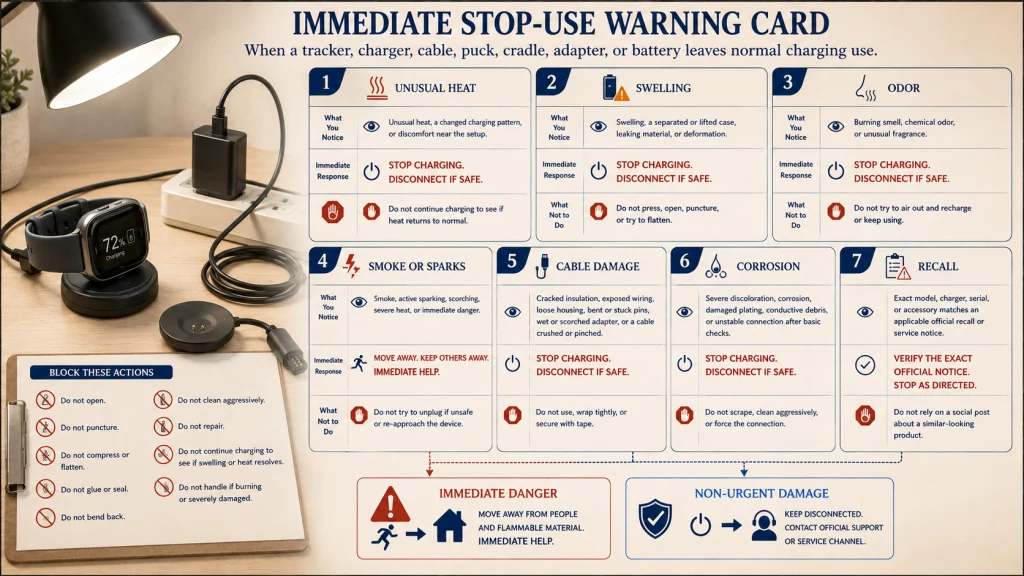
Stop for Heat, Swelling, Odor, Damage, Corrosion, or Recall
Repeated charging attempts are not appropriate when the device or accessory shows a safety warning. Disconnect power when it is safe to do so and keep the setup away from people and flammable material.
Stop-use warning card: Stop using and charging the wearable if you find unusual heat, swelling, a separated case, leaking material, smoke, sparks, melting, a burning or chemical odor, a cracked enclosure, exposed wiring, damaged insulation, bent or stuck pins, corrosion, scorching, or a recall that applies to the exact model or charger.
Do not open, puncture, compress, flatten, glue, or attempt to repair a lithium-ion battery or sealed wearable. Do not continue charging to see whether swelling or heat resolves.
If there is fire, active smoke, sparking, severe heat, or immediate danger, move away and contact emergency services. Do not handle a burning or severely damaged device.
For non-urgent damage, contact the manufacturer or an authorized service channel. Check the exact model, serial details, and official recall information rather than relying on a social post or a recall for a similar-looking product.
Store an Unused Device According to Its Exact Instructions
Long-term storage has its own battery, temperature, and recharging requirements. Do not copy a storage percentage or calendar interval from another brand.
Before storage:
- Review the exact device manual and current safety page.
- Use the charge state specified for that model.
- Power the device down when the instructions permit it.
- Disconnect and store the charger separately.
- Choose a dry location within the stated storage temperature range.
- Protect the device and cable from crushing, bending, direct sun, and metal debris.
- Set a reminder for any required inspection or periodic recharge.
Inspect the device before returning it to use. If its physical condition has changed during storage, keep it disconnected and follow the manufacturer’s service guidance.
The guide to fitness tracker lifespan and replacement covers long-term decline and replacement decisions separately. This article only addresses ordinary charging and storage setup.
Match, Dry, Ventilate, Confirm, Schedule, and Stop on Damage
Complete the charging process in six steps: match the exact device and charger, use an approved power source, clean and dry the contacts, clear metal objects, place the setup on an open stable surface, and confirm the correct charging indicator.
Then build the charging window around the features you actually use. Sleep tracking, workouts, alerts, cellular use, display settings, and missed removal windows can change the routine, so record real battery use instead of applying one universal percentage.
Stop when the hardware is damaged, the device behaves differently from its normal charging pattern, or an applicable recall changes the instructions. A charging routine is useful only when the connection, location, and device remain suitable for use.
FAQs
🔌 Can I use any cable that attaches to my fitness tracker?
No. A cable can attach magnetically or fit physically without being compatible. Use the supplied charger or one explicitly approved for the exact model, power conditions, and region.
💧 Can I charge a tracker after washing or swimming?
Only after the device, contacts, band area, charger pins, and nearby surface are completely dry. Water resistance during wear does not make a charger or damp charging connection safe.
🧲 Why should jewelry stay away from a magnetic charger?
Metal or magnetic objects can interfere with alignment or contact exposed charging pins. Unplug the charger, clear jewelry and debris, and inspect the surface before reconnecting power.
🌡️ Is it normal for a smartwatch to feel warm while charging?
Some warmth may occur, but a general article cannot define one safe temperature for every model. Disconnect and investigate unusual heat, a warning message, discomfort, odor, swelling, damage, or changed charging behavior.
🛏️ Is overnight charging always safe?
There is no universal overnight rule. Follow the exact manual, keep the setup uncovered and ventilated, and use model-specific optimized charging features when available.
📊 Should I always keep the battery within one percentage range?
No universal percentage window applies to every wearable. Follow the manufacturer’s battery guidance and charge enough for the next planned use without ignoring heat, damage, or accessory requirements.
⚡ What should I check when the charging indicator does not appear?
Verify compatibility, power, dryness, clean contacts, cable condition, accessory interference, and physical alignment. Stop repeated attempts if the device or charger becomes hot, damaged, corroded, or produces an odor.
🚨 When should I stop charging immediately?
Stop for swelling, smoke, sparks, melting, leaking, unusual heat, a chemical or burning odor, damaged wiring, severe corrosion, a separated case, or an applicable recall. Immediate danger requires emergency help.