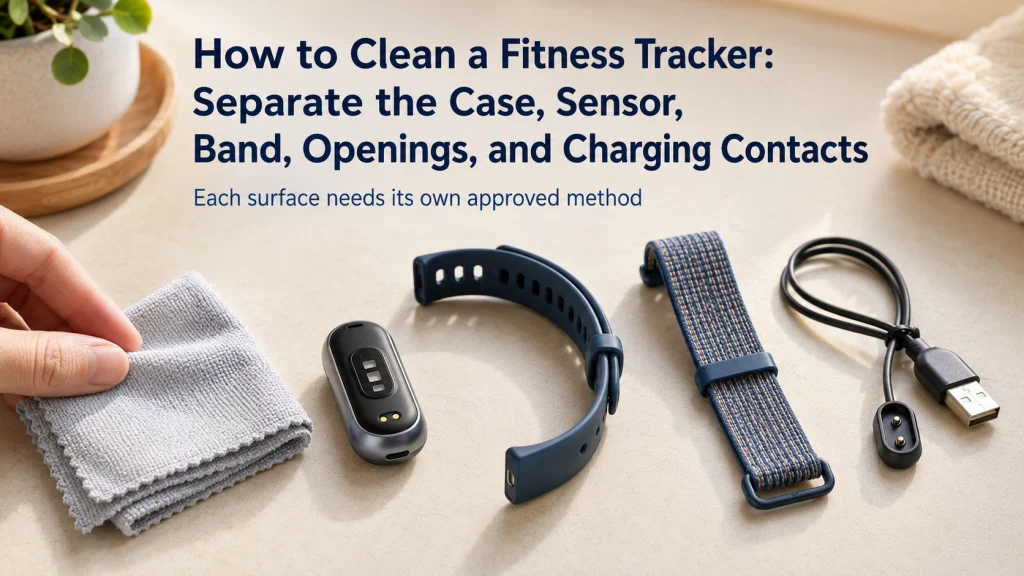
Learning how to clean a fitness tracker starts by treating the case, sensor, band, openings, charging contacts, and charger as separate surfaces. Identify the exact model and materials, follow the current official care instructions, and use only the method approved for each part. Dry the device, band, skin, and contacts completely before wearing or charging. Stop using the wearable when you find cracks, corrosion, a loose attachment, battery swelling, or another sign of damage.
One Cleaner Does Not Belong on Every Surface
Picture one disinfecting wipe pointed toward seven parts of the same wearable: a metal case, an optical sensor window, a smooth sport-style band, a woven band, a leather band, a speaker opening, and exposed charger pins. The wipe may be permitted on one surface, unnecessary on another, and damaging to a third.
A wearable is several materials joined into one small object, not one washable surface. The part that touches the wrist may tolerate rinsing while the attached case, an opening, the charging cable, or a different band requires a dry or lightly dampened cloth.
| Surface | Main concern | First rule |
|---|---|---|
| Case and display | Coatings, seams, buttons, and water limits | Use the exact device care method. |
| Sensor window | Film from sweat, lotion, sunscreen, or soap | Use a soft approved cloth without scratching. |
| Smooth band | Residue, trapped moisture, and odor | Follow the instructions for that band material. |
| Woven or fabric band | Moisture retention and long drying time | Remove it when instructed and allow complete drying. |
| Leather band | Water absorption, finish change, and deformation | Do not assume it can be rinsed or soaked. |
| Openings | Liquid entry and internal damage | Keep tools, sprays, and liquid out unless expressly allowed. |
| Charging contacts and pins | Debris, fibers, corrosion, and electrical contact | Clean by the model-specific method and dry before charging. |
Key decision: Identify the surface first, then choose the approved cleaning method. Do not choose one cleaner and apply it to the entire wearable.
The broader wearable technology guide explains the role and limits of consumer wearables. For setup, charging, notifications, and daily routines beyond cleaning, use the guide to using a fitness tracker day to day.
Identify the Exact Device, Band, Charger, and Care Page
Start with the exact model, not the family name printed on a store page or an old box. A later version can have different openings, coatings, band materials, charging contacts, or cleaning permissions. An accessory band may also follow different instructions from the case it is attached to.
Record these details before cleaning:
- Exact device model and size or version.
- Whether the band is removable or integrated.
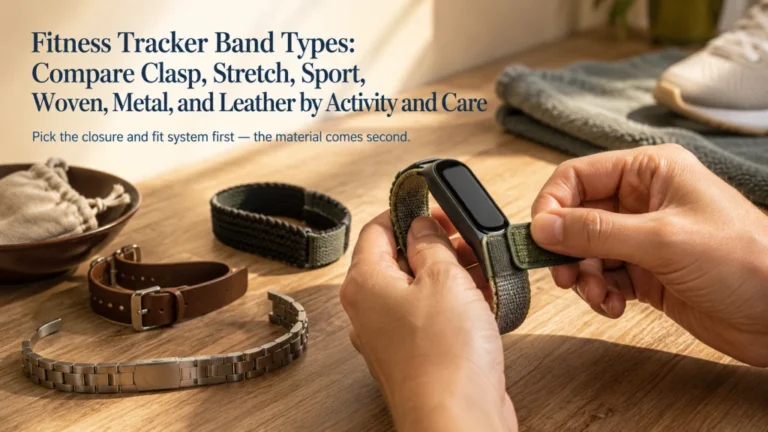
- Band material and closure type.
- Location of the sensor window, speaker, microphone, altimeter, buttons, and seams.
- Charging method, contact location, and cable or dock model.
- Current official care page or manual for the device and band.
Care guidance reviewed: July 30, 2026. Official instructions can change when manufacturers add new materials, coatings, sensors, openings, or charging systems. Recheck the exact care page before using a chemical, brush, running water, or disinfecting method.
Editorial observation: Removable and integrated bands create different cleaning friction. A removable band can often be handled separately, while an integrated design may force the user to protect the case and openings during every rinse or wipe.
If the band or charger cannot be identified, use the most conservative approved method available for the confirmed device and contact official support before trying a stronger cleaner.
Power Down and Disconnect From Charging as Instructed
Cleaning should begin with the device away from electrical power. Remove it from the charger, unplug the cable or dock, and turn the wearable off when the official instructions tell you to do so. Remove the band when the manufacturer requires separate cleaning or when the material needs a different process.
- Stop charging and disconnect the charger from power.
- Remove the device from the charger or dock.
- Power off the wearable when instructed.
- Detach removable bands when the care page calls for it.
- Move the charger and cable away from water, sprays, and wet cloths.
Do not clean the wearable while it is charging, and do not hold a wet band over an exposed charger. A small cleaning area can become confusing when the case, cable, band, cloths, and water are mixed together. Keep the dry charging parts on a separate surface.
Safety warning: Never connect a wet wearable, wet cable, or damp charging contact to power. Dry every charging surface completely and follow the charging instructions for the exact model.
Clean the Case and Sensor Surface With the Approved Method
Sweat, lotion, sunscreen, soap, skin oil, and dust can leave a film on the back of the case. That residue may make the wearable feel slippery, collect around edges, or interfere with consistent contact. Use a nonabrasive, lint-free cloth when that is the approved starting method.
- Wipe loose soil from the display, case edges, buttons, and sensor surface.
- Use a lightly dampened cloth only when the official instructions permit it.
- Apply any permitted cleaner to the cloth rather than spraying the device directly.
- Pay attention to residue around the sensor window without pressing sharp material into its edges.
- Dry the case and back surface with a clean lint-free cloth.
Some current device instructions permit fresh water on specific cases or approved disinfecting wipes on selected exterior surfaces. That permission does not transfer automatically to another model, an opening, a fabric band, a leather band, or the charger.
Note: A clear-looking sensor window can still hold a thin film of lotion or sweat. Clean gently rather than polishing, buffing, or scraping the surface.
Clean Each Band Material by Its Own Instructions
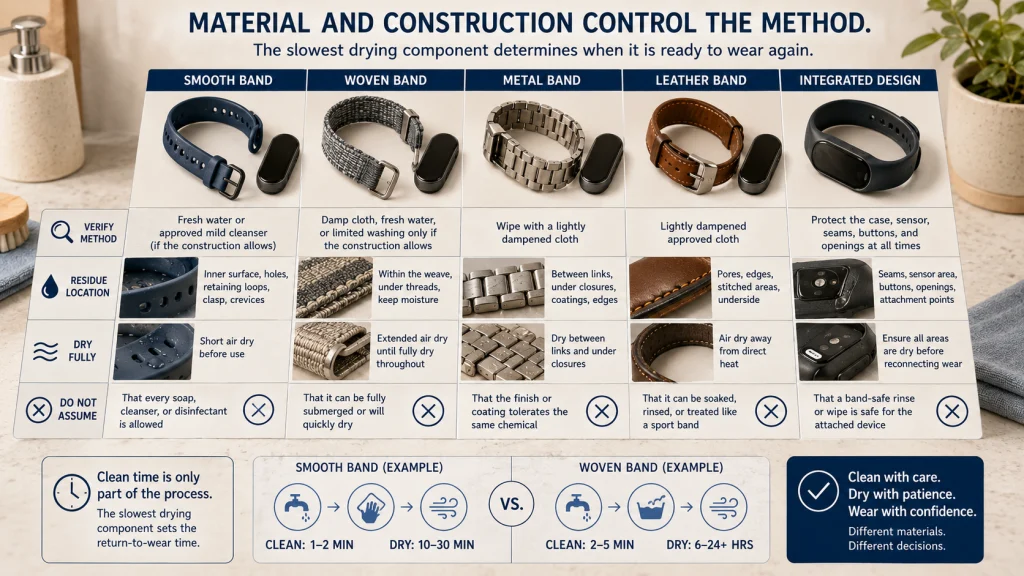
The band usually holds more sweat, sunscreen, soap, and skin oil than the case, yet it may also be the part most likely to absorb water or retain odor. Material and construction decide whether it can be rinsed, wiped, washed with an approved soap, or kept mostly dry.
| Band type | Typical care direction to verify | Drying concern | Do not assume |
|---|---|---|---|
| Smooth silicone or elastomer-style band | Fresh water or an approved mild cleanser may be permitted for some bands. | Dry the inner surface, holes, loops, and clasp area. | That every soap or disinfectant is allowed. |
| Woven or fabric band | A damp cloth, fresh water, or limited washing may be permitted depending on construction. | Moisture can remain deep in the weave after the outside feels dry. | That the band is ready to wear or attach immediately. |
| Metal band | Wiping may be preferred, with attention to links, closures, and coatings. | Water can remain between links or around the clasp. | That every finish tolerates the same chemical. |
| Leather band | A lightly dampened cloth may be allowed for selected surfaces. | Air drying away from direct heat may be required. | That leather can be soaked, rinsed, or cleaned like a sport band. |
| Integrated band or tracker housing | The complete device instructions control the method. | Water can reach the case or openings while the band is cleaned. | That a band-safe rinse is safe for the attached electronics. |
Remove loose bands before cleaning when instructed. Clean around buckles, loops, hook-and-loop surfaces, and attachment points because residue often remains where two surfaces overlap.
Editorial observation: A smooth band may wipe clean quickly while a woven band still feels damp against the wrist much later. Odor retention and drying time can matter more to the routine than the few minutes spent washing it.
Clean Charging Contacts and Cable Pins Without Scraping
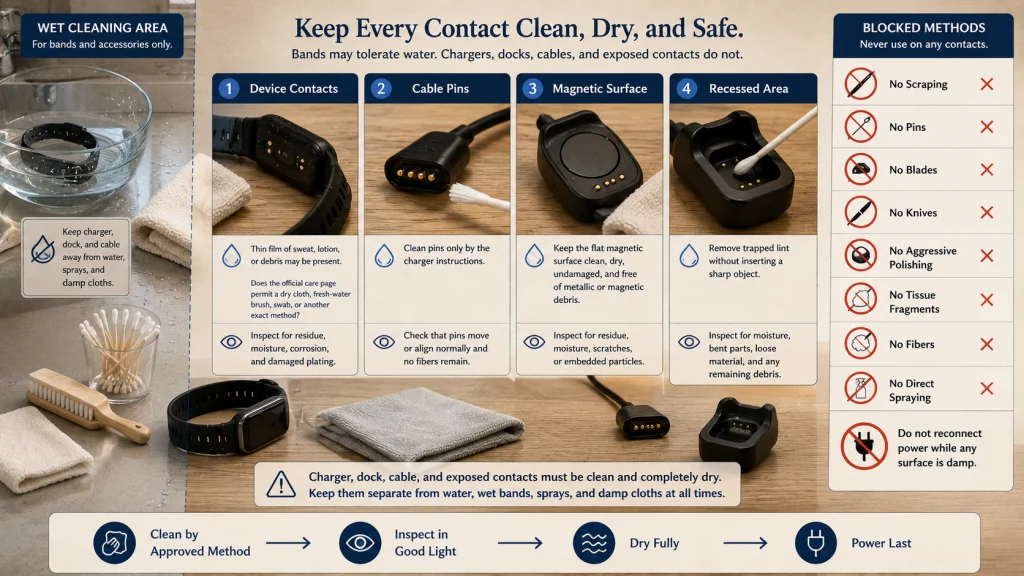
Charging contacts can look clean while holding a thin layer of sweat, lotion, or debris. Poor contact may lead to an unreliable charging connection, but aggressive scraping can damage plating or create corrosion.
| Part | Approved-method question | What to inspect after cleaning |
|---|---|---|
| Contacts on the device | Does the official page allow a dry cloth, fresh-water brush, swab, or another exact method? | No visible residue, moisture, corrosion, or damaged plating. |
| Pins on the cable or dock | Does the charger instruction permit a swab, approved liquid, or dry cleaning only? | Pins move or align normally and no fibers remain. |
| Magnetic charging surface | Should it be wiped dry and kept free of metal or magnetic debris? | The surface is clean, dry, flat, and undamaged. |
| Recessed charging area | Which method removes debris without inserting a sharp object? | No trapped lint, moisture, bent part, or loose material. |
Safety warning: Do not scrape contacts with metal, a pin, a blade, or another sharp object. Do not leave cotton, tissue, or cloth fibers on the pins. Allow the contacts and charger to dry completely before reconnecting power.
The charger has its own care rules. A band may be safe to rinse while the charger, dock, and cable are not water resistant. Keep them out of the wet cleaning area.
For moisture checks, cable condition, and safe charging setup, use the separate guide to charging a fitness tracker safely.
Keep Tools, Sprays, and Liquid Out of Openings
Speaker, microphone, altimeter, pressure, ventilation, and other openings can resemble places where a brush, pin, or cloth edge should be inserted. They are not ordinary seams, and an object can damage the internal part it was meant to protect.
Use the official instructions for the exact opening. Some models may permit lightly running fresh water, movement of a physical control, or a soft brush on a named opening. That permission is limited to the specified model and method.
Prohibited methods unless the exact instructions expressly allow them: Do not insert paper clips, pins, blades, toothpicks, cotton swabs, or brush handles into openings. Do not spray cleaner into the case. Do not use compressed air, ultrasonic cleaning, external heat, bleach, hydrogen peroxide, abrasive powder, or an unapproved disinfectant.
Do not try to force water or air through an opening because sound is muffled or a sensor reading looks unusual. Dry the device by the approved method and use official troubleshooting when the problem continues.
Dry the Device, Band, Skin, and Contacts Completely
Drying is a cleaning step, not a short pause before the wearable goes back on the wrist. Moisture can remain under the case, inside a woven band, between metal links, around a closure, or on charging contacts after the visible surfaces look dry.
- Blot and wipe the case with an approved lint-free cloth.
- Dry the back surface, sensor window, edges, buttons, and seams.
- Dry the band according to its material instructions.
- Let woven, fabric, or absorbent materials air dry for as long as required.
- Dry the wrist before putting the wearable back on.
- Inspect the charging contacts and charger pins in good light.
- Attach the band and reconnect power only after every relevant surface is dry.
Do not speed drying with a hair dryer, heater, hot plate, direct high heat, or compressed air. Heat can affect adhesives, seals, coatings, batteries, and band materials.
If the wearable was exposed to water beyond ordinary cleaning, use the exact model’s water guidance. The guide to water exposure and fitness trackers covers showering, immersion, water resistance, and activity limits separately.
Inspect for Cracks, Corrosion, Loose Parts, and Battery Damage
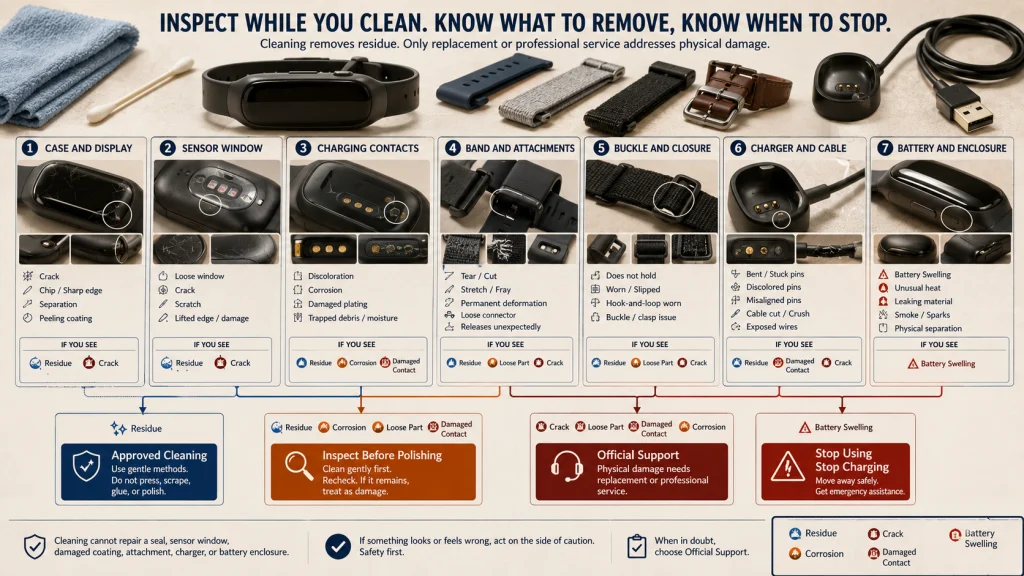
Cleaning creates a useful moment to inspect the wearable under good light. Do not polish away a mark before deciding whether it is residue, a damaged coating, a crack, or corrosion.
Damage inspection card: Stop and inspect the case for cracks or chips, the sensor window for damage, charging contacts for discoloration or corrosion, coatings for peeling, bands for tears or loose attachments, closures for failure, and the case for separation or swelling. Check the charger for bent, stuck, damaged, or discolored pins and for cable damage.
A cracked case, loose sensor window, swollen battery, separated enclosure, exposed sharp edge, smoke, unusual heat, leaking material, or damaged charging system is not a cleaning problem. Stop using and charging the device, move away from immediate danger when necessary, and contact official support or appropriate emergency help.
Safety warning: Do not press, puncture, flatten, or continue charging a device that appears swollen, hot, leaking, smoking, sparking, or physically separated. Immediate danger requires emergency assistance.
Know When to Replace a Band or Stop Using the Device
Cleaning cannot restore a band that no longer holds the case securely or a charger that has damaged contacts. Replacement decisions should be based on condition and compatibility, not appearance alone.
Replace or stop using the band when:
- The attachment releases unexpectedly or no longer locks fully.
- The band is torn, cracked, stretched, frayed, or permanently deformed.
- A buckle, loop, clasp, or hook-and-loop area no longer holds reliably.
- A sharp edge, exposed material, or rough damaged coating contacts the skin.
- Odor, residue, or contamination cannot be removed by the approved method.
- The exact band is not compatible with the case or intended activity.
Stop using the complete device when the case, sensor, battery, charging area, or seal appears damaged. Do not attempt to repair a seal, polish a sensor, glue a case, or flatten a battery enclosure.
Note: Cleaning does not treat a skin condition. Remove the wearable when irritation develops, keep the area clean and dry, and seek appropriate guidance when symptoms persist, worsen, recur, or cause concern.
Build a Condition-Based Cleaning Routine
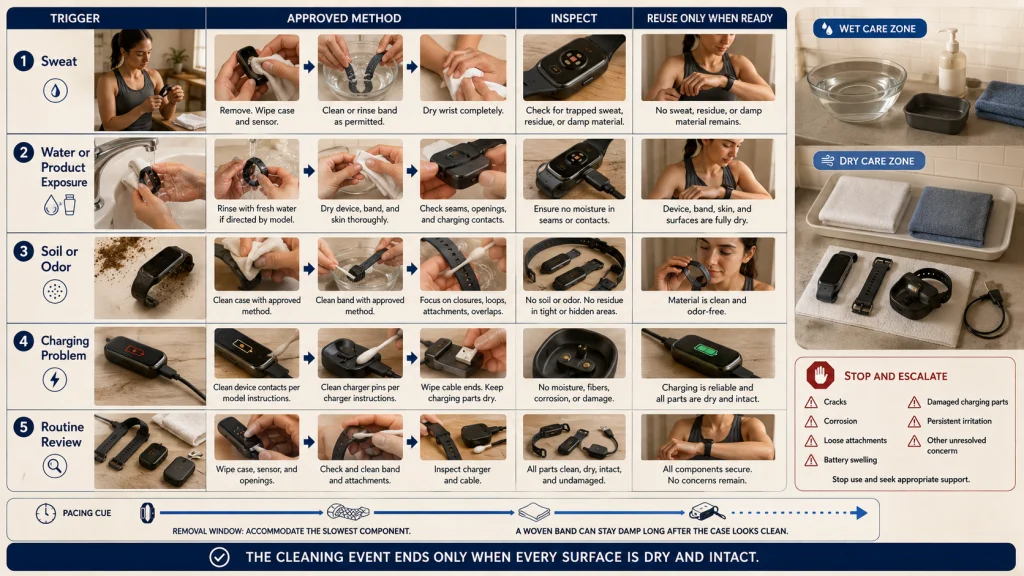
There is no universal schedule that fits every material, climate, activity, and wearing pattern. Use visible soil, sweat, water exposure, odor, charging problems, and skin comfort as triggers.
| Trigger | Routine | What must be true before reuse |
|---|---|---|
| After exercise or heavy sweat | Remove the wearable, clean or rinse only as permitted, wipe the case and sensor, and dry the wrist and band. | No trapped sweat, residue, or damp band against the skin. |
| After water, soap, lotion, or sunscreen exposure | Follow the model’s fresh-water and drying instructions, then check seams and contacts. | The device, skin, band, and charging surfaces are dry. |
| Visible soil or odor | Separate the case and band methods, then clean the closures and overlap areas. | Residue and odor are removed without using an unapproved chemical. |
| Charging becomes unreliable | Inspect and clean the device contacts and cable pins by their exact instructions. | No moisture, fibers, corrosion, or damaged pins remain. |
| Routine weekly review | Inspect the case, sensor, band, openings, contacts, charger, and cable even when little soil is visible. | All parts are clean, dry, secure, and undamaged. |
A post-workout wipe may take less time than cleaning a woven band and waiting for it to dry. Plan the removal window around the slowest material rather than putting a damp band back on because the case is already clean.
For fit, contact pressure, and removal when the skin needs a break, use the guide to wearing a fitness tracker correctly. The guide to planning all-day wear and removal windows can help place cleaning into the daily routine.
Clean by Material, Dry Fully, and Inspect Before Charging
Finish each cleaning session with five checks: the exact materials were identified, every surface received only its approved method, openings remained protected, the wearable and charger are completely dry, and no damage appeared during inspection.
Do not let convenience turn one wipe, one soap, or one brush into a universal rule. The case, sensor, bands, openings, contacts, and charger have different jobs and different limits.
When everything is clean, dry, intact, and securely attached, return the device to normal wear. When moisture, corrosion, damage, battery swelling, or persistent skin irritation remains, stop and address that problem before wearing or charging again.
FAQs
🧽 Can I use one disinfecting wipe on the whole tracker?
No. Some manufacturers permit selected wipes on specific exterior surfaces, while fabric, leather, openings, sensors, and chargers may have different restrictions. Confirm the exact model and material before using any disinfectant.
💧 Can I rinse the band while it is attached?
Only when the official instructions permit rinsing the complete setup. A band may tolerate water while the attached case, opening, or connector does not. Remove the band first when separate care is required.
🔌 How do I clean fitness tracker charging contacts?
Use only the method named for the exact device and charger, such as an approved cloth, brush, or swab. Do not scrape with metal, leave fibers behind, or reconnect power until the contacts and pins are completely dry.
🪥 Can I use a toothbrush on a smartwatch?
Do not use one universally. A manufacturer may allow a specific soft brush on a named model, opening, or charging contact, while the same tool could damage another sensor, coating, or opening. Follow the exact instruction.
🧴 Can I clean the device with soap or alcohol?
Only when the official care page allows that substance on the exact surface. Permission for one band or case does not apply automatically to leather, fabric, a sensor window, an opening, or the charger.
🌬️ Can I use a hair dryer or compressed air?
Do not use external heat or compressed air unless the exact instructions expressly allow it. Let the wearable dry by the approved cloth and air-drying method to avoid damaging seals, coatings, batteries, or internal parts.
⌚ How often should I clean a fitness tracker?
Use condition-based triggers rather than one universal frequency. Clean after sweat, water, lotion, sunscreen, visible soil, odor, or charging-contact buildup, and inspect the wearable regularly for damage.
🚩 When should I stop using the device?
Stop when you find cracks, corrosion, loose attachments, damaged charging parts, sharp edges, battery swelling, unusual heat, leaking, smoke, or sparks. Persistent or worsening skin symptoms also require removal and appropriate guidance.