Learning how to wear a fitness tracker correctly starts with the exact model and band, not a universal finger-width or hole-number rule. Set the software to the wrist you actually use, place the case where the manufacturer instructs, and choose a stable fit that does not rotate or create persistent discomfort. Exercise may require a temporary adjustment, followed by loosening, drying, or removal afterward. Correct fit can reduce one source of measurement error, but it cannot prove that every reading is accurate.
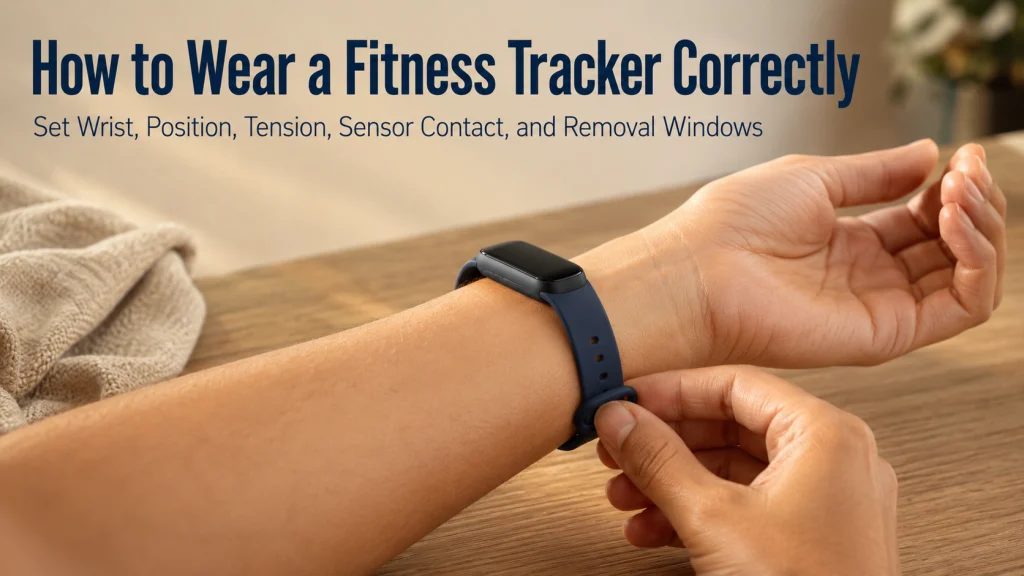
The Same Watch Can Sit on the Wrist Four Different Ways
Picture the same tracker in four positions. In the first, the case rests directly over the wrist joint and presses into the hand when the wrist bends. In the second, the band is loose enough for the case to rotate toward the side of the arm. In the third, the band compresses the skin and leaves lasting pressure marks. In the fourth, the case sits in the manufacturer-approved area behind or above the wrist bone, stays oriented on top of the wrist, and feels stable without being restrictive.
| Fit state | What you may notice | What to change |
|---|---|---|
| Over the wrist joint | The case shifts when the hand bends or presses into the joint during ordinary movement. | Move the case toward the forearm to the position specified for the exact device. |
| Rotating loosely | The sensor loses consistent contact or the case turns to the side of the wrist. | Shorten or adjust the band only enough to stabilize the case. |
| Compressed tightly | The band feels restrictive, creates persistent marks, or becomes uncomfortable as the wrist warms or swells. | Loosen or remove the device and reassess the band size and adjustment range. |
| Stable and comfortable | The case remains in the intended position, the back maintains ordinary skin contact, and the wrist can move comfortably. | Use this as the daily baseline, then follow model-specific exercise guidance. |
Key decision: Tighter is not the same as better contact. The useful fit is the least restrictive adjustment that keeps the case in its intended position during the activity.
Physical fit is only one part of using a wearable. The broader wearable technology guide explains what these devices can and cannot do, while using a fitness tracker day to day connects fit with charging, alerts, routines, and ordinary use.
Identify the Exact Model, Band, and Wear Instructions
Do not copy a fit rule from another device just because the cases look similar. Sensor shape, case weight, band attachment, clasp design, and the intended wrist position can differ. Even two bands made for the same case may need different adjustment methods.
Before changing the fit, record:
- The exact tracker or smartwatch model.
- The band type and size currently attached.
- Whether the band is original, approved for the device, or from another maker.
- The manufacturer’s current position and wear guidance for that model.
- Any separate instructions for workouts, sleep, water exposure, or extended wear.
- Whether the band, clasp, sensor surface, or attachment point shows wear or damage.
A universal hole number does not work because wrists, bands, and adjustment spacing vary. A universal finger-width rule is also unreliable because manufacturers may give model-specific instructions, and some band designs do not create a consistent gap.
Editorial observation: Band size, hole spacing, stretch, clasp design, case weight, sensor shape, wrist shape, and the dominant-hand setting all affect daily fit. A band can feel comfortable while sitting and become restrictive after heat, exercise, or normal changes in wrist size.
Use the official instructions as the starting point, then check how the device behaves on your wrist during the activities you actually perform.
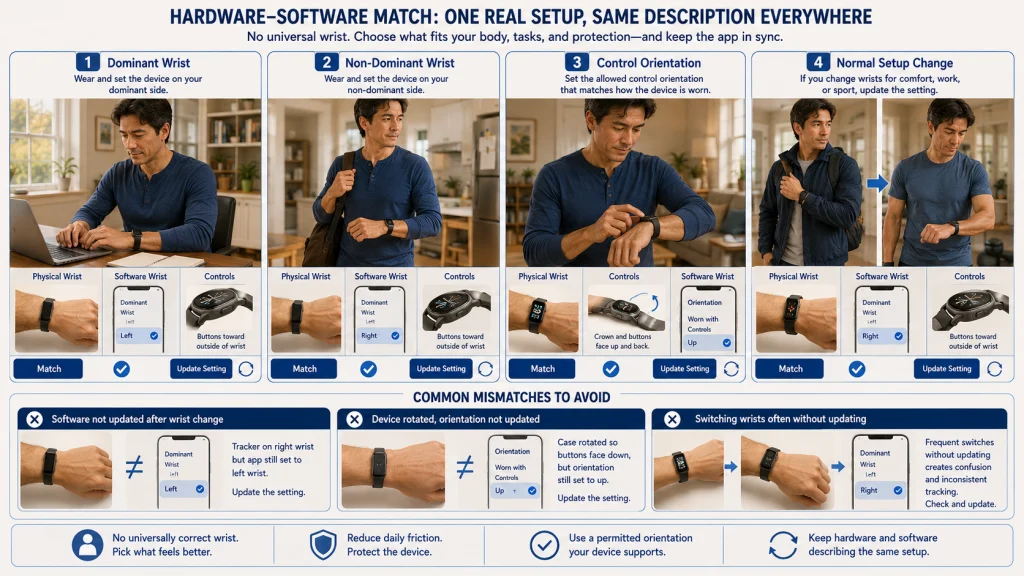
Choose a Comfortable Wrist and Match the Software Setting
There is no universally correct wrist for every wearer. Choose the side that allows comfortable movement, does not interfere with work or equipment, and keeps the case protected during ordinary tasks. Then make the software match the physical choice.
Many devices ask whether the tracker is on the dominant or non-dominant wrist. Some watches also ask which side the crown, buttons, or display orientation should face. These are not decorative settings. They help the software interpret how the device is worn and may change display orientation, gesture behavior, or movement processing.
| Hardware choice | Software choice | Mismatch to avoid |
|---|---|---|
| Device worn on the dominant wrist | Select the dominant-wrist option when the system provides it. | Leaving the app set to the other wrist after switching sides. |
| Device worn on the non-dominant wrist | Select the non-dominant option when available. | Assuming the default matches your actual setup. |
| Buttons or crown facing a chosen direction | Select the matching wrist orientation or control orientation. | Rotating the watch physically without updating the display and control setting. |
| Wrist changed for work, sport, or comfort | Update the setting when the change becomes your normal setup. | Moving the device repeatedly without knowing which setting is active. |
If both wrists are comfortable, consider practical friction. A case that catches on a desk edge, glove, tool, cuff, or exercise equipment may be better on the other wrist. The decision should come from the task and the manufacturer’s permitted orientation, not from a rule based on age or handedness alone.
Position the Case Away From the Wrist Joint as Instructed
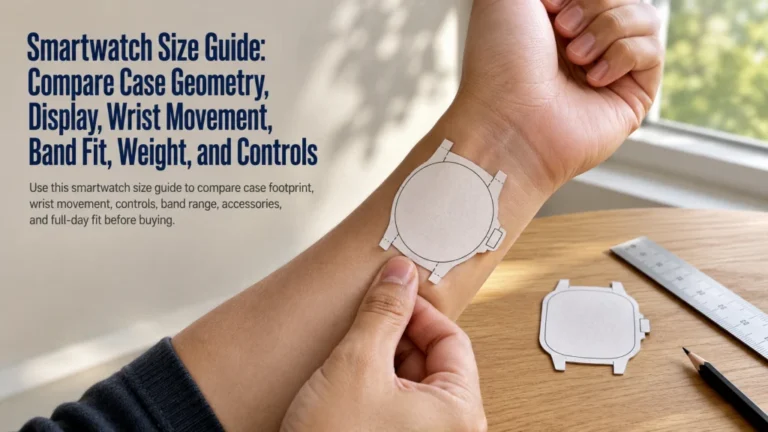
A wrist joint changes shape as the hand bends. When the case sits directly on that moving crease, it may lift, press into the hand, rotate, or lose consistent contact. Many wrist wearables are intended to sit on top of the wrist in an area behind or above the wrist bone, toward the elbow. The exact distance belongs to the manufacturer and model, not to a universal measurement.
- Relax the hand and place the forearm on a table.
- Find the wrist joint by gently bending the hand up and down.
- Move the case toward the forearm until it clears the moving crease and follows the official placement guidance.
- Center the sensor area on the intended side of the wrist.
- Bend and rotate the wrist through normal daily movements.
- Reposition the case if the edge presses into the hand or the sensor lifts noticeably.
The case does not need to be forced into one exact spot all day. Small shifts can happen as the wrist moves, the band flexes, or the skin changes with temperature. The goal is a repeatable starting position that avoids the joint and keeps the case stable enough for the intended use.
Practical tip: Check position while typing, carrying a bag, bending the wrist, and putting on a jacket. A fit that looks correct with the arm still may interfere with an ordinary task.
Limit Rotation Without Sacrificing Comfort
The band has two jobs that can pull in opposite directions. It must keep the case in contact with the intended area, but it must also allow comfortable movement and ordinary changes in wrist size. Tightening until the case cannot move at all may create more pressure than the wearer can tolerate. Leaving it loose enough to spin freely may interrupt sensor contact and make the case strike nearby objects.
Use these checks instead of a universal gap rule:
- The case stays mostly on top of the wrist during normal movement.
- The device does not rotate freely around the arm.
- The band does not pinch when the wrist bends.
- The clasp, loop, or band edge does not dig into the skin.
- The fit remains comfortable after several minutes of movement.
- Any temporary mark fades promptly rather than remaining painful, raised, or irritated.
Recheck after moving from a cool room into heat, beginning exercise, or wearing the device for a long period. A setting that works in the morning may feel different later because the environment, activity, and wrist have changed.
Safety warning: Loosen or remove the device if pressure or discomfort persists, or if numbness or swelling appears. Do not tighten through symptoms in an attempt to improve a reading.
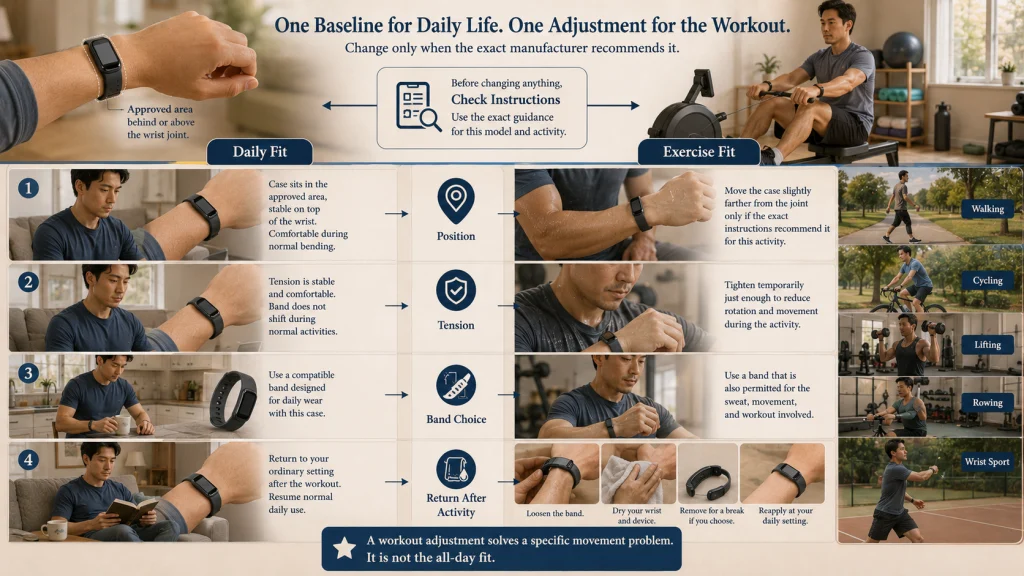
Adjust for Exercise Only When the Manufacturer Recommends It
Exercise can add faster arm movement, repeated wrist flexion, sweat, heat, and impact. Some manufacturers advise moving the case slightly farther from the wrist joint or using a temporarily more secure fit during certain workouts. That advice is not permission to copy one brand’s position or tightness rule to every tracker.
| Fit check | Ordinary daily use | Exercise use |
|---|---|---|
| Position | Use the standard manufacturer-approved position behind or above the wrist bone. | Move higher only when the exact device instructions recommend it for activity. |
| Tension | Stable, comfortable, and able to accommodate ordinary wrist movement. | Temporarily adjust only enough to reduce rotation during the activity. |
| Band choice | Use a band intended for daily wear and compatible with the case. | Confirm that the band is permitted for the workout, sweat, and movement involved. |
| After activity | Continue normal wear if the skin and device remain comfortable and dry. | Return to the daily fit, dry the wrist and device, or remove it for a break. |
A workout fit should solve a specific problem, such as rotation during running, not become the new all-day setting automatically. Stop and reassess if the adjustment creates discomfort, changes hand sensation, or leaves the band trapped against wet skin.
Activity type also matters. Cycling, lifting, rowing, racquet sports, and tasks that repeatedly bend the wrist may affect case position differently from walking. Check the fit during the actual movement rather than assuming one exercise adjustment suits every session.
Loosen or Remove It After Heat, Sweat, or Extended Wear
The fit should not remain fixed merely because it worked earlier. Heat, exercise, moisture, and long wear can change how the band feels against the wrist. After a workout, return the band to the ordinary daily setting or remove it while the wrist and device dry.
Use a removal window when:
- The skin under the case or band is wet.
- Sweat, soap, lotion, or debris is trapped against the wrist.
- The band feels tighter than it did earlier.
- The wrist shows irritation or persistent pressure marks.
- The device needs charging or cleaning.
- You have worn it for an extended period without a break.
A removal routine is easier to maintain when it attaches to an existing event, such as showering, changing clothes after exercise, charging at a desk, or preparing for bed. The guide to deciding when to remove a fitness tracker covers all-day wear, charging gaps, sleep, and planned wrist breaks in more detail.
Note: Water resistance does not mean wet skin should remain covered indefinitely. Follow the exact water, drying, and band-care instructions for the device and band.
Keep the Wrist, Sensor Surface, and Band Clean and Dry
Fit changes when sweat, oil, lotion, soap, dust, or residue collects between the device and skin. Moisture can also make a band slip, stretch, or feel tighter. Cleaning should remove the source of friction without damaging the sensor, coating, band, or charging contacts.
- Remove the device before cleaning it.
- Check the exact care instructions for the case, sensor surface, band, and charger.
- Clean each component only with methods approved for its material.
- Remove residue from the wrist as well as the device.
- Dry the skin and all wearable surfaces fully before putting the device back on.
- Recheck the fit after cleaning because a damp or stretched band may sit differently.
Do not assume that a cleaning method approved for one band is safe for another. Rigid hardware, elastomer-style bands, woven bands, coated surfaces, and decorative bands can have different restrictions. Avoid trapping personal-care products under the case or band.
Use the complete fitness tracker cleaning process for sensor surfaces, bands, charging contacts, drying, and material-specific checks.
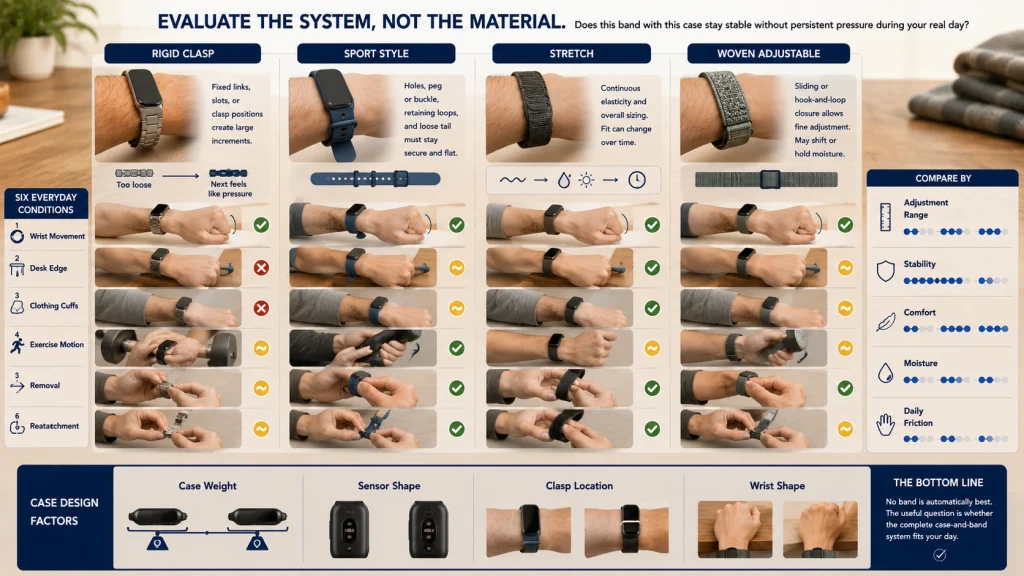
Compare Band Adjustment Without Ranking Materials
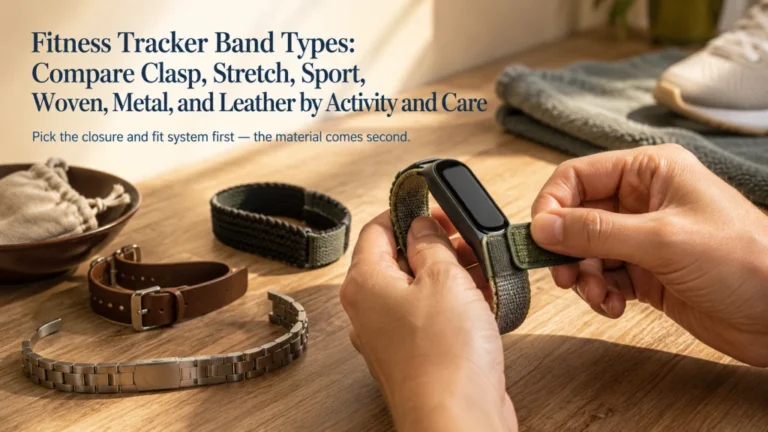
No band type is automatically best for every wrist. The useful comparison is how the adjustment system behaves during daily movement, exercise, heat, cleaning, and removal. Material labels alone do not show whether the band has the right size range or whether the clasp sits comfortably on a particular wrist.
| Band style | Adjustment pattern | Fit checks | Common friction to watch |
|---|---|---|---|
| Rigid clasp band | Uses fixed links, slots, or clasp positions. | Check whether the available increments allow stability without pressure. | A small adjustment step may feel too loose while the next feels restrictive. |
| Sport-style band | Uses holes, a peg, buckle, or retaining loops. | Confirm that the selected position holds during movement and the loose end lies flat. | Hole spacing, loop placement, and band tail pressure can affect comfort. |
| Stretch band | Relies on continuous elasticity and overall sizing. | Check whether the band returns to position without constant compression. | Stretch, heat, moisture, and long wear can change how it feels over time. |
| Woven adjustable band | Uses a sliding closure, hook-and-loop surface, or continuous adjustment. | Set enough tension to prevent rotation and verify that the closure remains secure. | Moisture retention, drying time, edge texture, and gradual loosening may matter. |
Compare the band on the wrist, not only on a product page. Test ordinary wrist movement, clothing cuffs, desk contact, exercise motion, removal, and reattachment. A band that is easy to fine-tune may still be unsuitable if it retains moisture or places the clasp in an uncomfortable location.
Editorial observation: Case weight and sensor shape can change how the same band design feels. A heavier case may rotate unless the band is adjusted more carefully, while a raised sensor area may create pressure on a wrist shape that feels comfortable with a flatter case.
Remove the Device When Skin or Circulation Symptoms Persist
Do not use the band as a test of endurance. If discomfort begins, loosen the band or remove the device, clean and dry the wrist and wearable as instructed, and allow the area to recover. Do not diagnose the cause from appearance alone or assume that changing tightness will solve every reaction.
Safety warning: Stop wearing the device if redness, soreness, swelling, numbness, tingling, burning, broken skin, or other irritation persists or worsens. Seek appropriate professional guidance for symptoms that do not resolve, return repeatedly, limit function, or cause concern. Urgent or severe symptoms require prompt medical attention regardless of any wearable reading.
Do not recommend a band material as a treatment for a suspected allergy or skin condition. A different material may change moisture, friction, closure pressure, or exposure, but only an appropriate professional can assess a persistent symptom.
When wear resumes, start with the official daily position and a comfortable stable adjustment. Shorten the first wear period, monitor the area, and remove the device again if symptoms return. If the problem follows one specific band or clasp position, record that pattern for support or professional review.
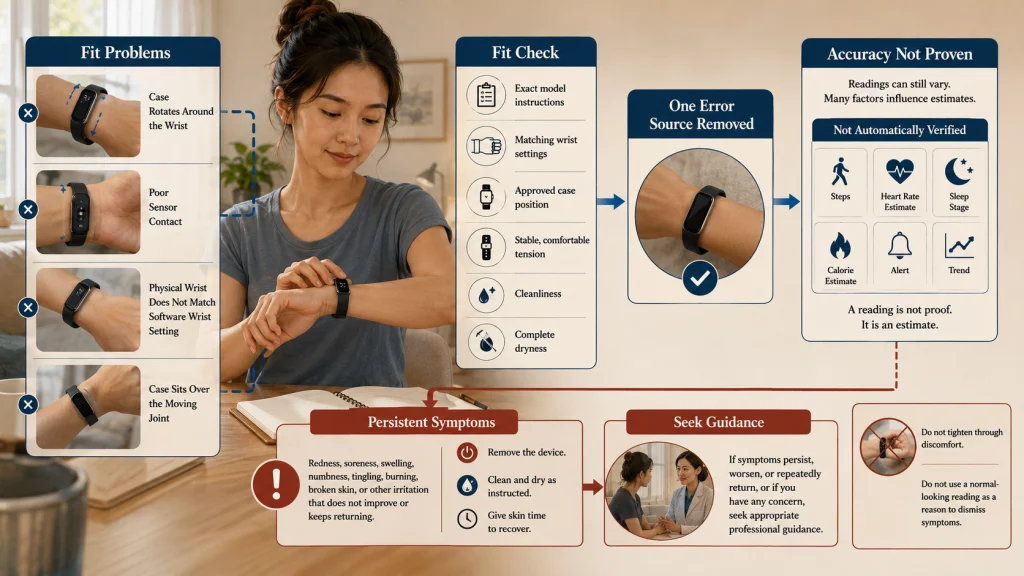
Correct Fit Reduces One Error Source but Does Not Prove Accuracy
A rotating case, poor sensor contact, incorrect wrist setting, or position over the joint can interfere with consistent measurement. Correcting those issues removes a plausible fit problem. It does not establish that every step count, heart-rate estimate, sleep stage, calorie estimate, alert, or trend is correct.
Accuracy limit: A stable fit supports the conditions the device was designed to use, but readings can still be affected by activity type, motion pattern, skin contact, environment, device limitations, software processing, and the metric being estimated.
Use a simple troubleshooting order:
- Confirm the exact model and current manufacturer wear instructions.
- Verify the physical wrist and software wrist setting match.
- Check case position, band stability, cleanliness, and dryness.
- Compare the same activity under similar conditions.
- Use the device’s official troubleshooting process if the pattern continues.
- Keep health and safety decisions separate from an unverified consumer reading.
The guide to understanding fitness tracker accuracy explains how to evaluate repeated differences without assuming that tighter wear will fix the metric.
Safety warning: Do not use a normal-looking wearable reading to dismiss concerning symptoms, and do not treat an unusual reading as a diagnosis. Seek appropriate medical attention for urgent, severe, persistent, or worsening symptoms.
Set Five Rules for a Repeatable Fit
Finish with five model-specific decisions: which wrist you will use, which software orientation matches it, where the case should sit, what daily tension keeps it stable and comfortable, and when exercise, heat, moisture, or symptoms require adjustment or removal.
The correct setup is not the tightest one and not the rule copied from another brand. It is a repeatable fit based on the exact device, band, wrist, activity, and current manufacturer instructions. Recheck it when the band changes, the device moves to the other wrist, exercise conditions change, or comfort declines.
Correct position and contact create a better starting condition for the sensor. They do not guarantee accuracy or replace attention to the person wearing the device.
FAQs
⌚ Which wrist should I wear a fitness tracker on?
Use the wrist that is comfortable, practical, and permitted by the manufacturer’s instructions. Then update the dominant or non-dominant wrist setting and any display orientation so the software matches the physical setup.
🔒 How tight should a fitness tracker be?
It should be stable enough to limit rotation while remaining comfortable during normal wrist movement. Do not use a universal finger-width or hole-number rule across brands, and loosen or remove the device if it creates persistent pressure or symptoms.
🦴 Should the watch sit directly on the wrist bone?
Follow the exact model instructions. Many wrist devices are positioned behind or above the wrist bone toward the forearm so the case clears the moving wrist joint, but the required placement is manufacturer-specific.
🏃 Should I tighten the band during exercise?
Adjust it only when the manufacturer recommends an exercise fit and only enough to reduce unwanted movement. Return to the normal daily setting, dry the device and wrist, or remove it after the activity.
💧 Can I put the tracker back on while the band is damp?
Dry the wrist, sensor surface, and band according to the care instructions before wearing it again. Moisture trapped under the device can change fit and increase friction or irritation.
🩹 What should I do if the band leaves marks?
Loosen or remove the device and check whether the marks fade promptly without pain or irritation. Persistent redness, soreness, swelling, numbness, tingling, burning, or broken skin requires stopping wear and seeking appropriate guidance if it does not resolve or causes concern.
📊 Does a better fit guarantee more accurate readings?
No. Correct fit removes one possible source of inconsistent contact, but it cannot prove that a consumer estimate is accurate. Evaluate repeated patterns and use official troubleshooting rather than tightening the band further.