A realistic phone plan keeps the functions you need and changes only the parts that delay or interrupt the night. Start by identifying the main mechanism, then test one adjustment to content, timing, notifications, display, or location for seven nights. Relocate the device only when physical access remains the strongest trigger. Built-in display settings can help with light, but they do not replace a stopping rule or explain persistent sleep difficulty.
Equal Screen Minutes Are Not Equal Bedtime Exposures
Imagine four phones at the same brightness. One displays a quiet novel. One shows a message marked urgent from work. One runs a fast game with constant decisions. One opens a social feed that produces a new item every time the thumb moves.
All four screens are present for 20 minutes, yet the evening is not the same. The novel has a chapter ending. The work message can reopen tomorrow’s responsibilities. The game asks for rapid attention. The feed removes the natural moment when the activity is finished.
Key decision: The useful question is not only whether the phone is present, but what job it is doing.
That distinction makes a realistic plan possible. Some people need a dimmer display. Others need work removed from the final part of the evening, notifications filtered, autoplay disabled, or the phone moved only after its alarm or audio role has been replaced. A total device ban may solve several pathways at once, but it is not the only valid starting point.
For the wider sleep framework, use the complete sleep improvement guide. The healthy sleep habits framework places phone changes alongside schedule, environment, activity, and other daily factors.
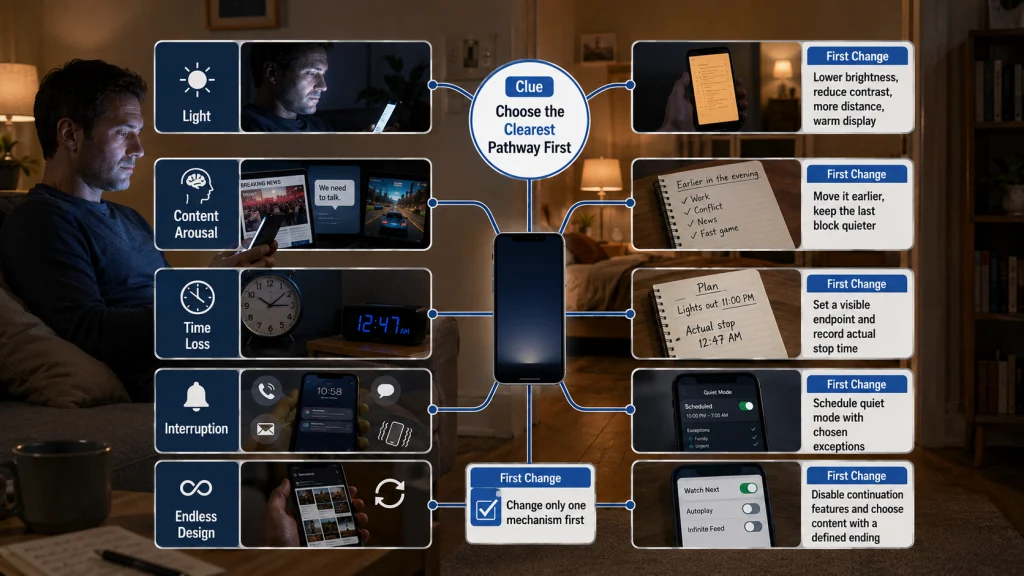
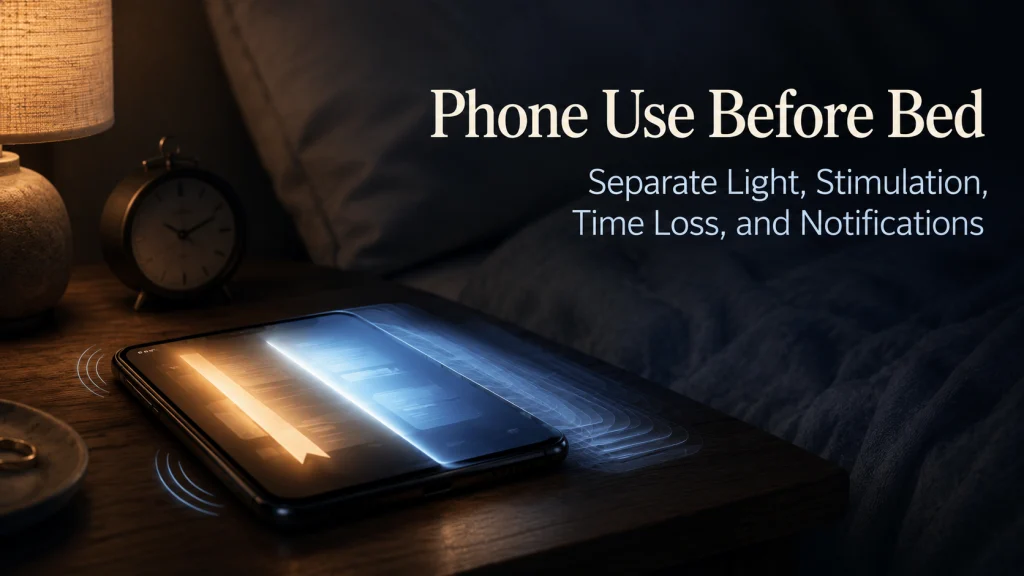
Separate Five Phone-Use Pathways
Reducing screen time before bed is easier when the problem is defined more precisely. The same person may have more than one pathway, but one usually creates the clearest first change.
| Pathway | What happens | Clue to observe | First change to test |
|---|---|---|---|
| Light | The display adds brightness and visual contrast close to the intended sleep period. | The room is dark while the screen remains bright or close to the eyes. | Lower brightness, reduce contrast with the room, increase distance, and use the current warm-display setting. |
| Content arousal | Work, conflict, games, news, or emotionally charged content keeps attention activated. | The phone is put down, but the conversation, task, or decision continues mentally. | Move that content earlier and reserve the late block for a quieter function. |
| Time displacement | Phone use occupies time that was intended for sleep or the transition into bed. | Lights-out moves later even though the person felt ready to stop earlier. | Create a visible endpoint and record the actual stop time. |
| Interruption | Calls, alerts, vibrations, previews, or checking behavior break the transition or wake the user. | The phone is no longer in active use, but it continues requesting attention. | Use a scheduled quiet mode with deliberate exceptions. |
| Endless design | Autoplay, infinite feeds, recommendations, and refresh actions remove a natural finishing point. | There is always one more item, episode, round, or reply. | Turn off continuation features and choose content with a defined ending. |
Do not try to solve all five pathways on the first night. If the phone is dim and quiet but still consumes 50 unplanned minutes, brightness is not the main starting point. If use stops on time but alerts repeatedly reopen the device, the notification path deserves attention first.
Understand What the Evidence Can and Cannot Prove
Adult research often finds associations between bedtime screen use and later timing, shorter sleep, poorer reported sleep, or difficulty settling. However, many studies are observational or cross-sectional. They can show that two patterns occur together without proving that the phone alone caused the sleep problem.
The behavior being measured also varies. One study may count any screen use in the final hour. Another may focus on use in bed, total daily screen time, media type, or self-described problematic use. Reading, work, video, messaging, and gaming can be grouped together even though they involve different light, attention, emotion, and stopping patterns.
Evidence limit: The overall pattern supports examining bedtime screen use, but it does not justify claiming that every minute has the same effect or that removing a phone will resolve every sleep problem. Adult findings vary by behavior, sleep outcome, timing, and the people studied.
Use evidence to justify a structured test, not a universal verdict. Change one plausible mechanism, hold the rest of the evening reasonably stable, and observe whether the intended bedtime, settling process, awakenings, and next-day function improve.
Audit When and Where the Phone Is Used
Location changes the meaning of phone use. Ten minutes on the couch before entering the bedroom is different from 10 minutes after lights-out, and both differ from checking a notification after an awakening.
For three ordinary nights, record four points:
- Where use begins: desk, couch, bedside, or in bed.
- When the phone enters the final hour before the intended bedtime.
- When active use actually ends.
- Whether the phone is checked after lights-out or after an awakening.
| Location or moment | Question to ask | Possible mechanism |
|---|---|---|
| Couch | Does use delay starting the bedtime transition? | Time displacement or endless design |
| Bedside | Is the phone serving an alarm, audio, communication, or reassurance role? | Useful function mixed with interruption |
| In bed | Does the activity have a defined ending? | Light, arousal, or time displacement |
| After an awakening | Does checking create more alertness or lead to another activity? | Interruption and content arousal |
Do not label the audit as good or bad behavior. Its job is to show where the first controllable handoff occurs. Moving an endless feed from bed to the couch may not reduce total time, but it can reveal whether entering bed has become the missing stopping cue.
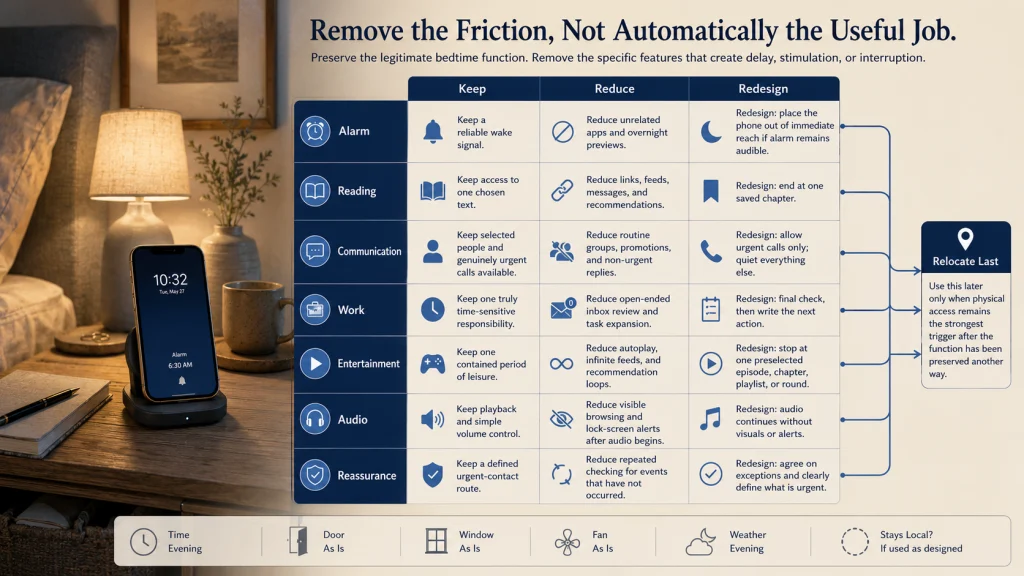
Identify the Phone’s Actual Job
A phone often remains near the bed because it performs a legitimate function. Removing it without replacing that function creates a plan that is easy to abandon.
| Phone function | What must remain available | What can be reduced | Possible redesign |
|---|---|---|---|
| Alarm | A reliable wake signal | Unrelated apps and overnight previews | Keep the alarm while scheduling quiet settings and placing the screen out of reach. |
| Reading | Access to chosen text | Links, messages, feeds, and recommendations | Open one saved chapter and use a defined stopping point. |
| Communication | Selected people or urgent calls | Routine groups, promotions, and non-urgent replies | Allow exceptions while silencing the rest. |
| Work | Only genuinely time-sensitive responsibility | Open-ended inbox review and unfinished task expansion | Set a final work check and write the next action before closing. |
| Entertainment | A contained period of leisure | Autoplay, infinite feeds, and recommendation loops | Choose one episode, chapter, playlist, or round in advance. |
| Audio | Playback and volume control | Visible feed browsing and lock-screen alerts | Start the audio before bed, lock the screen, and keep controls simple. |
| Reassurance | A way to receive a defined urgent contact | Repeated checking for events that have not occurred | Set clear exceptions and agree on what counts as urgent. |
The function inventory prevents an all-or-nothing argument. Keep the job that matters, change the part that causes delay or interruption, and relocate only when the phone’s physical presence remains the main problem.
Use Light Controls Without Treating Them as a Complete Fix
Display settings can reduce brightness, visual contrast, or cooler color appearance. They do not make stressful content quiet, return lost time, silence notifications, or decide when the session ends.
Start with the environment before chasing one ideal setting:
- Lower the screen to the minimum comfortable brightness rather than leaving it brighter than the room.
- Avoid using a bright phone in an otherwise completely dark room.
- Increase viewing distance when the activity allows.
- Use dark or low-contrast presentation when it improves comfort without making text hard to read.
- Schedule the current warm-display option if you find it useful.
- Turn off an always-visible lock screen when it keeps attracting attention.
Editorial observation: A night mode changes the display but does not create a stopping point. It can make a long session feel more comfortable while the same feed, work thread, or autoplay queue continues.
Do not buy a separate product simply because the display remains part of the routine. First test built-in controls, content changes, and a clear endpoint. The relevant question is whether the light adjustment solves the mechanism you observed.
Move Stressful Work and Social Conflict Earlier
Some content follows the user after the screen turns off. A work message may reopen a task list. A tense conversation may prompt repeated drafting and checking. Fast games and urgent news can keep attention searching for the next development.
Create a content boundary rather than a vague instruction to use less:
- Set a final time for inboxes, work chat, news, and conflict-heavy conversations.
- Write the next work action before closing so the task does not need to be mentally rehearsed.
- Move unresolved social discussions out of bed and into a time when a complete response is possible.
- Keep late digital activity to content that is familiar, bounded, and easy to leave.
- Do not use the bedroom as the place where tomorrow’s work is discovered.
The phone may not be the reason a stressful issue exists, but its timing can determine whether the issue enters the sleep transition. If work requirements genuinely continue late, treat that as a schedule or workload constraint rather than blaming the display setting.
Add an Endpoint to Activities That Can Continue Forever
Time loss is often difficult to feel while it is happening. The familiar thought is, “I will stop after this one,” but autoplay supplies the next item before a real decision occurs. Infinite feeds replace completion with refresh, and recommendations turn one chosen activity into a sequence that was never planned.
Use an endpoint that belongs to the content:
- One episode with autoplay turned off.
- One saved article or chapter rather than an open feed.
- One round or defined checkpoint in a game.
- One reply window followed by closing the conversation.
- One audio queue that does not require repeated browsing.
A timer can support the endpoint, but it should not be the only boundary. When the alarm rings during an unfinished feed, the phone still offers unlimited alternatives. A chapter ending, completed episode, or written final reply gives the brain and the hand a visible place to stop.
If the real issue is delaying the start of the night because evening feels like the only personal time, use the guide to protecting personal time without losing the night. A stricter app limit may fail when the phone is defending a need that the daytime schedule never met.
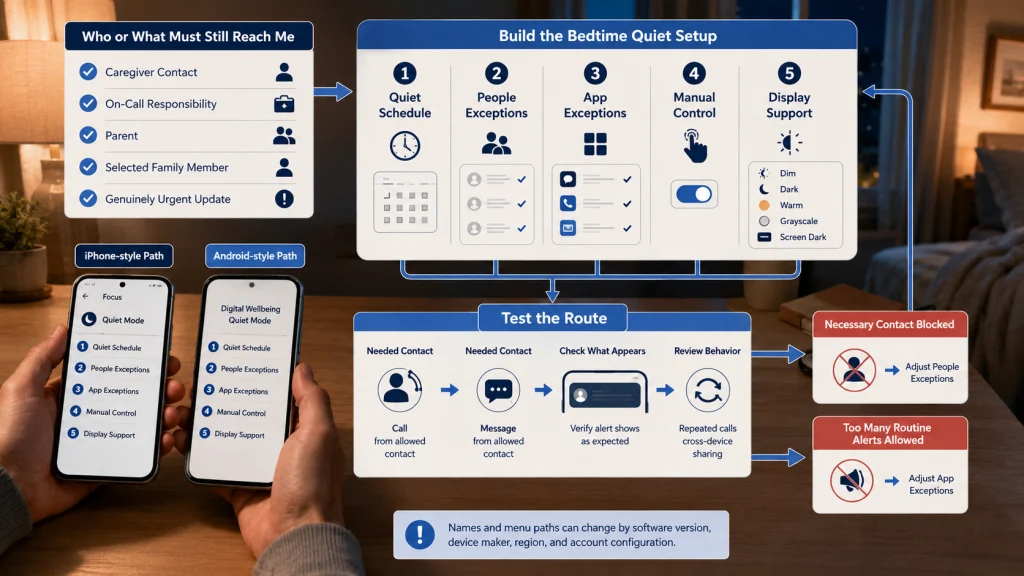
Filter Notifications Without Removing Needed Contact
Quiet settings work best when the exceptions are designed first. A caregiver, on-call worker, parent, or person waiting for an urgent update may need selected calls or messages while routine alerts remain silent.
Settings checked July 29, 2026: Names and paths can change with software versions, device makers, regions, and account configuration. Confirm the current labels on the phone before relying on an automated schedule.
| Check | Current iPhone route | Current Android route |
|---|---|---|
| Scheduled quiet mode | Settings > Focus > Sleep, or configure the sleep schedule in the Health app. | Settings > Modes > Bedtime. Some devices place bedtime controls under Digital Wellbeing. |
| People exceptions | Inside the selected Focus, review People and allowed calls. | Inside Do Not Disturb or Bedtime mode, review notification filters and people exceptions. |
| App exceptions | Inside the selected Focus, review Apps and allowed notifications. | Inside the selected mode, review app notification filters. |
| Quick manual control | Open Control Center, tap Focus, then choose Sleep or Do Not Disturb. | Open Quick Settings and tap Do Not Disturb or the configured bedtime mode. |
| Display support | Settings > Display & Brightness for brightness, Dark Mode, Night Shift, and supported always-on options. | Bedtime mode may offer grayscale, dark theme, dim wallpaper, or keeping the screen dark, depending on the device. |
After setup, test the exception path during the day. Ask the selected person to call or message, verify what appears, and check whether repeated-call behavior or cross-device sharing changes the result. A quiet mode that blocks a necessary contact or allows every group chat is not finished.
Choose a Charging Location That Matches the Remaining Functions
Moving the phone can create a strong boundary, but only when the remaining functions still work. Placing it across the room may help with automatic checking while preserving the alarm. Moving it outside the bedroom may work after communication, audio, alarm, or caregiving needs have another route.
Use a location ladder:
- Keep the phone in hand but remove the highest-friction app from the final block.
- Place the phone on a bedside surface rather than in the bed.
- Place it across the room with the screen facing away.
- Charge it outside the bedroom after replacing the required alarm or contact function.
Do not turn the location change into a product roundup. A stable surface, reachable charger, safe cable path, audible alarm, and clear emergency-contact plan matter more than buying a specialized station.
Editorial observation: A charging setup can look tidy and still fail in ordinary use. If the alarm is hard to hear from across the room, the audio app needs another login, or the cable is never where a tired person expects it, the phone usually returns to the bed within a few nights.
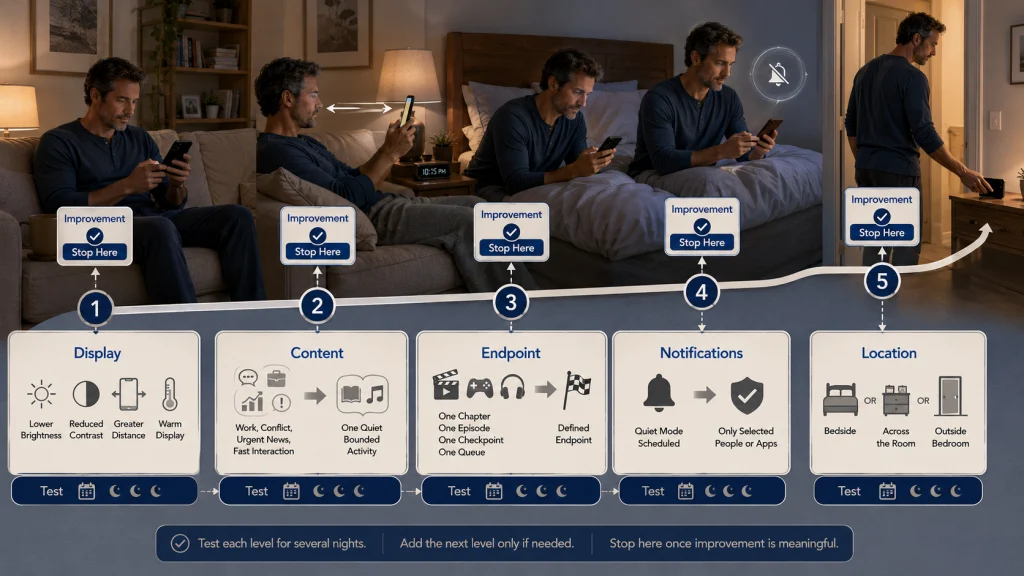
Build a Graded Reduction Plan
Begin with the mechanism that is easiest to verify. A smaller rule is often easier to trust than a dramatic ban, especially after a night when looking at the clock already creates frustration. Keep each step for several nights before adding another unless the current setup is clearly unworkable.
| Level | Change | Best fit |
|---|---|---|
| 1. Keep the phone, change the display | Lower brightness, reduce room contrast, and schedule the warm-display setting. | Light is the clearest concern and stopping already occurs on time. |
| 2. Keep the function, change the content | Replace work, conflict, news, or fast interaction with one quiet bounded activity. | The phone remains useful but the content carries into the night. |
| 3. Keep the activity, add an endpoint | Disable autoplay, leave infinite feeds, and choose one chapter, episode, or queue. | Time disappears even though the activity feels relaxing. |
| 4. Keep urgent access, filter interruption | Schedule a quiet mode and allow only selected people or apps. | Alerts and checking reopen the phone after use ends. |
| 5. Relocate the device | Move it to the bedside, across the room, or outside the bedroom after replacing needed functions. | Physical reach and automatic checking remain the main trigger. |
Stopping at the first level that produces a meaningful improvement is reasonable. The goal is not to prove that you can tolerate the strictest rule. It is to make bedtime and sleep less vulnerable while keeping useful phone functions under control.
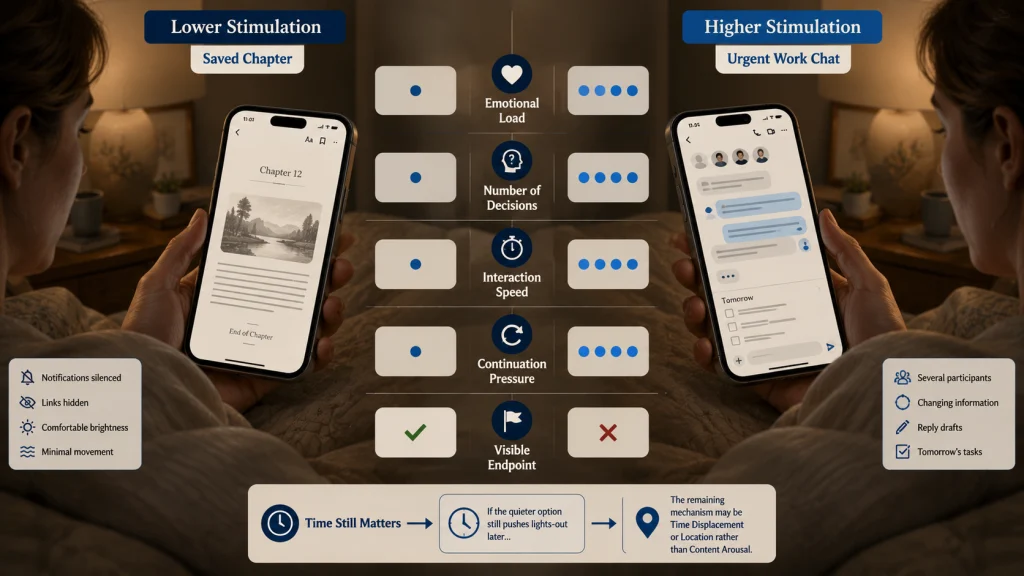
Compare Low-Stimulation and High-Stimulation Content
A dim e-reader-style activity and an urgent work chat can use the same device at the same brightness while creating very different demands.
The comparison does not prove that digital reading is harmless or that every work message prevents sleep. It shows why screen minutes alone are an incomplete measure. Content type, timing, emotional load, interaction, and the presence of an endpoint all change the exposure.
If the lower-stimulation option still pushes lights-out later, the remaining mechanism is likely time displacement or location rather than content arousal. Change the next relevant pathway instead of adding random restrictions.
Run a Seven-Night Test
Choose one change and keep the intended bedtime, evening responsibilities, and basic routine as stable as practical. The test is not meant to produce a perfect week. It is meant to show whether the selected mechanism matters in your real evening.
| Night | Phone job | Mechanism changed | Active use ended | Lights-out | What happened next | Next-day function |
|---|---|---|---|---|---|---|
| 1 | Reading | One saved chapter | Record time | Record time | Brief note | Manageable, difficult, or unusually sleepy |
| 2 | Communication | Quiet mode with exceptions | Record time | Record time | Brief note | Manageable, difficult, or unusually sleepy |
| 3 to 7 | Keep the same primary job | Repeat the same single change | Record time | Record time | Brief note | Record the practical effect |
Improvement may mean active use ends closer to the intended time, lights-out stops drifting, fewer alerts reopen the phone, the transition feels calmer, awakenings involve less checking, or next-day alertness improves. Do not claim that one week proves a medical cause.
If the change works only on nights without late work, caregiving, or conflict, record the condition. The phone setting may be useful while the larger schedule still needs attention.
Look Beyond the Phone When Sleep Difficulty Persists
The phone can delay bedtime or interrupt sleep, but it is not the only possible explanation. A person may reduce use successfully and still have persistent difficulty falling asleep, repeated awakenings, severe daytime impairment, breathing-related symptoms, pain, medication questions, mood symptoms, or a schedule that does not allow enough sleep.
Do not respond by making the phone rule increasingly strict without examining the wider pattern. Record what changed after the seven-night test and what did not. That distinction is more useful than declaring the device the cause or concluding that nothing helps.
Safety warning: Persistent or severe sleep difficulty, significant functional impairment, breathing-related symptoms during sleep, or dangerous daytime sleepiness requires appropriate professional evaluation. Do not delay needed help because the phone has been removed or because a sleep app reports a normal-looking result.
When the phone change works but the full transition remains inconsistent, build it into a short repeatable bedtime routine. The routine should begin after the phone’s final job is complete rather than adding more digital steps.
Keep, Change, or Relocate Each Phone Function
List the jobs your phone performs in the final hour and in bed. Keep the functions that are necessary, change the mechanism that causes delay or interruption, and relocate the device only when physical access remains the strongest trigger.
A practical first plan might keep the alarm and one emergency contact, move work and social conflict earlier, lower brightness, turn off autoplay, choose one chapter as the endpoint, and place the phone across the room after use ends. Another person may need only a quiet notification schedule.
The best plan is not the most restrictive one. It is the smallest reliable redesign that protects the intended bedtime, preserves necessary contact, and gives the evening a clear stopping point.
FAQs
📱 Is all phone use before bed equally disruptive?
No. Brightness, content, timing, interaction, notifications, and whether the activity has an endpoint all matter. Compare the job the phone is doing rather than counting every minute as identical.
🌙 Does night mode solve the problem?
No. A warm display can make the screen feel less harsh, but it cannot decide when the session ends, quiet a stressful conversation, or stop an alert from reopening the phone. Treat it as one light-control setting, not the whole plan.
⏰ Can I keep my phone in the bedroom for the alarm?
Yes. Keep the alarm function while filtering notifications, facing the screen away, and moving the device out of immediate reach. Relocate it farther only after confirming that the wake signal remains reliable.
📖 Is reading on a phone better than scrolling?
A saved chapter with a defined ending may create less time loss and arousal than an infinite feed, but it still involves a screen and can still delay lights-out. Test the actual timing and next-day effect.
🔕 Should I turn off every notification at night?
Not when selected contacts or responsibilities must remain available. Schedule a quiet mode, set deliberate people and app exceptions, and test that urgent contact can still reach you.
🛏️ Is using the phone in bed worse than using it on the couch?
Using it in bed can remove the location change that would otherwise signal the end of the evening. Audit both locations because total time, content, and stopping behavior may matter more than location alone.
🪜 What is the easiest first reduction step?
Choose the clearest mechanism. Lower brightness for a light problem, disable autoplay for time loss, filter alerts for interruption, or move stressful content earlier for arousal. Change one pathway before banning the device.
🚩 When should I seek help for sleep difficulty?
Seek appropriate evaluation when sleep difficulty is persistent or severe, causes significant impairment, includes breathing-related symptoms, or creates dangerous daytime sleepiness. A phone change is not a substitute for professional assessment.