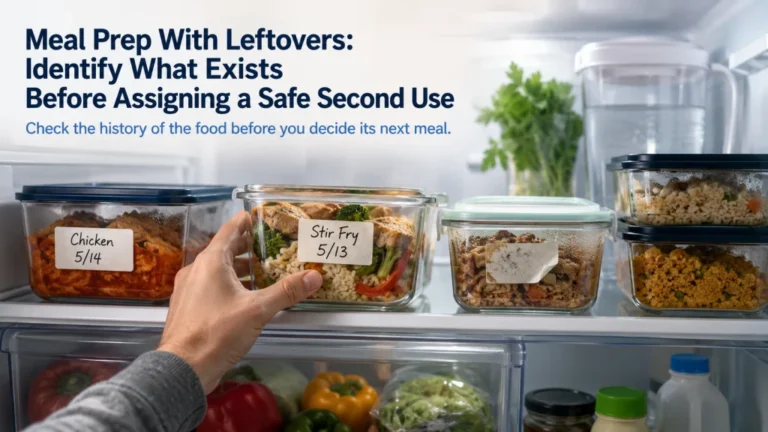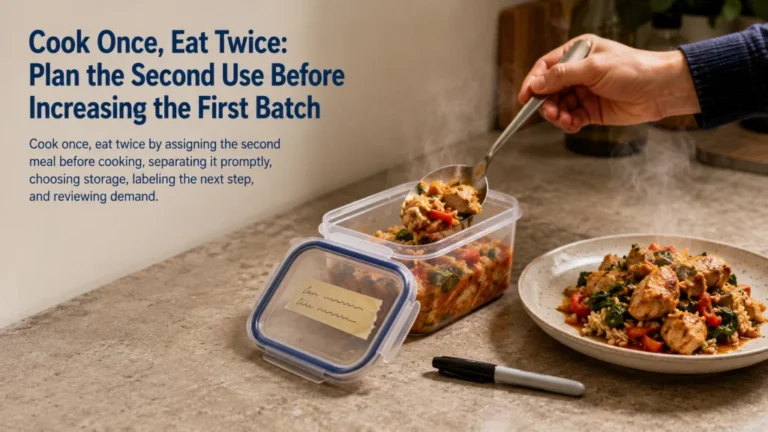
A meal prep schedule is a weekly cadence, not a rule that everything must happen on one day. Choose whether planning, shopping, cooking, assembly, the post-cooking handoff, the kitchen reset, and a possible midweek check belong in one block, two shorter blocks, or small rolling sessions. Put inventory before the grocery list, reserve refrigerator and freezer space before cooking, and match later-week meals to current food-specific storage guidance. A workable schedule gives the visible work and the quiet work after the stove turns off an honest place in the week.
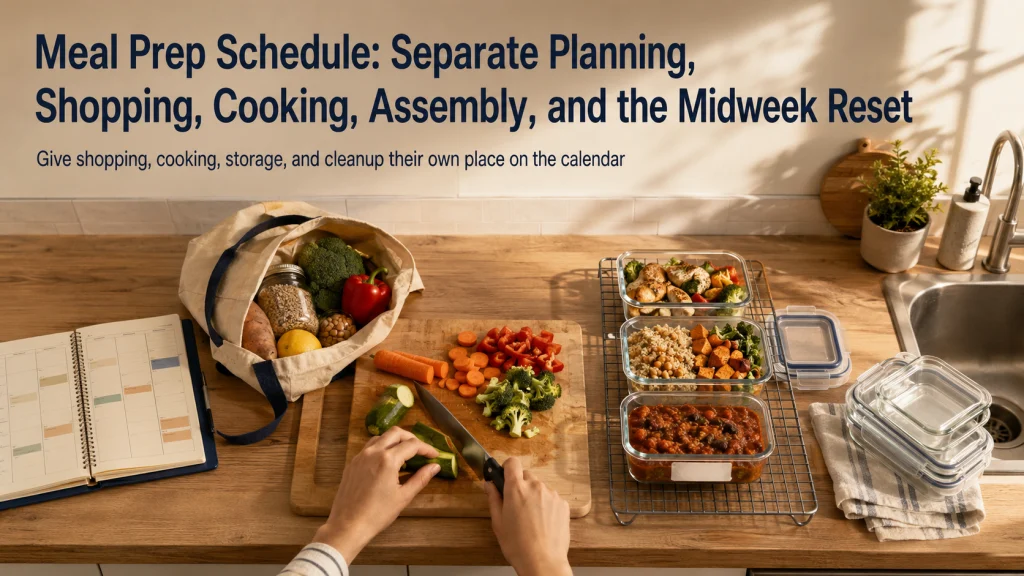
The Same Meals Can Fit Three Different Weekly Calendars
Imagine the same modest plan for each calendar: two lunches, one dinner component, one flexible breakfast item, and one backup meal. The food does not change. Only the timing changes.
| Calendar | Early-week work | Later-week work | Best fit when |
|---|---|---|---|
| One main block | Plan, shop, prepare, cook, cool, label, store, and clean in one extended window | Only reheating, assembly, or a small freshness check | One reliable block exists and the selected food fits the storage plan |
| Split-day cadence | Plan and shop on one day, then cook and store on another | A short check or reset if needed | Shopping and cooking together would make the day too crowded |
| Early block plus midweek reset | Prepare early-week meals and stable components | Refresh selected items, move a frozen portion, or assemble later meals | Freshness, storage limits, or changing schedules make one long block impractical |
The one-block calendar may look simplest because every task sits in one box. It can also hide the longest chain of work. Shopping must happen, bags must be unloaded, food must be prepared, cooked items must move through a safe cooling and storage process, labels must be added, and the kitchen must be restored.
The split calendar spreads the same work across the week. The reset calendar accepts that not every item needs to be ready on the first day. None of the three is automatically better. Meal prep is a cadence chosen around real availability and the food being prepared, not a mandatory Sunday event.
The guide to planning meals for the week decides which eating occasions and meals belong on the calendar. This article decides when the work supporting those meals will happen.
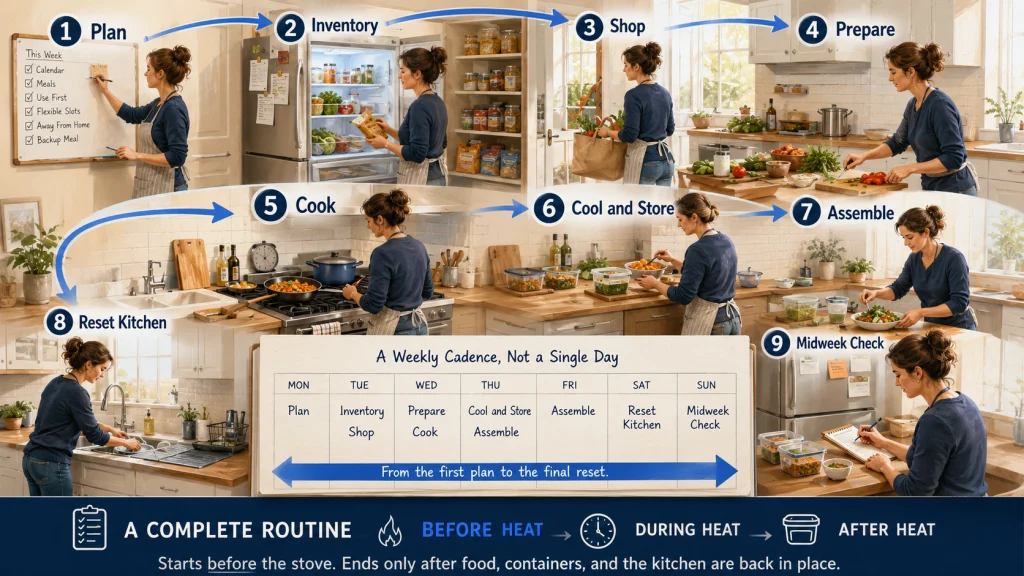
Give Every Part of the Routine Its Own Place on the Schedule
A schedule becomes unreliable when “meal prep” means only the visible cooking time. The complete routine begins before heat is turned on and continues after the food leaves the pan.
| Scheduled block | What belongs there | What is commonly forgotten |
|---|---|---|
| Planning day | Calendar review, meal selection, use-first decisions, and backup choice | Meals away from home and flexible slots |
| Inventory check | Refrigerator, freezer, pantry, and current leftovers relevant to the plan | Open packages and food already assigned elsewhere |
| Shopping window | Trip or order, travel, checkout, unloading, and putting purchases away | The time and energy required after returning home |
| Preparation block | Washing, trimming, measuring, gathering tools, and preparing containers | Setup and repeated hand washing or surface resets |
| Cooking block | Active cooking and the waiting periods tied to selected meals | Attention conflicts when several items need checking at once |
| Cooling and storage window | Moving cooked food through the planned cooling, labeling, refrigeration, or freezing process | Container space and the time after cooking appears finished |
| Assembly block | Combining already prepared components for meals that do not need full cooking | Small fresh elements or sauces kept separate until use |
| Cleanup and reset | Dishes, surfaces, waste, drying, container storage, and restoring the kitchen | The final workload that makes the routine feel longer than expected |
| Midweek reset | Fresh preparation, freezer transfer, inventory check, and plan adjustment | Deciding what should not remain refrigerated until later in the week |
Naming each block exposes the handoffs that can otherwise disappear between “cook” and “done.” It becomes easier to see whether the routine truly fits the week before groceries are bought or several recipes are started.
The article on how long meal prep takes handles detailed time estimation. Here, the goal is simpler: make sure each category of work has a day and a realistic window.
Choose a One-Day, Split-Day, or Rolling Cadence
Start with the shape of the week rather than a favorite prep day. Look for reliable windows, predictable interruptions, available kitchen space, and the point when later meals may need a reset.
A one-day cadence keeps decisions and kitchen setup together. It works best when the full chain from shopping through the final kitchen reset genuinely fits the available window. It becomes fragile when one delay pushes every later handoff into the evening.
A split-day cadence separates planning or shopping from cooking. The groceries are already home when the cooking block begins, and the cook is not starting with travel, checkout, unloading, and pantry organization still in the body.
A rolling cadence prepares small components or meals on several days. It asks for shorter sessions but more frequent transitions into and out of kitchen work. This can suit changing schedules or meals that benefit from later preparation.
The best cadence is the one the household can repeat without treating the post-cooking handoff or the midweek decision as an unwelcome surprise.
Place Inventory and Planning Before the Grocery List
Shopping cannot be scheduled accurately while the meal plan is still changing. A late calendar edit can remove a dinner, add a leftover slot, or shift a fresh meal to the freezer. If the list was already built, those ingredients may remain even after the meal disappears.
Use this order:
- Mark the meals that will actually happen at home.
- Identify leftovers, flexible slots, and the backup meal.
- Check current food that can support those meals.
- Decide which items should be used first.
- Build the consolidated grocery list only after those decisions settle.
The inventory check does not need to catalog the whole kitchen. It only needs to reveal food that changes the current plan. One leftover may remove a lunch from the shopping list. One open package may need to move into an early meal. A frozen component may make a later cooking block unnecessary.
The guide to building a meal prep grocery list turns the finished plan and inventory into consolidated purchase quantities. Scheduling the shopping window comes after that translation is complete.
Decide Whether Shopping and Cooking Belong on the Same Day
Shopping and cooking can share a day, but they should not be treated as one continuous task with no transition. The shopping window includes more than time inside the store. It includes travel or order management, checkout, carrying, unloading, checking purchases, and putting food away.
Keeping both on the same day may work when the list is short, the store is predictable, the meals are modest, and the cooking block remains protected. It is less workable when the trip is large, several stops are required, or the cook routinely returns home ready for a break.
Separate the days when:
- The shopping trip regularly expands beyond the planned window.
- Unloading and organizing purchases take meaningful time.
- The cooking plan requires sustained attention or several setup steps.
- The household needs the kitchen available for another meal after shopping.
- Starting tired leads to rushed storage decisions or an abandoned kitchen reset.
A useful split might place planning and the list on one evening, shopping the next morning, and cooking in a later protected block. The days themselves matter less than the separation of competing demands.
Editorial observation: Weekly planners often give cooking the largest visual block while shopping, unloading, container setup, refrigerator handoff, dishes, and the midweek refresh appear as tiny notes or not at all. That layout can make the routine look organized even though the transitions most likely to derail it have no owner or protected window.
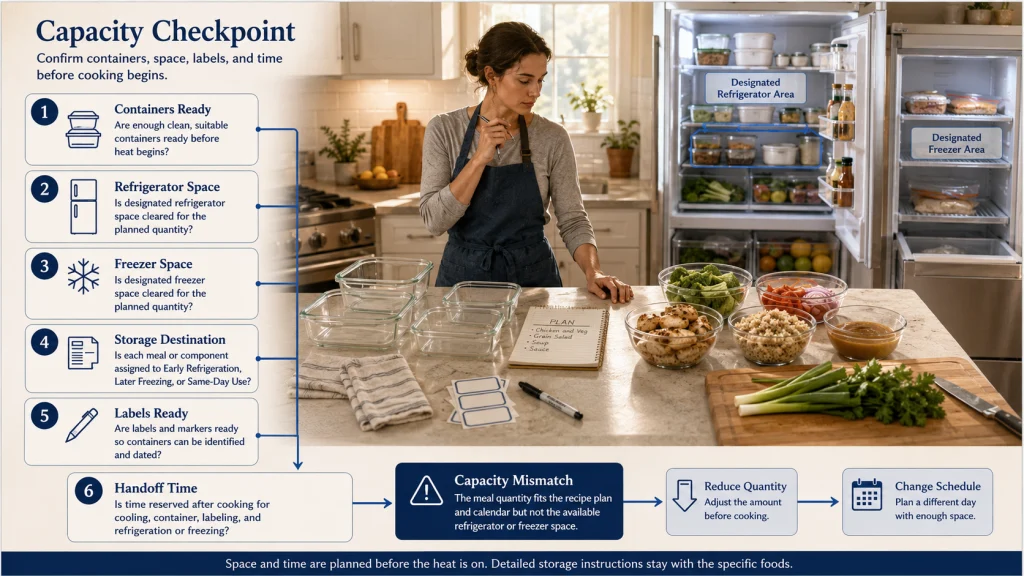
Reserve Cooling, Labeling, and Cold-Storage Space Before Cooking
The stove may be off while the counter is still crowded and the refrigerator has no obvious place for the finished food. That moment is not an afterthought. Prepared food still needs a planned route into suitable containers and cold storage according to current food-specific guidance.
- Are suitable clean containers ready before cooking begins?
- Is there enough refrigerator and freezer space for the planned food?
- Which items are intended for early refrigeration, later freezing, or same-day use?
- Are labels and date marks ready so storage decisions are not left to memory?
- Does the schedule leave time to complete the safe cooling and storage process?
Space can be the hidden limit. A plan may fit the calendar but not the refrigerator. If containers must be stacked wherever they fit, if older food blocks the intended shelves, or if freezer space is uncertain, solve that before increasing the cooking quantity.
Use shallow, suitable containers and follow current official guidance for cooling, refrigeration, freezing, thawing, reheating, and the specific foods being prepared. This article does not assign one storage duration to every meal.
Detailed container placement, storage decisions, and food-specific limits belong to the meal prep storage guide. The schedule must simply reserve enough time and space to follow that guidance.
Use a Midweek Reset for Fresh Items and Shorter Storage Windows
A midweek reset is not a second full prep day. It is a small scheduled decision point that keeps later meals from depending on food prepared too early or on a plan that no longer matches the week.
- Check which prepared items remain and which meals were postponed.
- Move a planned frozen portion according to the intended thawing method and timing.
- Prepare one fresh element that was deliberately left for later.
- Use or redirect any ingredient that has become more time-sensitive.
- Confirm that the final meals still fit the calendar.
- Cancel unnecessary preparation instead of creating extra food.
The reset is especially useful when early-week meals use fresh ingredients, later meals rely on frozen components, or the household schedule often changes after the first few days.
Keep the reset narrow. If it repeatedly becomes another shopping trip, a long cooking session, and a complete kitchen cleanup, the weekly plan may be asking for too many meals or too much variety.
The guide to meal planning that reduces unused food explains how use-first ingredients and postponed meals should shape the later part of the week.
Move Later-Week Meals to the Freezer When Appropriate
A weekly calendar should not assume that every cooked item can remain refrigerated until its assigned day. The food, preparation method, handling, and current official guidance determine the storage plan, not the number of days the household wants to cover.
When a meal is intended for later in the week, decide before cooking whether it should be refrigerated, frozen, prepared later, or replaced with a shelf-stable or frozen backup. That decision affects containers, labels, freezer space, and the midweek reset.
Freezing can separate the cooking day from the eating day, but it adds its own scheduled work:
- Choose food and containers suitable for freezing.
- Label the item so it can be identified later.
- Reserve freezer space before the cooking block.
- Assign the transfer or thawing step to the correct day.
- Follow current food-specific guidance for freezing, thawing, and reheating.
The quantity plan matters here. Preparing more food than the freezer or later calendar can support creates storage pressure rather than convenience. The guide to how much food to meal prep helps connect planned meals with realistic amounts.
Assign Cleanup and the Kitchen Reset Explicitly
A finished meal-prep session can still leave the sink full, the only clear counter covered, and tomorrow’s containers drying wherever they fit. Cleanup is therefore the final scheduled block, not work that begins after the schedule has supposedly ended.
Include dishes, surfaces, sink space, waste, drying, container storage, and returning frequently used tools. Also account for any pan or appliance that cannot be cleaned until it has cooled.
A kitchen reset can be divided rather than postponed:
- Wash or load items during natural cooking waits when attention allows.
- Keep one clear surface available for moving finished food into containers and storage.
- Move finished containers into their planned storage location before starting optional work.
- Leave only tasks that safely require later cooling or drying.
- Record the remaining cleanup as part of the total routine.
When cleanup repeatedly exceeds the planned block, reducing recipes, tools, or simultaneous cooking may help more than trying to work faster. Detailed inside-session sequencing belongs to later workflow guidance rather than this weekly calendar.
The guide to organizing the kitchen for meal prep addresses how space and tool placement can reduce avoidable setup and reset work.
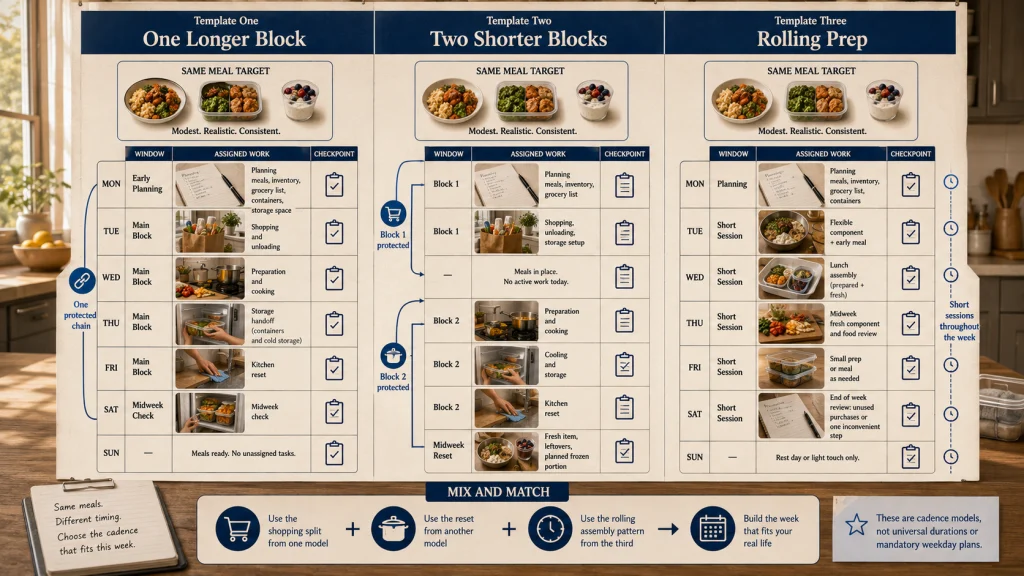
Compare Three Complete Schedule Templates
The following schedules use the same small meal target. They show how the work can move without changing the meals themselves. The times are sequence labels rather than universal duration estimates.
Template One: One Longer Main Block
| Window | Assigned work | Checkpoint |
|---|---|---|
| Earlier planning window | Confirm meals, inventory, grocery list, containers, and storage space | The plan is final enough to shop |
| Main block, stage 1 | Shop or receive the order, unload, and put purchases away | The cooking area remains clear |
| Main block, stage 2 | Prepare and cook the selected meals and components | Attention demands still fit the block |
| Main block, stage 3 | Move finished food through the planned container, date-marking, refrigeration, and freezing steps | Food and storage plan remain compatible |
| Main block, stage 4 | Clean and reset the kitchen | No unassigned task remains |
| Midweek check | Confirm later meals and move a frozen item if planned | No full second prep session is required |
Template Two: Two Shorter Blocks
| Window | Assigned work | Checkpoint |
|---|---|---|
| Block one | Calendar review, inventory, list, shopping, unloading, and storage setup | All ingredients and containers are ready |
| Block two | Preparation, cooking, the post-cooking storage handoff, and the kitchen reset | The cooking session begins without shopping fatigue |
| Midweek reset | Prepare one fresh item, check leftovers, and manage a frozen portion | Later meals still match the week |
Template Three: Rolling Component Preparation
| Window | Assigned work | Checkpoint |
|---|---|---|
| Planning window | Choose meals, inventory food, build the list, and define the backup | Only missing ingredients enter the shopping window |
| Early short block | Prepare one flexible component and one early meal | Cleanup remains small |
| Next short block | Assemble lunches from prepared and fresh elements | No unnecessary full cooking session is added |
| Midweek short block | Prepare the later fresh component and review remaining food | The final days do not depend on food prepared too early |
| End-of-week review | Record skipped work, unused purchases, and the step that became inconvenient | One scheduling rule changes next week |
Use the templates as cadence models, not minute-by-minute prescriptions. A household may borrow the shopping split from one model, the reset from another, and the rolling assembly pattern from the third.
The broader meal prep process connects scheduling with planning, preparation, safe storage, and later use.
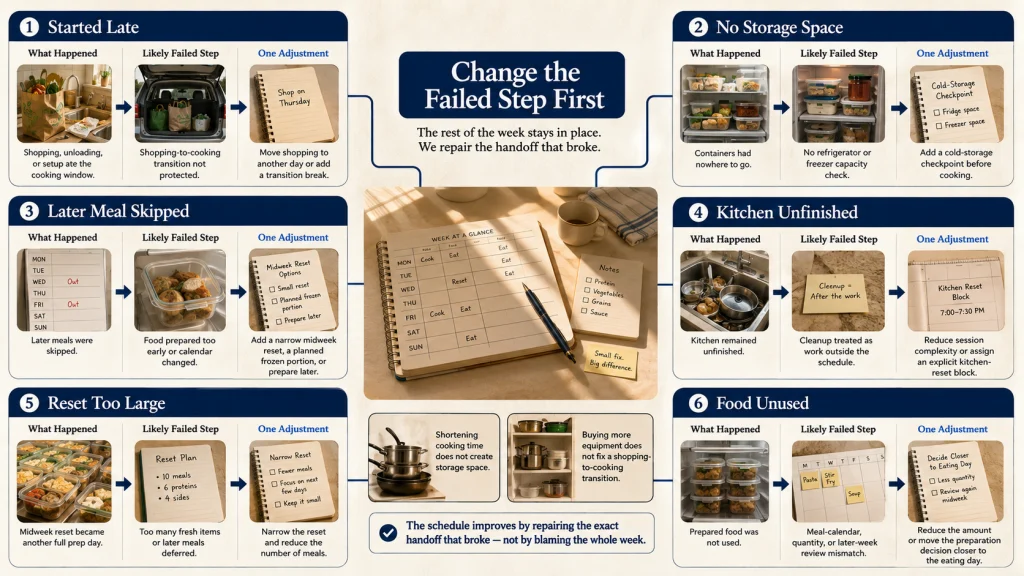
Review Which Scheduled Step Actually Failed
When the routine breaks down, “meal prep took too long” is often too broad to guide the next week. The failure may have happened before cooking, after cooking, or during a transition that was never scheduled.
| What happened | Likely failed step | Schedule adjustment |
|---|---|---|
| Cooking started much later than planned | Shopping, unloading, or setup consumed the cooking window | Move shopping to another day or protect a transition break |
| Containers had nowhere to go | Cold-storage space was not checked before cooking | Add a refrigerator and freezer checkpoint to planning |
| Later meals were skipped | The plan relied on food prepared too early or ignored a schedule change | Add a midweek reset, freeze an appropriate portion, or prepare the item later |
| The kitchen remained unfinished | Cleanup was treated as work outside the schedule | Reduce session complexity or reserve an explicit reset block |
| The midweek reset became another full prep day | Too many fresh items or later meals were deferred | Narrow the reset and reduce the number of scheduled meals |
| Food was prepared but not used | The meal calendar, quantity, or later-week review failed | Reduce the amount or move the decision closer to the eating day |
Change the failed step rather than redesigning the entire routine. If shopping caused the delay, splitting the day may be enough. If cold storage was the problem, reducing food quantity may matter more than shortening cooking.
The meal prep systems guide can help when the same handoff, reminder, or household responsibility fails repeatedly across several weeks.
Choose the Cadence, Assign Every Task, and Set the Reset
Begin with the real shape of the week. Choose one longer block, two shorter blocks, or rolling preparation based on availability, storage, and the food in the plan. Place inventory before the list, decide whether shopping and cooking should share a day, and reserve the post-cooking handoff, cold-storage space, and kitchen reset before cooking begins.
Add a small midweek reset when later meals need fresh preparation, freezer management, or a calendar check. Then review the step that actually failed rather than blaming the entire routine. A useful schedule does not make every week look identical. It gives every necessary task a place and leaves enough flexibility for the week to remain real.
FAQs
🗓️ Does meal prep have to happen on Sunday?
No. Choose the day or combination of days that fits shopping, cooking, storage, cleanup, and the household calendar. Sunday is one possible option, not a required or universally better day.
🛒 Should I shop and cook on the same day?
They can share a day when the trip is predictable and the cooking block remains protected. Split them when shopping, unloading, or fatigue regularly delays cooking or leads to rushed storage and cleanup.
⏱️ How long should a meal prep block be?
There is no universal duration. The block depends on meal count, preparation level, equipment, available help, post-cooking handling, storage space, and the kitchen reset. Estimate the complete routine rather than timing only the recipes.
❄️ Should later-week meals be frozen?
Freezing may be appropriate when the food, containers, handling method, and later schedule support it. Follow current food-specific guidance rather than assuming every cooked meal can remain refrigerated for the full week.
🔄 What belongs in a midweek reset?
Check remaining food and calendar changes, prepare one planned fresh element, manage a frozen portion, and redirect an ingredient that should be used sooner. Keep the reset small enough that it does not become another full prep day.
🧼 Should cleanup be included in the schedule?
Yes. Include dishes, surfaces, waste, drying, container storage, and restoring the kitchen. Leaving cleanup outside the calendar makes the total routine look shorter than it is.
📋 What should I change when the schedule fails?
Identify the specific failed step, such as shopping, refrigerator space, the post-cooking handoff, the kitchen reset, or the midweek check. Change that part first instead of rebuilding the entire week.